How to Tell If an Employee Is Using a Fake GPS App, and Which App It Is
In short
You can tell an employee is using a fake GPS app when your time clock flags the shift and names the app. Here is what each kind of app means and what to do.
- You can tell an employee is using a fake GPS app when your time clock flags the shift as a simulated location; guessing from a timesheet alone is not enough.
- In Shiftelio the flag names the app when the phone reports it, so you know whether you are looking at a game, a location changer or a GPS receiver used for work.
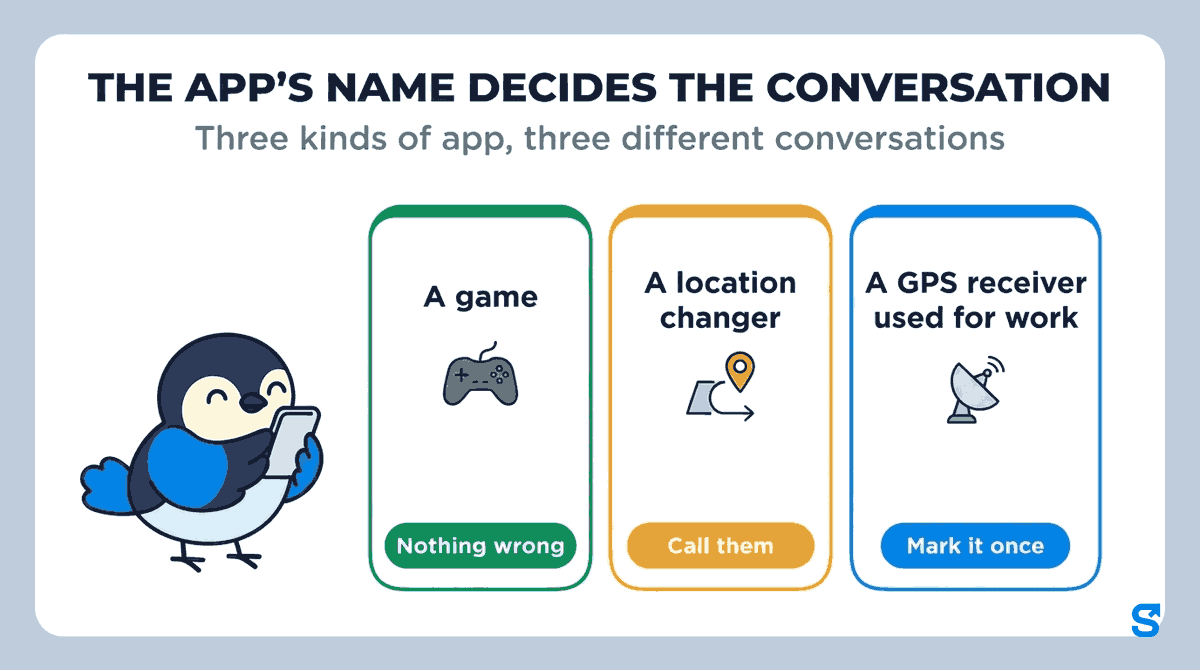
- The app's name decides the conversation: a game is a quick "please turn it off", a location changer is a call about the hours, a work receiver is marked once and never raised again.
You can tell an employee is using a fake GPS app when your time clock flags part of their shift as a simulated location and, ideally, tells you the name of the app that set it. Looking at a timesheet will not show it: a faked location looks exactly like a real one unless the software checks for it.
Knowing which app it was changes what you do next. A pirate-treasure game left running from the weekend, an app built to move your phone across town and a GPS receiver a surveyor uses for work all produce the same "wrong" location. They do not deserve the same conversation. This guide covers the signs owners notice on their own, what a flag looks like when it names the app, and how to handle each kind without turning every flag into an accusation.
What owners notice before any software does
Most owners start with a hunch. The usual ones:
- The customer says nobody came. The timesheet shows a full visit at the client's address, and the client says the door was never knocked.
- The pin never moves. On a job where people walk around all day, a cleaner or a warehouse picker, the location sits perfectly still for hours.
- The story does not fit the day. The person was "on site" at 8:00 but answered your call from somewhere loud with traffic in the background.
These are reasons to look closer, not evidence. Phones lose their location indoors, customers forget, and a still pin can just mean a phone left in a locker. Accusing somebody on a hunch costs you a good worker far more often than it catches a bad one. What you want is a record that says, for a specific stretch of a specific shift, that the location came from an app and not from where the phone really was.
What a flag looks like when it names the app
In Shiftelio you do not go looking for it. A shift where a staff member's phone showed a simulated location lands on your dashboard as a Simulated location card, one line per case:
- Who and when: the person, the day and the shift.
- How long: for example "Simulated location for 1 h 10 min out of 8 h", or "Simulated location now" while it is still happening.
- Which app: the app's name when the phone reports it, or "App not named by the phone" when it does not.
- How often: "First time in 30 days", or how many times it has happened in the last 30 days.
- Two buttons: See what happened, and Ask the person to explain.
Take Ana, a cleaner whose phone had GeoFaker running for part of the morning. Her card reads "Simulated location for 1 h 10 min out of 8 h", names GeoFaker as the app, and offers See what happened.
If you watch the live map during shifts, the person's pin carries a badge such as "simulated since 9:40 AM" followed by the app's name, so a supervisor watching the map knows which app it is at the same moment you do. The live map is an add-on, priced separately.
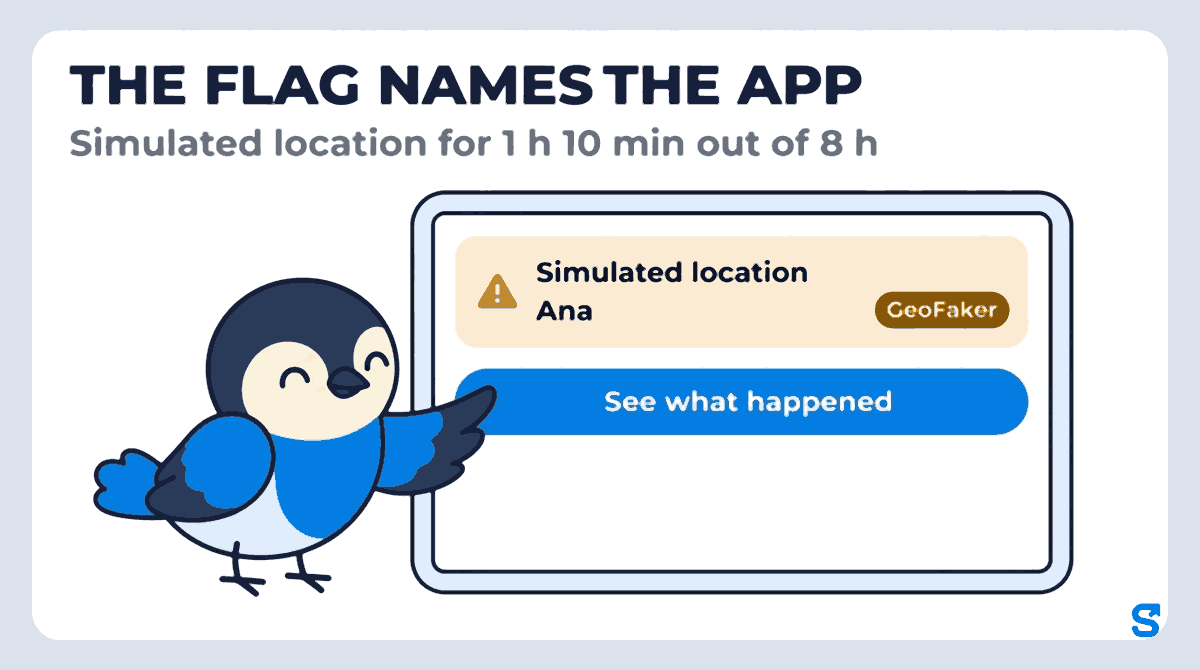
GeoFaker is a made-up name for this guide: on your screen you will see whatever the phone reported.
What the app's name tells you
Once you can see the name, most cases sort themselves into one of three kinds.
| The app is | What it usually means | What to do |
|---|---|---|
| A game | It was left running from home and nobody thought about it | Ask them to turn it off during shifts, then close the case as Nothing wrong |
| A location changer | Somebody chose to put the phone somewhere it was not | Call them and ask about the hours before you decide anything |
| A GPS receiver used for work | The job needs it, for example a survey or field crew | Mark the person once so it is not raised again |
A game. Location-based games are a common reason a phone reports a place it is not. The person usually has no idea it matters at work. One friendly message ends it.
A location changer. These apps exist to make a phone appear somewhere else, and nobody installs one by accident. That does not prove the hours were not worked: some people use them to clock in from the parking lot on a cold morning, which is a policy problem, not a missing shift. It does mean the call is about the hours.
A GPS receiver used for work. Some field jobs pair the phone with a separate receiver, which can look the same as a fake app. The case page has a decision called Uses an external GPS receiver for exactly this: pick it and the person is marked, so the same receiver does not raise a case every shift.
When the phone does not report a name, treat it like the middle row until you have spoken to the person. Ask them which app it was. Most people tell you.
Let each team manager handle their own crew
If you run more than one site or crew, you do not want every flag landing on you. In Shiftelio, the attendance Checks tab shows a manager only the flags for the team they manage, the same people they see on the live map. A store manager in one branch sees their own staff's cases and nobody else's, and cannot review a case outside their team.
That split works well in practice:
See what happened lays the shift out as a timeline: the last real location before it started, when the simulated location began, when the app was named, when the real location came back and when the shift ended.
The case page has a Call button. A two-minute call settles most cases faster than any message.
Ask the person to explain sends a question to their phone, at most once a day per person, and the reply appears next to the timeline.
Three decisions: Nothing wrong, Uses an external GPS receiver or A real problem. Who decided and when stays on the record. The decision never changes pay by itself.
You step in only where it matters: a case marked as a real problem, or a card that says Again after review, which means the same person was flagged again after somebody already closed a case for them. A repeat is the pattern worth your time. A single flag usually is not.
Settle the hours before the app
The flag tells you that, for a stretch of the shift, the phone's location could not be trusted. It does not tell you whether the person worked. So decide the hours first:
- Real location inside the site before and after: the person was most likely at work, and the app is a policy problem.
- Real location somewhere else when it came back: ask what they were doing for that stretch, and fix the timesheet to the hours they actually worked.
- The shift ended while the location was still faked: ask for the clock-out time and check it with the customer or the site.
Then deal with the app under your written policy, the same way for everybody. Docking a whole shift for a game left running is the fastest way to lose an honest worker.
Put one line about location apps in your time clock policy
Your staff should hear the rule before the first flag, not after it:
- The rule: clock in and out on your own phone, at the job, with your real location on during the shift.
- Location apps: apps that change your phone's location, games included, are turned off during shifts. If you use a GPS receiver for work, tell your manager and it will be marked.
- What happens on a flag: your manager calls you and asks. An honest reason is closed as nothing wrong.
When a case is raised, the staff member sees a plain notice on their phone with the times and the app's name, asking them to turn the app off so their real location is shared during the shift. Nobody is told they are in trouble by a notification.
If somebody is not sure what their phone is sharing, the phone makers' own help pages walk them through it: Google's guide to managing location settings on Android and Apple's guide to turning Location Services on or off on an iPhone. Five minutes with those at onboarding saves most of the flags that are honest mistakes.
Which time clock app tells you which fake GPS app was used
If you also plan shifts in the app, shift scheduling shows how the scheduled shift and the clock-in line up on the same day.
Questions owners ask
How can I tell if an employee is using a fake GPS app?
Use a time clock that checks for it. A faked location looks real on a timesheet; Shiftelio flags the shift as a simulated location and names the app when the phone reports it.
Can fake GPS be detected?
Yes, on the phones where apps can set the location. Shiftelio flags fake GPS on Android phones and shows how long the location was simulated during the shift.
What does "mock location app" mean?
It is an app allowed to set the phone's location instead of the phone's own GPS. Developers and some work receivers use it; so do apps built to fake a location.
Should I fire someone for using a fake GPS app?
Not on one flag. Check the hours first, call them, and ask which app it was. Act on a repeat after a case was already closed, under a written policy.
Who sees the fake GPS flags?
The owner sees every flag. A team manager sees only the flags for the team they manage, and cannot review a case outside it.