Incomplete Personnel Files: Collect Missing Employee Documents From a Whole Crew in One Visit
In short
When staff never send their documents, collect them yourself: one supervisor, one phone, the whole crew on site, each photo marked with who collected it.
- The staff who never send documents are usually not refusing: many have no smartphone, no data or no space on their phone.
- The fastest fix is in person: pick who is behind, walk the crew, photograph each document on one phone.
- Letters are signed by the staff member's own finger, and the supervisor ticks Signed in my presence only if they watched.
When personnel files are missing documents, stop chasing staff by message and collect the papers yourself: a supervisor visits the crew, photographs each person's documents on one phone and has letters signed on the spot. It takes one visit, and every file then shows who collected each item and for whom.
This guide is for owners and supervisors of cleaning crews, construction gangs, warehouse shifts and security teams, where a good part of the team never uploads anything. It covers what a complete employee file usually holds, why the "send it from your phone" step fails for the same people every time, and how Shiftelio lets one person close every gap in a single round of the site.
What a complete personnel file usually holds
A personnel file, or employee file, is the set of records you keep for one person. What goes in it depends on where you operate and what the job needs, so treat this as a working checklist, not a legal one. For an hourly crew it is usually short:
- A photo ID, so you know the person on your payroll is the person on your site.
- An emergency contact, typed in rather than scribbled on a form that gets lost.
- Bank details for pay, so the first wage goes to the right account.
- Certificates the job needs, such as a forklift ticket, a first aid card or a site safety card.
- Signed letters: the joining letter, the site rules, the equipment they were handed.
- Their hours worked, which your timesheets already record.
The first five are the ones that go missing. Hours come from clock-ins, so they fill themselves. Documents need a person to act, and for some of your crew that is exactly where it stops.
Why some staff never send their documents
Asking staff to photograph their own papers works for most teams. It fails for a predictable group, and the reasons are rarely about attitude:
- No smartphone at all. The ITU reports that 82 per cent of people aged 10 and over own a mobile phone worldwide, and adds that some phones, such as feature phones, are used for calls only. Source: ITU, Facts and Figures 2025: mobile phone ownership. Checked on 14 October 2026.
- A phone with no data. The GSMA found that 58 per cent of the world's population used mobile internet on their own device, which leaves billions who do not, even where there is coverage. Source: GSMA, State of Mobile Internet Connectivity 2025. Checked on 14 October 2026.
- A shared or borrowed phone. The worker's daughter's phone is not where their ID scan should live.
- A full phone. The camera will not save another picture, so the document waits.
- They asked you to do it. Some people would simply rather hand the paper to their supervisor.
None of these get better with a fourth reminder. The person is standing in front of you at the start of every shift, with the papers in their bag. That is the moment to collect.
How to see who is behind before you go
Do not walk the site with a paper list. On Shiftelio's Staff documents page, the People view shows every person against the checklist you asked them for, and flags the ones who are late, for example "12 days late · nothing sent for 12 days". Those are the people to visit.
You can still ask everyone first. Most of the crew will send their documents from their own phone, and that costs you nothing. Collecting in person is for the rest.
Collect for them: one phone, the whole crew
Here is how Sam, who supervises a 12-person night cleaning crew across two client buildings, closes every gap in one round. Each cleaner owes two things: a photo ID and a signed copy of the site rules.
On Staff documents, Sam selects the 12 cleaners who still owe documents and taps Collect for them (12).
The phone asks "What are you collecting today?". Sam picks the photo ID and the site rules letter, and taps Start collecting.
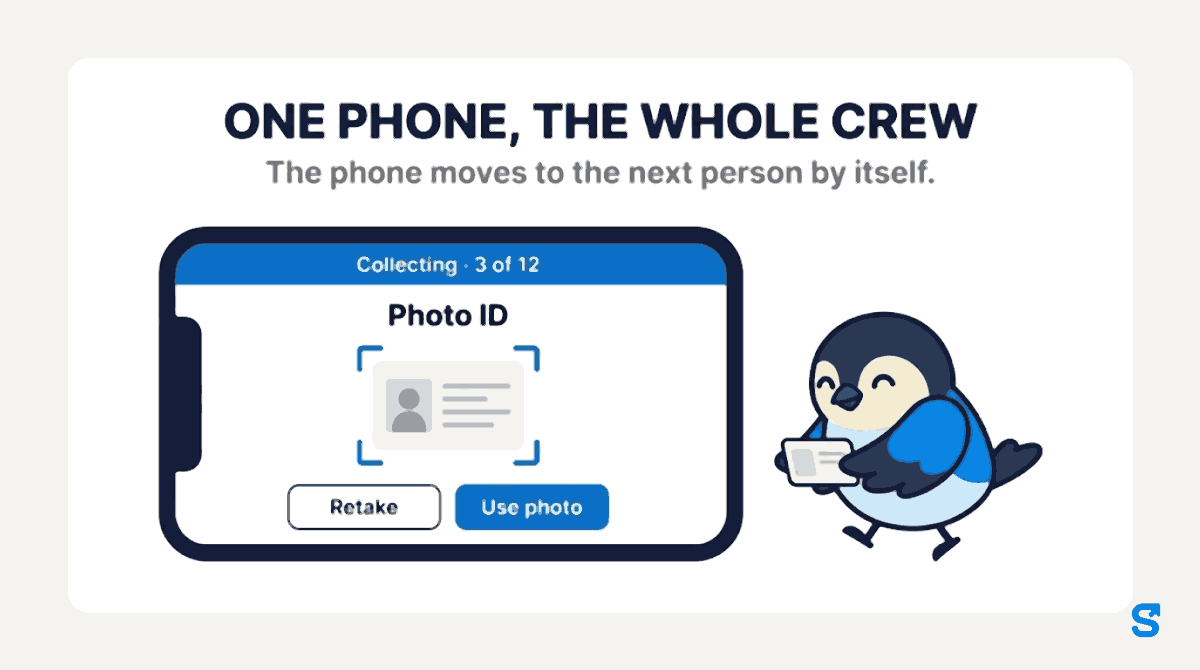
Before each photo the screen reminds Sam to ask the person's name and look at their face. One big camera button opens for the document. Sam taps Use photo, or Retake if the picture is blurry. The top of the screen counts the round: "Collecting · 3 of 12".
For the site rules, the phone says to hand it over: only the staff member signs, with their own finger. Sam takes the phone back and ticks Signed in my presence, which is only ticked when the supervisor watched.
The phone moves to the next person by itself. Two cleaners are off tonight, so Sam taps Not here today for each, and they stay on the list for the next round. If one person has no ID with them, Skip this document leaves that item open and keeps the rest.
No signal in the basement
Cleaning crews, warehouses and building sites are often where the signal is worst. It does not stop the round. Before Sam starts, the phone shows "Ready for offline: names, documents and letters are saved on this phone." The photos wait on the phone and send once there is signal again.
At the end the phone sums up the round. Sam's reads "Collected 20 documents for 10 people." and "2 not here today.", with 6 photos still waiting to send and 14 already sent by the time Sam walks back out to the car park.
What the file shows afterwards
Each collected item says Collected by Sam for Ana, so anyone opening Ana's file later knows a supervisor collected it on site, not Ana from her own phone. A collected item never replaces a document the person already sent themselves, or one that was already approved: the phone marks those "They already sent it" or "Already approved" and moves on.
Good habits when you collect for someone else
Collecting on someone's behalf is a position of trust, so set a few habits for every supervisor who does it:
- Check the person, every time. Ask the name and look at the face before the first photo, even on a crew you know.
- Never sign for anyone. Hand the phone over. If the person cannot sign tonight, leave the letter for the next round.
- Collect only what the checklist asks for. Do not photograph every card in a wallet "just in case".
- Keep it to your own people. In Shiftelio a supervisor can only collect for people in their own sites or teams; anyone outside is left out of the round with a note.
- Let someone else review. A collected document waits for review like any other, so the person who collected it is not the only pair of eyes on it.
Which app lets a supervisor collect a whole crew's documents?
You can see every other part of the app on the features page.
Questions owners ask
What should be in a personnel file for hourly staff?
Usually a photo ID, an emergency contact, bank details for pay, any certificates the job needs and the signed letters you gave them. What your country requires on top of that is a question for your local labor agency.
How do I get documents from employees who don't have a smartphone?
Collect them yourself on site. In Shiftelio a supervisor picks the people, photographs each document on one phone and hands the phone over only for signatures.
Can a manager upload documents on behalf of an employee?
Yes, if the owner turns on the "Collect documents for staff" permission for that manager. The owner can always do it, and every item records who collected it.
What if there is no signal where the crew works?
Collect anyway. The names, documents and letters are saved on the phone before the round starts, and the photos send once there is signal.
What happens to someone who is off on collection day?
Tap "Not here today" and they stay on the list for the next round, with nothing lost.