New Hire Paperwork: How to Collect Every Document Before Day One
In short
Collect new hire paperwork before day one: one checklist per role, sent to the new hire's phone, each document approved or sent back with a reason.
- Build one checklist per role, so every new hire is asked for the same things.
- Send it before the first shift, with a deadline, so day one is for work and not for forms.
- Ask for a photo from the phone of each document, not a paper copy handed over "later".
To collect new hire paperwork before day one, send each new hire one checklist for their role, have them photograph every document on their own phone, and have one named person approve each item or send it back with a reason. Paperwork that is finished before the first shift never has to be chased during it.
This guide is for owners and managers of shift and field teams who hire a few people a month and have nobody whose whole job is HR. It covers why onboarding documents go missing, a five-step process that gets them in, what to put on the checklist, and how Shiftelio runs it from the new hire's phone.
Why new hire paperwork goes missing in a small team
A restaurant, a cleaning company or a security firm hires all year round, and onboarding happens in between everything else. The same problems turn up everywhere:
- The forms arrive on day one, if at all. A new hire is handed a pile of paper at the start of their first shift, takes it home, and brings back half of it a week later.
- Documents come in through a chat. A photo of an ID card sits in a manager's messages, next to a photo of a delivery note, and nobody can find it three months later.
- Nobody knows what is still missing. The manager who hired the person left, and the checklist was in their head.
- A blurry photo counts as done. It was received, so it was ticked, and only later does anybody notice it cannot be read.
- Everybody can see everything. ID copies and bank details sit in a shared folder that every supervisor can open.
This is common, not a sign of a careless business. Gallup reports that only 12% of employees strongly agree their organization does a great job of onboarding new employees, and SHRM's onboarding toolkit warns that onboarding too often consists of handing a new employee a pile of forms. Paperwork is the dull part of onboarding, but it is the part that decides whether a new hire can be paid on time, so it is worth a process.
An employee onboarding checklist that actually gets finished
A server, a delivery driver and a supervisor may need different things. Write a checklist for each role once, and reuse it for every hire into that role. Mark which items are required and which are optional, and add one line of help under any item a new hire could get wrong: "both sides of the card", "a photo of a recent bill with your address".
The checklist goes out the day the offer is accepted, not on the morning of the first shift. Give a deadline in days and say it out loud. A new hire who has four days and a clear list will finish it on their sofa; one who is handed forms during a busy lunch will not.
Everybody you hire carries a camera. A photo taken on their own phone and sent straight to the checklist is readable, dated and filed against the right person. It also means nobody has to collect, scan or post paper copies.
Name one person who checks onboarding documents. For each item they either approve it or send it back with a short reason: "the photo is blurry", "this bill is older than three months". The new hire fixes only that item and sends it again. A document that cannot be read is not done, whatever the checklist says.
Approved documents belong in one place, filed under the person, where the owner and the people who need them can find them in seconds. Supervisors who only run the schedule do not need to see an ID copy or a bank detail.
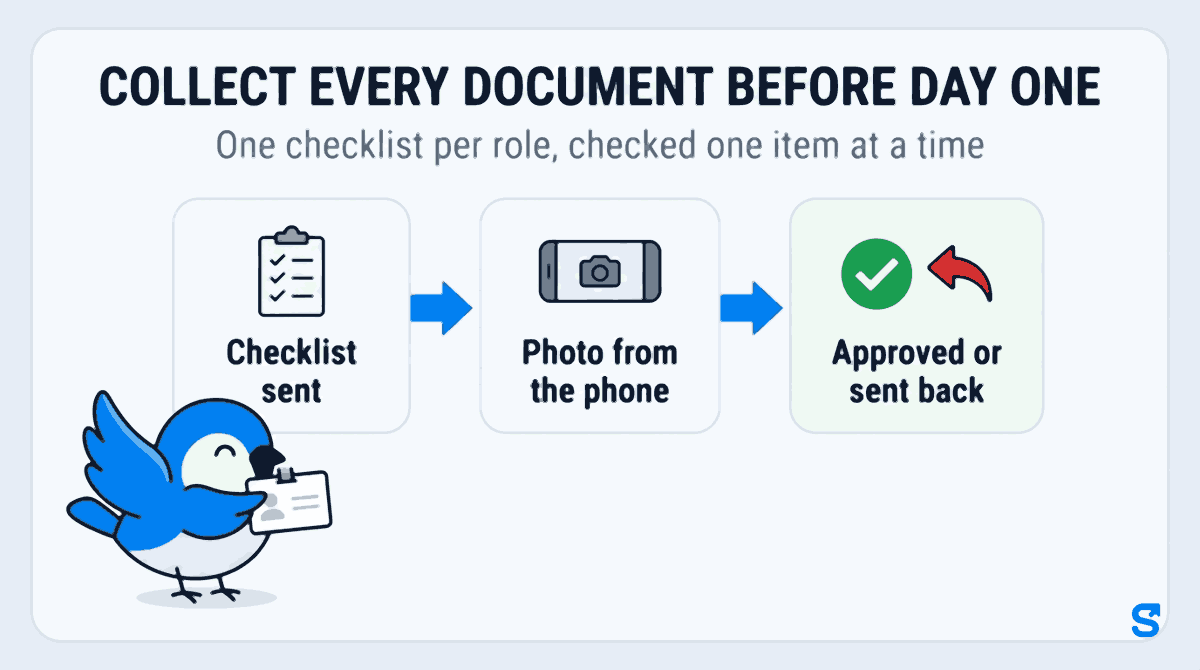
Put together, the whole process fits in three words per stage: Checklist sent, Photo from the phone, Approved or sent back.
What goes on a staff onboarding checklist
Keep it to what you will actually use. Most small teams need some version of these:
- Proof of identity, photographed on both sides.
- Proof of address, such as a recent bill or bank statement.
- Bank details for wages, so the first payday is not missed.
- An emergency contact: a name, how they are related and a phone number.
- Any license or certificate the job needs, such as a driver's license for a driver.
- The new hire's signature on the joining letter or offer you sent them.
- Uniform size, if you hand out uniforms.
The tax and employment forms you must keep for a new hire depend on where you operate, and this guide does not cover them. Ask your tax office, your labor agency or your accountant which ones apply, then add them to the checklist as items like any other.
What the checker looks at on each document
A one-minute look at each item catches most problems before they cost anything:
- The photo is sharp, and every word and number on it can be read.
- The whole document is in the frame, with no corner cut off.
- The name on it matches the name the person was hired under.
- The document has not run out, if it carries a date.
- The item is the one that was asked for, not a different document sent by mistake.
When something fails, write the reason the way you would say it to the person: "Please take it again in daylight, the numbers are not readable." A reason they can act on gets a good photo back the same day.
How Shiftelio collects onboarding documents
In Shiftelio this is Onboarding, in the owner menu. The page is called Employee Docs, and it does the five steps above from the same app your staff already use to clock in.
Tap Create Template, give it a title such as "Full Time Employee Onboarding", and use Add Requirement for each item. Every item has a label, such as "Upload ID Proof", an input type (File Upload, Image (Camera/Gallery), Text Input, Date Picker, Number Input or Joining Letter / Signature), optional helper text, and a Required field box. Drag items to put them in order.
Tap Assign on a checklist to open Manage Assignments, pick the people (or Select All) and Save Changes. You can also give a checklist to one person with Assign Onboarding from your staff list. The new hire gets a notification that onboarding documents have been assigned to them.
The new hire opens Onboarding Required in the app. For a photo item they tap Take Photo or Choose from Gallery; for a file they upload it; for text, numbers and dates they type and save. Under each item they see where it stands: Submitted, waiting for approval, Approved, or Rejected with your reason beside it. A countdown on their home screen shows how many days they have left, which you set as the Onboarding Grace Period, and the app reminds them while anything is still missing.
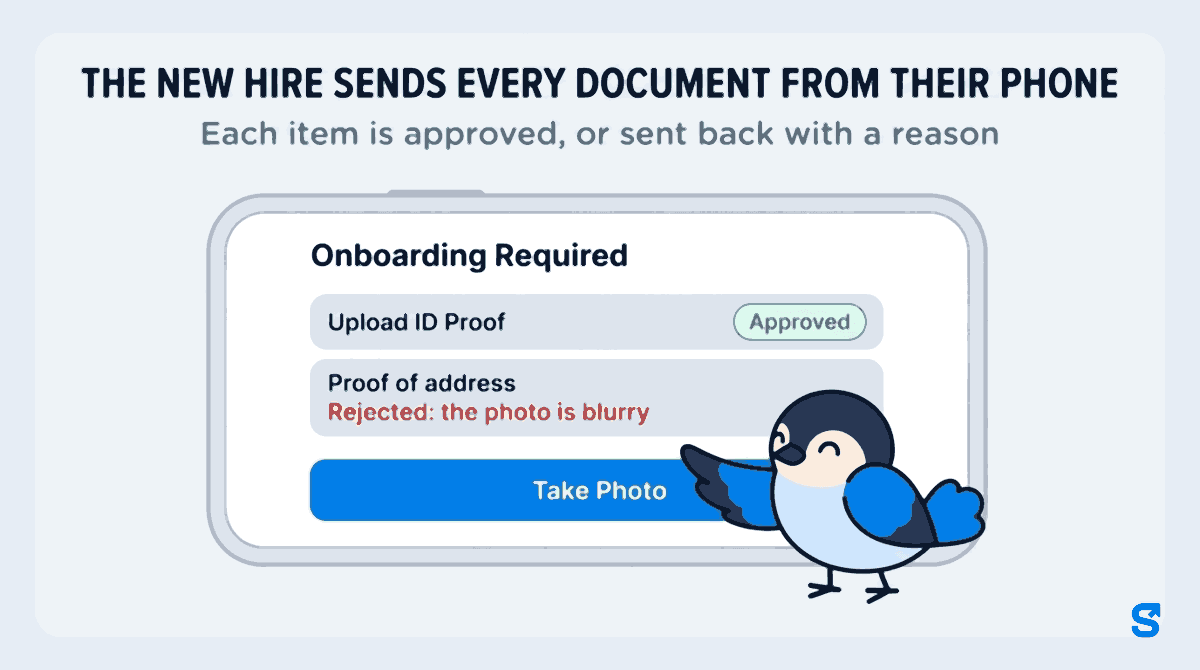
Waiting items show on the Employee Docs page under Pending Reviews, with a Review link. Owners and managers who have connected Telegram also get each submission there as a message with the photo, and a reminder follows if a submission has waited more than two days. In the review screen each item has Approve and Reject; a rejection needs a reason, which the new hire reads in the app before sending the item again. When everything is in order, Approve Entire Assignment closes it, and the new hire sees All Caught Up!
If you add a Joining Letter / Signature item, you write the letter once and the new hire's name fills itself in. The new hire reads it and signs on the screen with a finger, and you can open it later as a formal letter or download the original.
The owner sees everything. A manager sees onboarding documents only if you give their role the Onboarding permission to view them, and can approve or reject only with the permission to edit. A supervisor who runs the schedule never has to see a bank detail.
Which app collects new hire documents for a shift or field team?
You can see how onboarding fits with check-in, rosters and pay on the Shiftelio home page.
Questions owners ask
What paperwork does a new hire need to fill out?
Usually proof of identity, proof of address, bank details for wages, an emergency contact, any license the job needs and a signed joining letter. The tax and employment forms you must keep depend on where you operate, so confirm those with your tax office or labor agency.
When should new hire paperwork be completed?
Before the first shift. Send the checklist the day the offer is accepted, with a deadline of a few days, so day one is spent working and not filling in forms.
How do I collect documents from new employees without paper?
Ask them to photograph each document on their own phone and send it to a checklist that is filed under their name. In Shiftelio they do it in the app under Onboarding Required, using Take Photo or Choose from Gallery.
What if a new hire sends a blurry or wrong document?
Send that one item back with a reason they can act on, such as "the numbers are not readable". In Shiftelio you tap Reject, write the reason, and the new hire sees it and sends the item again.
Who should be able to see employee documents?
Only the owner and the people who actually need them, such as whoever runs payroll. In Shiftelio a manager sees onboarding documents only if their role has the Onboarding permission.
Does Shiftelio stop a new hire from working until the paperwork is done?
No. It shows the new hire a countdown and reminds them until every item is in, and it shows you what is still waiting, but it does not lock them out of clocking in.