Approve Staff Leave From WhatsApp, and Keep the Record
In short
Your staff already ask for leave on WhatsApp. Here is how an Approve or Reject tap on that message becomes a recorded decision, with the reason attached.
- Staff apply in the app; you decide on WhatsApp with Approve or Reject.
- A tap is checked like an app decision: pending, right person, not their own leave, permitted.
- Approval deducts the balance and tells the employee; Reject accepts a typed reason for 24 hours.
Most owners of a shop, a restaurant or a field team in India already approve leave on WhatsApp. A cook sends "Sir, 2 days leave, sister's wedding" at 11 at night, you reply "ok", and that "ok" is the whole record. Three weeks later nobody remembers whether it was two days or three, whether it was paid, or who else was off that week.
This is why some companies have told their staff to stop asking for leave on WhatsApp at all. TeamLease reported employers calling the app an informal, unofficial channel. They are right about the record and wrong about the habit. Your staff will keep using WhatsApp, and so will you.
The better fix keeps the habit and repairs the record: the request is made in the app, the decision arrives on WhatsApp as two buttons, and the tap writes the decision where payroll can read it.
Why this matters more in the festive weeks
Leave requests bunch together exactly when you can least spare people. Adecco India expects festive-season temporary staffing to grow 15 to 20% this year, as Storyboard18 reported, because shops, kitchens and delivery teams are all short at the same time. Your own staff want the same days off to travel home.
In those weeks an owner decides leave from the shop floor, from a supplier's godown, from a traffic signal. If deciding means opening a laptop, the request waits. If it means replying "ok" in a chat, it is decided, but nothing is recorded.
What the WhatsApp leave message looks like
When somebody on your staff opens the Shiftelio app, taps Apply Leave and then Submit Leave Request, the app sends a WhatsApp message to everyone who can decide it. The message carries:
- The applicant's photo at the top: their profile picture, or their newest check-in selfie if they never set one.
- The leave type, whether it is paid, how many days, the dates and the reason they typed.
- Two buttons under it: Approve and Reject.
The photo is there for a reason. In a business with two Rajeshes, the face tells you which one is asking before you read a word.
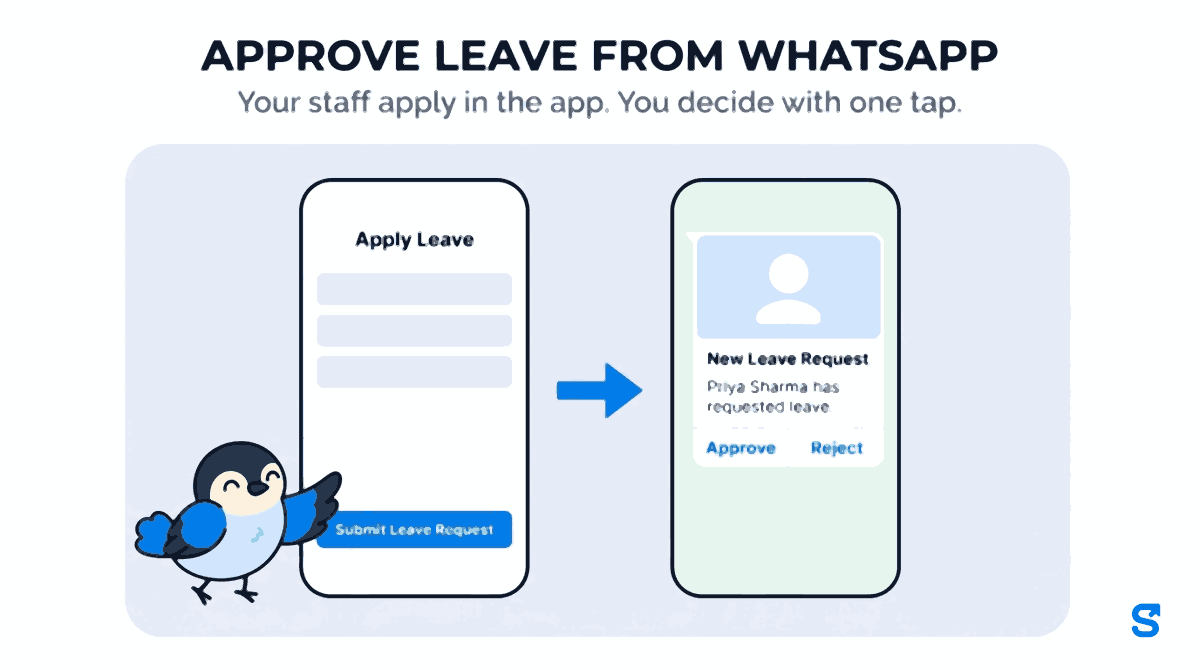
Tap Approve and three things happen at once. The request is marked approved in the app, with your name and the time. The days come off the employee's leave balance. The employee is told in the app, and on WhatsApp if they have a number saved, who approved it and for which dates. You get a reply in the same chat confirming it, so you know the tap landed.
Who gets the buttons, and who can use them
The message goes to the business owner, to every co-owner, and to any manager whose role has the Leaves: Approve permission. That permission is the same checkbox that decides who may approve leave inside the app, and a manager holding it only decides leave for the people their role covers.
A tap is checked before it changes anything, the same way a tap in the app is:
If a co-owner already decided it, you get a reply saying who decided it and when, and nothing changes. Two people tapping at once cannot both win: only the first tap is written.
The number that tapped is matched to one Shiftelio account in your business. If it matches nobody, nothing is changed and the reply says so. If it matches two accounts (a shared family phone, for example), nothing is changed and the reply asks you to decide it in the app.
Nobody approves their own leave, the owner included.
An owner or co-owner always is. A manager only with Leaves: Approve for that employee.
The buttons are also signed. A forwarded screenshot or a typed "Approve" does nothing, because the tap carries a code that only the original message holds.
Rejecting, and saying why
Rejecting quickly and rejecting properly usually pull against each other: a proper rejection means stopping to type a reason on a screen. Here you do both, in the chat.
Tap Reject and the request is rejected immediately. The reply in the chat asks you to send a reason within 24 hours. Type one line, "Too many staff already on leave that week", and it is attached to that request as your comment. The employee sees it on their leave screen, and the chat confirms it with "Reason added to Priya's leave request."
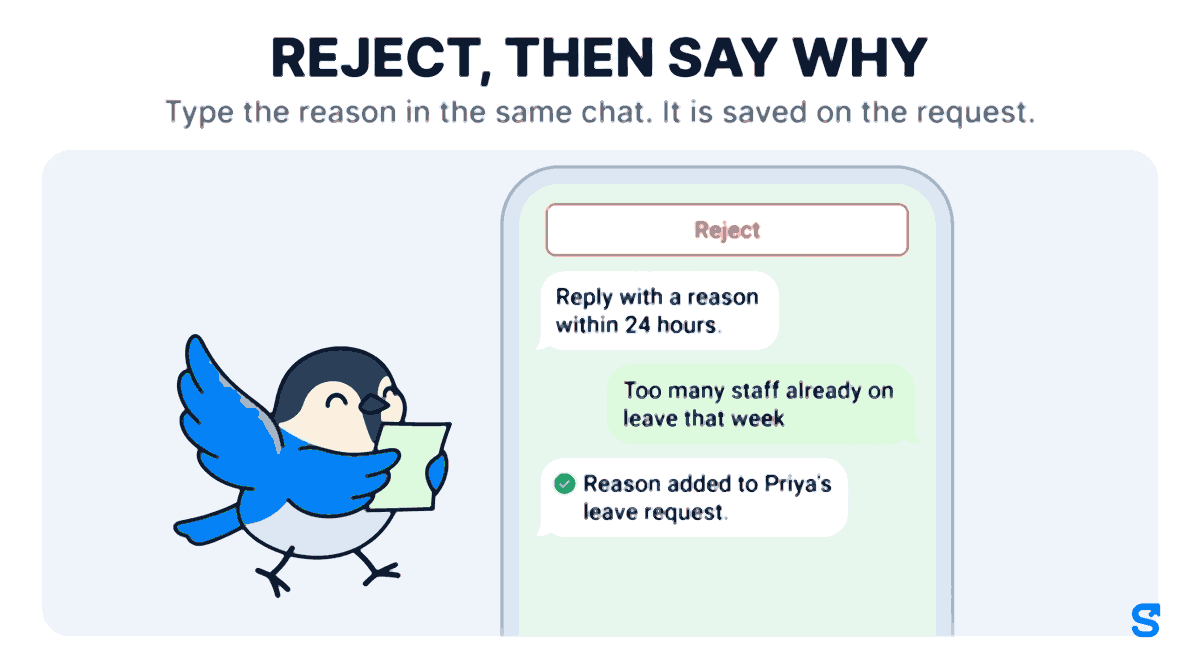
The reason is only attached when it is clear which request it belongs to: exactly one rejection by you, in the last 24 hours, with no reason yet. If you rejected two people in the same hour, a sentence could belong to either, so it is not attached, and you add the reason in the app instead. Guessing wrong would tell somebody a reason that was meant for somebody else.
What the owner who is not tapping still sees
If a manager decides a request from WhatsApp, the owners are told, with the manager's name and role, exactly as they would be if the manager had decided it in the app. A decision taken from a chat is not a quieter decision.
And every decision, from whichever channel, lands on the same Leaves screen, which is what payroll reads when it counts paid and unpaid days. That is the record the "ok" in a chat never was.
| "ok" in a WhatsApp chat | Leave buttons on WhatsApp | |
|---|---|---|
| Who decided, and when | Scroll back and hope | Stored on the request |
| Leave balance | Updated by hand, if at all | Deducted on approval |
| Employee told | Only if you remember | In the app and on WhatsApp |
| Reason for a rejection | Lost in the chat | Attached to the request |
| Two people deciding at once | Both reply, both think they decided | The first tap wins, the second is told |
Setting it up
In WhatsApp settings, check that Leave Request is switched on. Each alert has its own switch, and an alert that is switched off is not sent.
WhatsApp messages are paid from your prepaid WhatsApp credit, which you recharge in Billing. Every alert to every person is paid from that credit, so a request that goes to an owner and two managers is three messages.
In your roles, tick Leaves: Approve for the managers who should decide leave. They need a WhatsApp number on their profile to receive the message.
If you would rather not pay for WhatsApp messages at all, anyone who has connected Telegram gets the same request there with its own Approve and Reject buttons, and Telegram messages are not paid from WhatsApp credit.
Which app lets you approve leave from WhatsApp
Can my staff apply for leave on WhatsApp?
They apply in the Shiftelio app, under Apply Leave. That is what gives the request its type, dates and balance. The decision is what comes to WhatsApp.
What happens if two managers tap at the same time?
The first tap is written. The second person gets a reply saying the request was already decided, by whom and when.
Can I change my mind after tapping Approve?
A decided request no longer changes from WhatsApp. Open it on the Leaves screen in the app.
Does the employee see why I rejected their leave?
Yes, if you reply with a reason within 24 hours of tapping Reject. It shows on their leave request in the app. The WhatsApp message telling them it was rejected goes out the moment you tap, so it says who rejected it and when, but not a reason typed afterwards.
Keep reading
Free to use, no signup: Shift roster template.