Bank Account Details for Salary Transfer: Collecting Them From Every Staff Member Without a Wrong Digit
In short
Collect bank account details for salary transfer from the whole team, check every IFSC and account number before payday, and get a second person to approve.
- Your bank credits the account NUMBER you send. The name on the transfer is not what decides where the money lands.
- Excel silently destroys long account numbers. A 16-digit number can come back as 5.01235E+15, or with its last digit turned into a zero.
- Check the shape of every row before payday: IFSC has 11 characters, an account number is digits only, and the name on the account is filled in.
To collect bank account details for salary transfer safely, get every staff member's account number, IFSC and name on the account into one list, check each row before it is saved, and have a second person approve the list before any salary goes to it. The wrong digit is the expensive part: your bank pays the account number you give it, not the name.
Most small businesses do this once, in a hurry, the week before the first salary by bank transfer. Somebody sends a WhatsApp message asking everybody for a passbook photo, the photos arrive over four days, and the office manager types them into an Excel sheet. That sheet then quietly becomes the payroll for years. This article is about getting that first collection right, and about the three mistakes that sheet almost always carries.
Why one wrong digit is your problem, not the bank's
It is tempting to assume that if the account number is wrong, the name will not match and the bank will send the money back. Sometimes that happens. You cannot rely on it.
The Reserve Bank of India's circular on processing inward transactions based solely on account number information (RBI/2010-11/235) says the beneficiary name must travel with the transfer, but "reliance will be only on the account number for the purpose of affording credit". The same circular puts the responsibility for a correct account number on the remitter. On a salary run, the remitter is you.
So a salary sent to a mistyped account that happens to exist is a salary paid to a stranger. Getting it back means letters to two banks and a staff member waiting weeks for wages they already earned.
Many banks now let you look up the account holder's name before you send a transfer. If yours offers it, use it on any account you have not paid before. It is the only check that actually asks the bank.
The three mistakes almost every bank details sheet carries
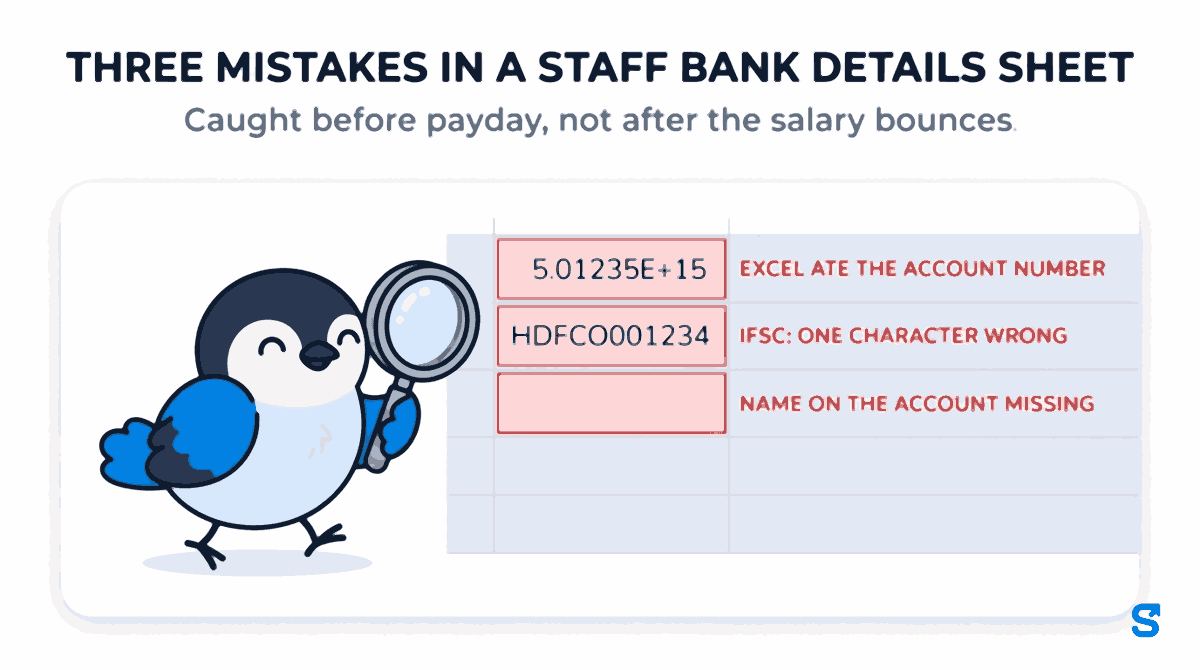
Excel eats the account number
This one is not a typing error, which is why nobody catches it. Microsoft's own support page explains that Excel keeps only 15 significant digits in a number and turns every digit after the fifteenth into a zero. Many Indian savings account numbers run to 16 digits or more.
So the manager types 5012345678901234 correctly, Excel shows 5.01235E+15, and when somebody widens the column it reads 5012345678901230. The last digit has been replaced. The sheet looks fine, the number looks plausible, and the salary goes to the wrong account or bounces.
The fix is to format the account number column as Text before anybody types into it. Microsoft's page gives that fix too. Most sheets are made before anybody reads it.
IFSC codes copied with one character wrong
An IFSC code is always 11 characters: four letters for the bank, a zero, then six characters for the branch, like HDFC0001234. Passbook photos are blurry, and the fifth character is the one people get wrong, typing a letter O instead of a zero. A wrong IFSC usually bounces, which is better than a wrong account number, but a bounce the day after payday is still a staff member without wages.
The name on the account is missing, or is somebody else's
When a staff member has no account of their own, they sometimes give a brother's or a husband's. That can be perfectly fine, and it can be a problem, and you want to know which before you pay into it. A sheet with a blank "name on account" column hides it completely.
A safer way to collect bank details from the whole team
Whatever you use, the order is the same:
A passbook photo has to be retyped by somebody else, and every retyping is a chance for a wrong digit. Ask staff to type their own account number, IFSC and the name on the account, or better, to enter it themselves where it gets saved.
Account number, UAN and ESI number columns as Text. Do it before the first row, not after.
IFSC 11 characters with a zero in fifth place. Account number digits only, no spaces, no E+. Name on the account filled in whenever there is an account number. A UPI ID looks like name@bank.
The person who typed it reads it once more against the passbook photos, and somebody else approves it. Our article on who approves a change to an employee's bank details explains why that second person matters even more for changes later.
The person whose salary it is will spot their own wrong digit in a second. They are the cheapest check you have.
How Shiftelio collects bank details for the whole team
In Shiftelio, bank and UPI details live under Payment details, described in the app as the place to "see and enter the bank or UPI details staff get paid into". You choose whether you need a bank account, a UPI ID, or either one, and staff are asked for what you need. There are two ways in, and you can use both.
Staff enter their own. Each staff member sees a Payment details screen in the app, types their account number, IFSC and name on the account, or their UPI ID, and submits it. It goes to the Payment approvals screen for review. If it is rejected, they get a notification with your reason and resubmit. Nobody retypes a passbook photo.
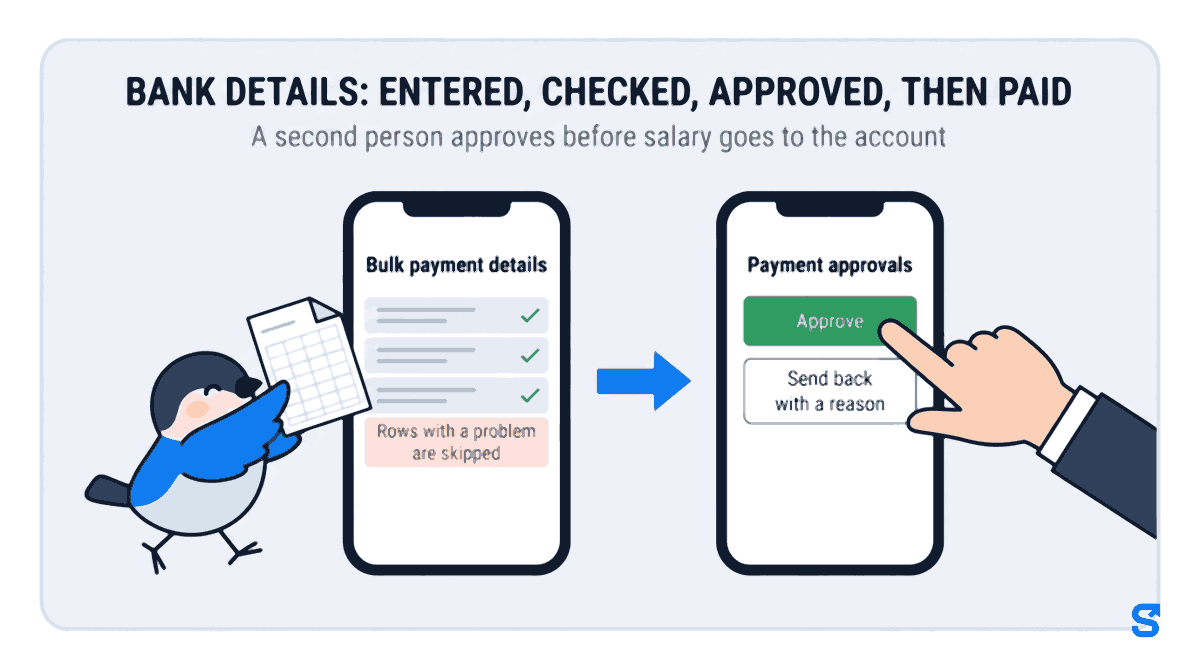
A manager fills them in for everybody at once. On the Bulk payment details screen you download your staff list, fill in the bank or UPI details in Excel or Google Sheets, and upload it back. Or you fill in the blanks on screen, one person at a time. Before anything is saved, every row is checked:
- An account number Excel has turned into 5.01235E+15 is refused, with a note telling you to format the column as Text.
- An IFSC that does not look like HDFC0001234 is refused.
- An account number with no name on the account is refused, because the bank needs the name.
- A UPI ID that does not look like name@bank is refused, and so are PAN, UAN and ESI numbers in the wrong format.
- A blank cell means "leave what is on file alone". Blank never deletes.
Rows with a problem are skipped and listed, so you can fix them and save again or download the ones not saved. Before saving you tick a box confirming you understand this changes the account those people are paid into.
Then the second person. When a manager saves the list, it goes to the Payment approvals screen as one upload, and whoever holds the Approve permission, usually you, approves it or sends it back with a reason in one decision. When you, the owner, enter details, they are approved straight away, because you are the approver. Details already on file come back hidden as ****4821 in the list a manager downloads, and only the owner can download the full numbers.
Every staff member whose details you add is told, and their screen says plainly that the details were added by their employer and asks them to check they are correct. If an upload was wrong, you can put those bank and UPI details back exactly as they were before it.
See where payment details sit beside attendance, payroll and the rest on the features page.
What details do I need from an employee for salary transfer?
The account number, the IFSC code of their branch, and the name on the account, or a UPI ID if you pay by UPI. For PF and ESI you will also want their UAN and ESI number.
Why does Excel show an account number as 5.01235E+15?
Excel treats a long number as a number and shows it in scientific notation. It keeps only 15 significant digits, so a 16-digit account number also loses its last digit. Format the column as Text before typing.
Will the bank return a salary sent to the wrong account?
Not reliably. Banks credit by account number, and the RBI places responsibility for a correct number on the sender. If the wrong number exists, the money lands there.
Can staff enter their own bank details in Shiftelio?
Yes. Staff type their own bank or UPI details in the app and submit them for approval. You approve or reject with a reason, and they are notified either way.
Does Shiftelio verify the account with the bank?
No. It checks that each detail is complete and correctly formed, and it makes a second person approve. For an account you have never paid, use your bank's name look-up or a small test transfer.
The short version
The account number is the one part of a salary run that decides where the money lands, and the bank will not catch your mistake for you. Get staff to type their own details, keep Excel away from long numbers, check every row's shape, and have somebody who did not type the list approve it. Then tell each person what was saved, because they know their own account number better than anybody.
Keep reading
Free to use, no signup: Payroll calculators.