Daily Visit Report for Field Staff: Every Stop Named, Without Anyone Typing It
In short
A daily visit report your field staff never fill in: every stop named, km that ignores GPS jumps, gaps explained, customers saved by name once.
- A visit report typed by the person being measured cannot be checked; one drawn from the shift's location can.
- A stop is a place the person stayed; a gap is a stretch with no location, and it says why.
- The km ignores GPS jumps; a shift whose distance still makes no sense reads Distance unclear and stays out of every total.
Every evening the same message arrives on the owner's phone: "Visited 6 clinics today, 2 orders, 1 follow up." Nothing in it can be checked. Which six? For how long? Was the long gap after lunch a traffic jam, a dead phone, or a nap? The daily visit report was meant to answer that, and in most small businesses it has become a form the salesman fills in at 9 at night from memory.
This article is about a different way to get the same report: let the phone's location during the shift draw the day, name each place it stopped, and leave nobody anything to type. It covers what a good visit report has to show, where the usual methods break, and how the Field staff add-on in Shiftelio builds one.
What a daily visit report has to answer
Strip away the format and an owner wants four things from a field employee's day:
- Where they stopped, by a name the owner recognises: "City Care Clinic", not a pin.
- How long they stayed, because a 3 minute stop and a 45 minute visit are different days.
- How far they travelled, so fuel and travel allowance rest on a number.
- What happened in the gaps, said plainly, not hidden.
A paper or Excel daily visit report format asks the employee to supply all four. That is the weakness. The person being measured is the person writing the measurement, after the fact, and nobody can check it without phoning the customer.
Why the usual methods fail
| Method | What you get | Where it breaks |
|---|---|---|
| Visit report in Excel or on paper | A list typed in the evening | Written from memory; nothing proves a visit happened |
| A WhatsApp location at each visit | One pin per message | Easy to forget, easy to send from the wrong place, no time spent |
| A GPS trail on a map | Every point the phone sent | A tangle of lines; nobody can read a day from it |
| Named stops on a timeline | The day as a list of places, drives and gaps | Needs the phone's location on during the shift |
The GPS trail is the trap most owners fall into. The data is all there, but a map with 400 dots is not a report. Somebody still has to look at the dots and decide "he was at the clinic from 11:10 to 11:45". That is the job the Field staff add-on does for you.
How Shiftelio turns a shift into a visit report
Shiftelio already records where a staff member's phone is while they are clocked in, and nowhere near it when they are not. The Field staff add-on reads that trail and rebuilds it as the day an owner would describe: place names for every stop, the day as a timeline, km so far, and your own saved places.
A stop is a place they stayed, not a dot
A stop is counted when the phone stays in one place for a few minutes. Waiting at a red light is not a stop; a 20 minute visit is. Stepping out to the vehicle and back does not split a visit in two.
The time between two stops is a drive, and each drive carries its km. The same km figure appears everywhere else in Shiftelio, so the visit report and the travel number never disagree.
How the km is worked out, and why it may read lower than before
A phone's GPS is not a measuring tape. Indoors, under a flyover or beside a tall building, one reading can jump half a kilometre away and come straight back, and a plain sum of the trail counts that jump twice. Over a day of such jumps a short round can read far longer than it was, and a travel allowance paid on that number is paid on noise.
Since 3 October 2026 Shiftelio works out every shift's km a stricter way: impossible jumps are not counted, and no km is counted across a stretch where the phone sent nothing, because nobody knows the route taken in it.
The one corrected figure is what every screen now prints: the Movement tab of the Report, its WhatsApp summary, the trip timeline, the check-out line in the Activity Log and the Distance (km) column of the map-history export. The last 31 days were recalculated the same way, so a month's totals are comparable. If your team's km reads a little lower than it did in September, that is the reason, and the Movement tab carries a note saying so until 17 October 2026.
When the distance makes no sense, it says "Distance unclear"
Very rarely, even the corrected figure cannot be right, because the shift's GPS makes no sense. Shiftelio does not print a number it cannot stand behind. That shift reads Distance unclear instead.
Say Ravi and Meena both worked yesterday. In the Movement tab's table, Ravi's Total travelled reads "about 18 km" and Meena's reads "Distance unclear". Here is what happens to Meena's shift:
What "Distance unclear" changes
- It is left out of every km total and every per-day average, so one broken day cannot inflate a month.
- A total that skipped such a shift says so: "about 18 km (1 unclear)", never a quiet smaller number.
- The WhatsApp summary and the Activity Log's check-out line print the same words, the trip timeline shows no km for that shift, and the map-history export writes "unclear" in Distance (km).
- Her stops, times and gaps are still on the timeline; only the km is withheld.
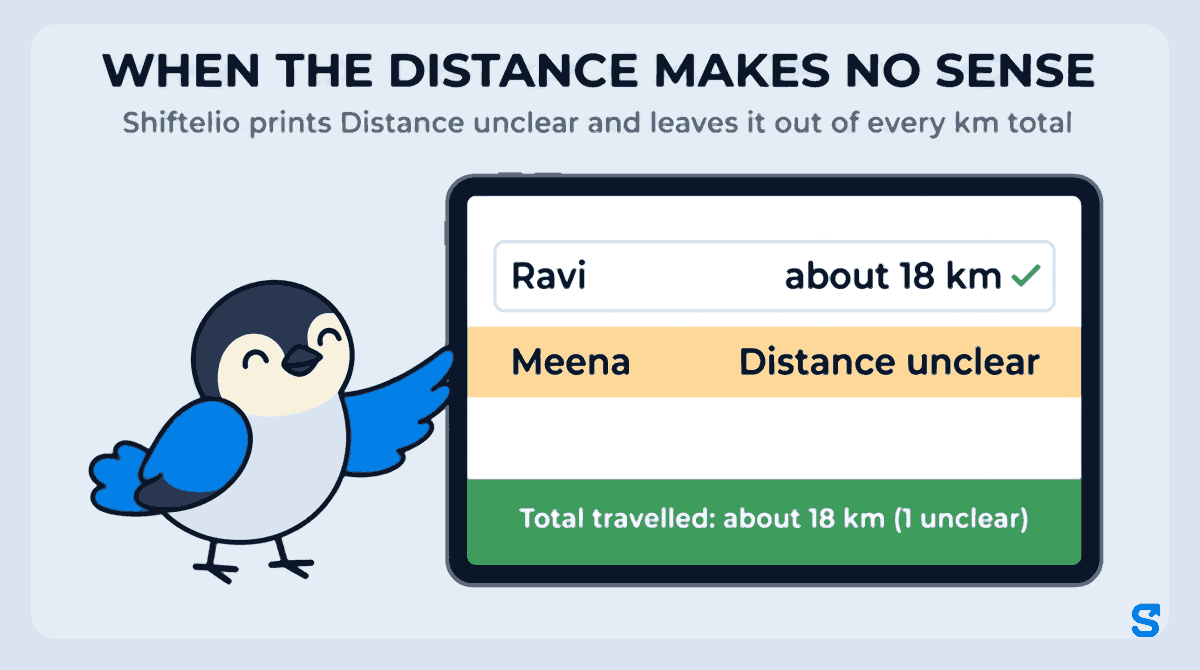
For a travel allowance this is the safe default: you pay that day by hand, from the stops on the timeline, rather than on a figure the phone made up.
Every stop gets a name
Each stop is named in this order, cheapest and most trusted first:
- One of your own sites. A stop inside a site's boundary shows the site's name.
- A saved place. A customer, a clinic or a warehouse you named once.
- A name your business already has nearby, from an earlier stop.
- The map name, from Google or OpenStreetMap, shown as "near" that place.
If none of these finds anything, the stop says "Unnamed stop" with a Show on map link. It does not guess.
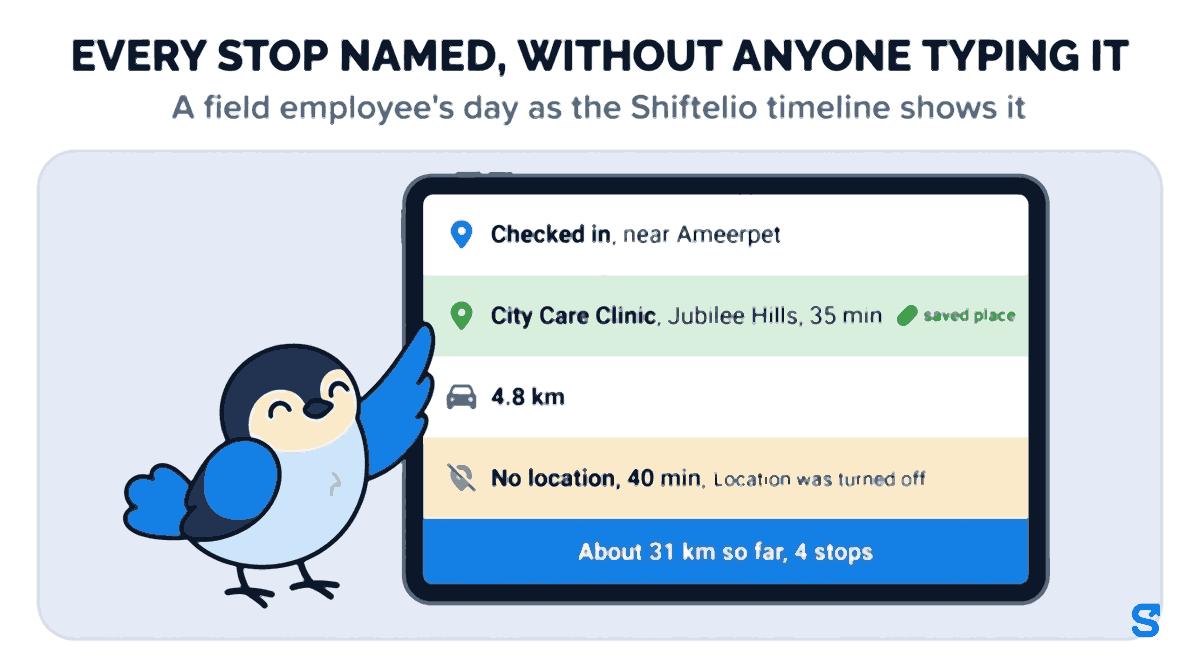
Here is part of a medical representative's day in Hyderabad as the timeline shows it, with the summary line for the whole day so far:
- 9:40 Checked in, near Ameerpet
- 10:05 to 10:40 City Care Clinic, Jubilee Hills, 35 min, saved place
- Drive 4.8 km
- 11:10 to 11:30 near Road No. 10, Banjara Hills, 20 min
- 13:15 to 13:55 No location, 40 min. Location was turned off
- Summary About 31 km so far, 4 stops, 6 h 10 min on duty
Gaps say why, instead of hiding
When the phone sends no location for a long stretch, the timeline shows a No location gap and gives the most likely reason:
The reasons a gap can show
- Location was turned off: the phone's location or GPS setting was switched off during that window.
- Battery was very low, the phone probably switched off.
- The phone closed Shiftelio; it restarted later.
- The phone sent nothing; reason not known: none of the above could be proved.
No km is counted across a gap, because nobody knows the route taken. If the phone was in the same place before and after the gap, the stop simply carries on through it. This matters for fairness as much as for control: a dead battery reads as a dead battery, not as an employee who vanished.
"Km so far" while the shift is still running
For a shift that is still open, the summary updates through the day and reads "About 31 km so far" with the time it was last updated. An owner checking at 3 pm sees the day up to roughly 3 pm, not a blank until check-out. Readings a phone sends late, after coming back into network, are folded into the day afterwards.
Name a customer once, and every visit shows it
The map name is fine for a road. It is useless for a customer. "Near Road No. 36" tells an owner nothing; "City Care Clinic" tells them the visit happened.
So the add-on lets you save places. There are two ways to do it:
From the timeline. Any stop on the day's timeline has a Save this place button. Type the name, save, and every stop inside that place's radius, by any of your staff, shows that name: later visits, and the stops already on past days too. A stop inside one of your own sites keeps the site's name.
From Settings. Under Settings → Saved places, add a place with its location. In Google Maps, press and hold the spot and copy the two numbers it shows (Google's own help page explains this). Choose how close counts as "here": 50, 75, 150 or 300 metres.
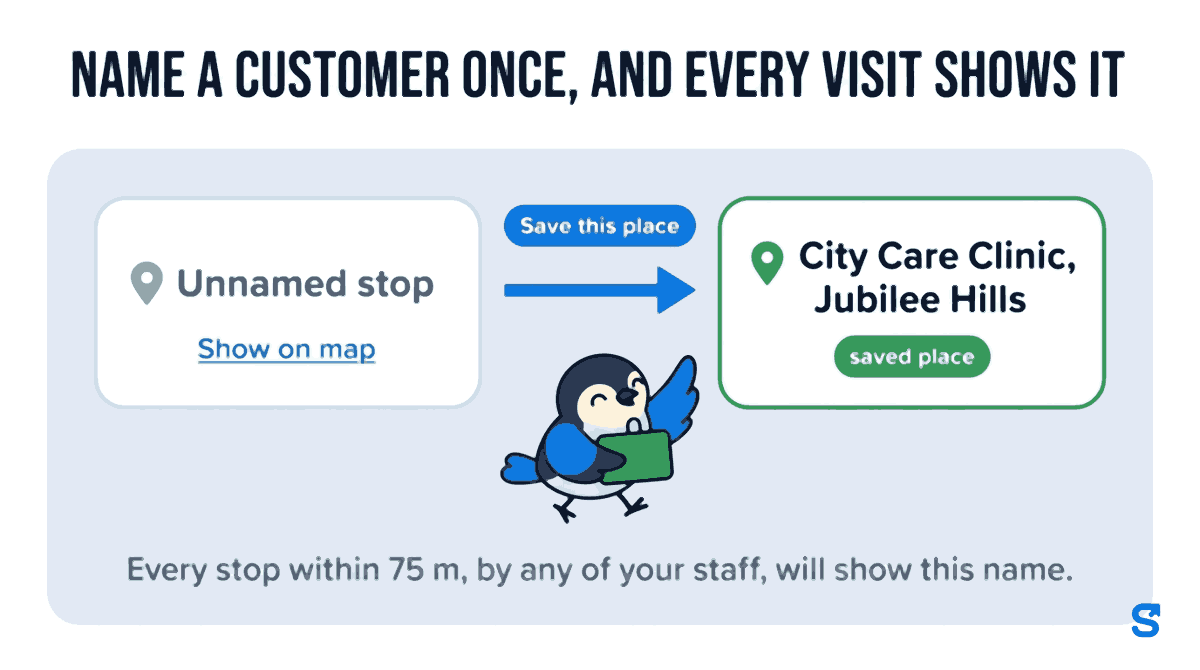
A saved place is shared by the whole business. That is what turns a tracking tool into a customer visit register: after a month of saving the clinics, shops or sites your team visits, most of the timeline reads in your own words.
Staff never name places. Only the owner, or a manager given the Save places permission, can.
Who sees it, and the travelling staff who are not "away"
The timeline appears on the screens an owner already uses: the attendance record of the shift, the history on the Live Map, and the Movement tab of the Report, which lists named stops, real gaps and the km so far for everyone.
- Owners and co-owners see every field employee.
- A manager sees it only with the Field staff View permission, and only for the staff they manage.
- Each employee sees their own day on their own attendance record, the same timeline the owner sees.
There is also a list on the Saved places settings page called Who works in the field. Turn it on for the people whose job is to travel, and the Activity Log shows where they are without raising an "away from site" warning every time they leave the office. Shiftelio marks people as Suggested when most of their check-ins in the last 14 days were away from any site, so you do not have to work it out.
Tracking only during the shift, and why that matters
India's Digital Personal Data Protection Act, 2023 allows an employer to process an employee's personal data for the purposes of employment under Section 7(i), but that does not make round-the-clock tracking reasonable. The Ministry's data protection framework page carries the Act and its rules. The safer line, and the one Shiftelio holds, is that location is recorded between check-in and check-out, and the field timeline is built only from those hours. Tell your staff this in writing before you switch anything on; a visit report people trust is one they were told about.
Where this fits, and what it is not
The one thing it does that a GPS trail on a map does not: it reads the day for you, names it in your own words, and says why a gap happened instead of leaving a hole in the line.
Frequently asked questions
Does the salesman still have to fill in a daily visit report?
Not for where they went. The stops, their times, the drives and the km come from the phone during the shift. If you need order values or visit notes, those still need their own record; this add-on does not collect them.
How short a visit does it catch?
A stop needs the phone to stay in one place for a few minutes. A 2 minute drop-off at a counter will usually show inside a drive rather than as its own stop.
What if the employee switches location off?
The timeline shows a No location gap with the reason "Location was turned off", and no km is counted across it. You see the gap and its cause, not a smooth line drawn across it.
Can I see last month's visits when I switch it on?
Yes. Switching the add-on on rebuilds the last 30 days of stops from the location history Shiftelio already holds, so past shifts get a timeline too.
Why does one shift say "Distance unclear" instead of km?
Because the GPS for that shift makes no sense even after GPS jumps are removed. Shiftelio prints Distance unclear rather than a wrong number and leaves that shift out of every km total. The stops and times are still there, so you can settle that day's travel by hand.
Why is the km lower than it was in September?
Since 3 October 2026 the km ignores impossible GPS jumps and counts nothing across a long gap with no location. The last 31 days were recalculated the same way, so totals are comparable across the month.
Can staff rename a stop to whatever they like?
No. Only the owner, or a manager with the Save places permission, can name a place. Staff see their own day but cannot change what it says.
Keep reading
Free to use, no signup: Shift roster template.