Device Binding: Stop Buddy Punching Without Collecting a Face
In short
Face scans are not the only way to stop a worker clocking in from a friend's phone. Device binding ties each person to one handset and collects no biometric.
- A selfie proves a face was present. It does not prove whose phone reported the shift.
- Device binding ties each employee to one handset, and it collects no biometric data at all.
- The rule that makes it bite is not the block. It is that signing in on a new phone signs the old one out, so the two can never run at once.
There is a version of buddy punching that a selfie will not catch and a geofence will not catch either.
The worker stays at home. He hands a second phone to a friend, who carries it around the site all day. The app on that phone reports a location inside your geofence, a trail that moves the way a working person moves, and a check-in at the right time. Nothing about it looks wrong, because nothing about it is technically wrong. One phone reported, and it reported honestly. It was just in the wrong hand.
You can catch this after the fact. You can notice that the same person's handset changed three times this month, or that his trail is suspiciously tidy. What you cannot do, with a selfie and a geofence alone, is make it cost him anything at the moment he does it.
The fix everyone is selling, and the bill that now comes with it
Search for this problem in India right now and you will be told the answer is face recognition. Most of the attendance vendors here have spent 2026 publishing on exactly that: AI selfie matching, facial recognition at the gate, fingerprint readers on the wall. It does work. A face is hard to lend to a friend.
It is also now a regulated thing to collect, and the timetable is no longer hypothetical.
The Digital Personal Data Protection Act, 2023 treats a fingerprint or a facial scan as personal data. The DPDP Rules, 2025 were notified in November 2025 with an eighteen month phased compliance window, which puts the obligations on notice, consent and the duties of a data fiduciary squarely in front of every employer in the country. The Rules themselves are published by MeitY.
The awkward part for an employer is not the paperwork. It is the word free. Consent under the Act has to be free, specific, informed and unconditional, and legal commentary in India has been blunt about what that means when the employer holds the salary: consent given because the alternative is not being paid is consent given from a very weak bargaining position. Nobody has tested that in court yet. You may not want to be the case that does.
So the question worth asking is not "how do I get a face scan signed off". It is: is there a control that solves the same fraud and collects nothing sensitive at all?
There is. It is much duller than a face, and for this particular scheme it is sharper.
What a registered work phone actually means
In Shiftelio the capability is called one registered work phone. Each employee is tied to one handset. The phone he checks in from becomes his registered phone, and a second handset appearing in his name is a thing the system has an opinion about.
The data involved is a device identifier. Not a face, not a fingerprint, not a voice print. Just an opaque string that says this install, on this phone. It is the difference between recording a body part and recording a serial number.
The first handset an employee is ever seen on registers itself, approved, without asking anybody. That is deliberate, and it is not politeness. A security feature whose opening move is to lock out an entire workforce is not a security feature, it is an outage.
The rule that makes it bite
Here is the part that does the actual work, and it is not the block.
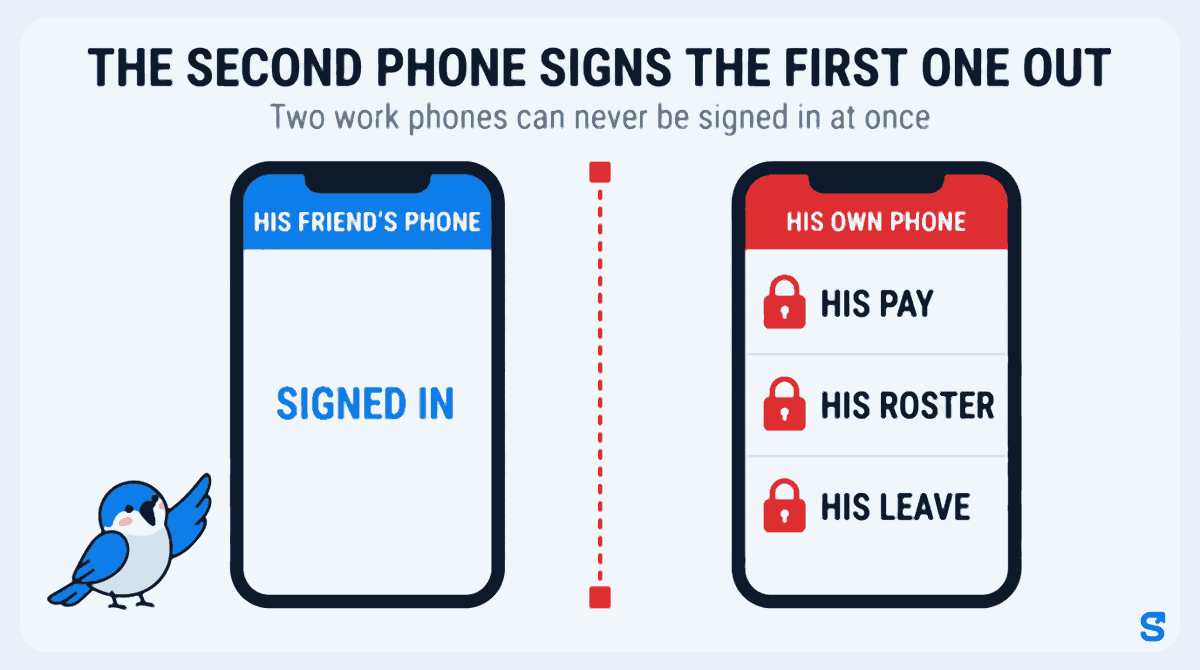
Two work phones can never be signed in at once. When a new handset takes over, the previous one is signed out.
Follow what that does to the scheme. The friend's phone in the field works only while the employee's own phone is signed out. Not his attendance app in isolation: his pay, his roster, his leave, the whole thing, on the handset in his pocket at home. To keep the fraud running he has to give up his own access to his own record for the rest of the day. To get it back he has to switch again, which signs the friend's phone out and strands the person carrying it.
The loophole stops being something you detect afterwards and becomes something that costs him, immediately, without anybody at head office noticing or deciding anything.
There is a twenty four hour cool down between switches, and it is worth being precise about what it is for, because it is not an anti-fraud number. It is an anti-ping-pong number. Without it a pair of phones can be alternated all day, each switch handing the free allowance back, and the switch history turns into noise instead of a record. A genuine phone change happens once. A ping-pong happens inside a shift.
A cool down never produces a dead end. It removes the free allowance, which means the employee has to ask you. That is a button, not a wall.
Three settings, and the default is "do nothing"
The owner-facing setting has exactly three positions, and they are written on the screen in these words:
| Setting | What happens when a second phone appears |
|---|---|
| Do nothing (default) | Nothing at all. No check-in is interrupted, no binding recorded, no alert sent. |
| Tell me, but never stop anyone | The switch is recorded and both you and the employee are told. Nothing is ever refused. |
| Tell me, and pause the second change until I approve | A second unapproved change is held until you approve the first. The first change always goes through. |
Read the third row again, because it is the one people misread. It never blocks the first phone change. Somebody who genuinely drops their handset in a bucket of water on a Tuesday gets their new phone working on the Tuesday. What gets held is a second unapproved change on top of an outstanding one, which is the shape a ping-pong has and a genuine upgrade does not.
Off is the default for a real reason. Turning a binding rule on by default would have interrupted every check-in across every business on the day it deployed, including the businesses that never asked for it.
The four moments it deliberately does nothing
A control that can lock a person out of their own attendance record has to be more careful about when it stays quiet than about when it fires. There are four cases where this one refuses to act, and each of them is a decision, not a gap.
- Web check-in is never bound and never blocked. A browser cannot be tied to one person reliably. It changes when somebody clears their browsing data, opens a second browser, or uses the shared machine at reception. Binding to it would treat a worker who cleared their cookies as a stranger on a stolen account. Checking in from a browser is a supported way to work, not a degraded one.
- Never during an open shift. A switch mid-shift is the most suspicious shape this feature can see, and it is recorded and flagged as hard as any other. Enforcement still waits. He is already checked in from a handset the rule accepted, so whatever the switch was going to enable has already happened, and acting now cannot undo it. All it can do is strand somebody at a client's house with no way to reach anyone. Detection is kept in full. Only enforcement waits.
- Never on a phone holding unsynced offline work. Punches made with no signal are still on that phone until they are sent, so do not sign it out before then, because those punches are somebody's pay for a day they actually worked. Deferring costs you minutes of friction. Not deferring costs a worker a day's wages.
- Never the first phone. The first handset an employee ever appears on auto registers as approved, so nobody is ever locked out of an account they have not yet used.
When somebody genuinely buys a new phone
Most phone changes are honest. People upgrade, lose handsets, break screens.
You get a notification with the employee's name and an Approve this phone button on it. Approving confirms the new handset and the matter is closed. Denying puts back the handset he was using before this one, read out of the switch history rather than guessed at. If there is no previous handset, because this is somebody's very first phone, deny does nothing rather than binding him to a device that has never existed.
If two owners are looking at the same alert on two phones, whoever taps second is told who decided it. That is not an error and it is not their fault. Two owners is ordinary.
What this does not do
It proves which handset reported the shift. It does not prove who was holding it.
An employee who hands over his own registered phone is not stopped by device binding, because from the system's point of view nothing changed. That is the job of the selfie and the geofence, and this sits alongside them rather than replacing them. What binding closes is the specific hole those two cannot see: a second handset, reporting honestly, from the wrong pocket. Run all three and the scheme needs the worker's own phone, the worker's own face at check-in, and the right location, which is close enough to just turning up.
It also does nothing on web check-in, as above. If your staff clock in from a shared browser at reception, this is not the control for them.
Which app does this
The product answer
Questions owners ask
Is a device identifier personal data under the DPDP Act?
Treat it as personal data and handle it properly, because it relates to an identifiable person. The point of the comparison in this article is narrower and it still holds: a device identifier is not biometric data, so it does not carry the elevated consent expectations that a facial scan or a fingerprint does, and it cannot be reused to identify somebody outside your workplace. Take your own advice on your notice and consent wording either way.
Will this lock somebody out at the gate at six in the morning?
Not on their first phone change, and not while they have a shift open. Both of those are hard rules rather than settings. The setting you choose only decides what happens to a second unapproved change, and even the strictest position routes to an approve button rather than a refusal you cannot undo.
Do I have to turn it on?
No. It ships doing nothing. Most businesses should start on "tell me, but never stop anyone" for a month and look at what the switch history actually shows before they consider pausing anything.
What if an employee changes phone every month legitimately?
You will see it, which is the point. A person who genuinely replaces a handset monthly is unusual enough to be worth a conversation, and the history gives you the dates to have it with.
The short version
Face recognition is a good control and a real liability. For the particular scheme where a worker stays home and a friend carries a second phone, you do not need it. You need the two phones to be unable to run at the same time, which is a much smaller idea and a much smaller pile of data.
Turn it on in warn mode. Read the switch history for a month. Decide after that whether anything needs pausing.
Keep reading
Free to use, no signup: Attendance register generator.