Staff Incentive Targets That Get Paid: A Festive Guide for Salons and Shops
In short
Set a festive staff target, have each sale logged with a photo, and pay the reward on the payslip. A guide for Indian salons and retail shops.
- A target incentive fails on the count, the proof or the payout, almost never on the idea.
- Set targets as a count of things a person does: add-on services, memberships sold, units of a product, reviews collected.
- Ask for a photo with every entry, and decide up front whether entries count at once or wait for your approval.
It is the first week of October. The salon is booked solid from Navratri to Diwali, and you tell the team what you tell them every year: whoever sells twenty hair spa add-ons this month gets ₹1,000 extra.
By the fifteenth, three stylists say they are at twelve. Your receptionist's notebook says eight, nine and eleven. By the end of the month one stylist is sure she crossed twenty, you are sure she did not, and the ₹1,000 either gets paid to keep the peace or quietly forgotten when the salary sheet is made. Next year, fewer people believe the offer.
This is not a motivation problem. The incentive was a good idea. It failed at three mechanical points: nobody agreed on the count, nobody could prove an entry, and nobody carried the promise to the payslip. This guide fixes all three, and shows where Shiftelio does the carrying for you.
Why the festive season makes this worse
Festive trade is when owners lean hardest on incentives. TeamLease Services' Festive Season Workforce Report 2026 expects temporary hiring in organised retail and related sectors to rise 15 to 20 per cent this season, and lists attendance bonuses and productivity-linked rewards among the tools employers are using to hold on to frontline staff through the rush (IBEF, 13 August 2026).
That means more people on a target, many of them new, for a short and chaotic window. New staff have no history of trusting your notebook. A target that cannot be checked turns into an argument in the busiest month of the year.
The three places a target incentive breaks
1. The count
"Sell more" is not a target. "Twenty hair spa add-ons between 1 and 31 October" is. The number, the thing being counted and the dates must be written down before the first customer walks in, and every person on the target must be able to see their own running total without asking you.
2. The proof
Once money depends on a count, every entry becomes something somebody might question. The cheapest proof in a salon or a shop is a photo taken at the moment: the product on the counter, the treatment in progress, the membership form signed. A photo from the phone's gallery proves much less than one taken with the camera right now, and your rules should say which one you accept.
3. The payout
The most common failure is the quietest one. The month ends, the salary sheet is made from attendance, and the incentive lives in a different notebook. It is either forgotten, or paid as cash with no record, which means next month nobody can tell whether it was paid at all.
Count things, not rupees
Most salon software pays commission as a percentage of billed revenue. That works when the billing system knows exactly who did the service. A festive target is usually simpler and more personal: a number of things one person did. Good targets for a salon or a shop:
- Add-on services sold, such as hair spa, head massage or a facial upgrade.
- Memberships or prepaid packages signed.
- Units of one product sold at the counter, such as a festive gift box.
- Google reviews collected from happy customers.
- Home-delivery orders packed and handed over, for a shop.
Each of these is something a person can log the moment it happens, and something you can check with one photo. That is exactly the shape of a target Shiftelio's Goals & Rewards handles: set targets for staff and pay out when they hit them.
Be clear about what that means. Goals & Rewards counts entries your staff log. It does not read your billing software or your POS, so it will not calculate a percentage of revenue for you. If your incentive is "10 per cent of everything you bill", keep that in the system that does the billing. If it is "twenty of these this month", read on.
Setting a festive target in Shiftelio
In the owner app, open Goals & Rewards and tap New Goal. The form walks you through five steps.
Give it a Goal title your staff will recognise, such as "Hair spa add-ons", and answer "How many do they need to do?" with the target, for example 20.
Under "What proof do you need for each entry?" the default is one required photo. You can make it camera only, so nobody uploads last week's picture, and add a short text box, a checklist, a dropdown or a choice, for example which product was sold.
"How should entries be checked?" has two answers. Count automatically adds each entry to the total the moment it is logged. I'll approve each one holds entries until you or a manager with permission approve them. For money that depends on a count, the second is usually right in the first month.
Choose one of three rules, set the Reward amount (₹), and use Preview the payout to slide through different totals and see what each person would get. The next section explains the three rules.
Choose Monthly goal or One-time goal, set the dates, and pick the people under "Assign to staff". A monthly goal can Repeat every month, and you decide whether someone who falls short starts fresh or carries their progress over.
Pick the payout rule before the month starts
This is where most festive schemes cause arguments, because the rule was never said out loud. Take one stylist with a target of 20 hair spa add-ons and a reward of ₹1,000. She finishes the month at 14. What she gets depends entirely on the rule you chose:
| Pay only when fully complete | Pay for how much they do | Pay at milestones | |
|---|---|---|---|
| How it works | The full amount at 20, nothing below it | A share of the amount, in step with progress | A fixed amount at each milestone reached |
| At 14 of 20 | ₹0 | ₹700 | ₹400 (the 50% milestone) |
| At 20 of 20 | ₹1,000 | ₹1,000 | ₹1,000 |
| Best for | A short, hard push with a clear finish | Steady work where every entry matters | Keeping people trying after a slow start |
The milestone example assumes two milestones: ₹400 at half the target and ₹1,000 at the full target. "Pay for how much they do" also takes an optional Maximum cap (₹). None of the rules pays more than the full amount for going past the target, so if you want to reward overachievement, set a second goal rather than stretching the first.
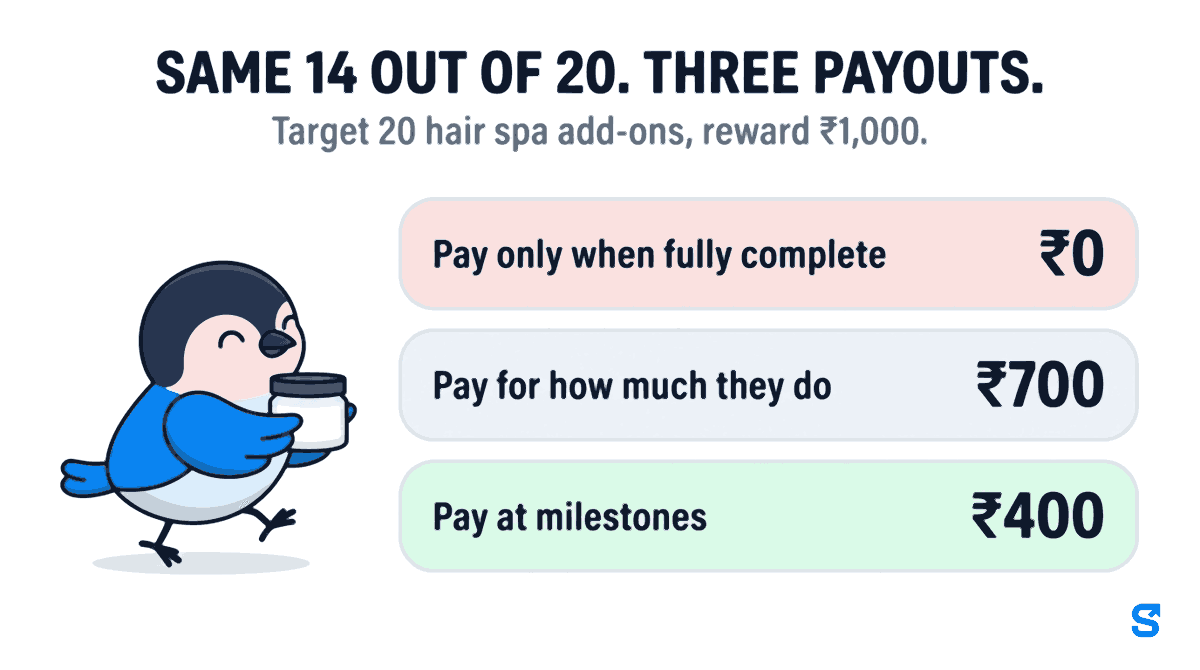
For a festive month with many new staff, milestones are usually the kindest and the easiest to explain. A new stylist who is at 6 on the twentieth still has a reason to keep going, and nobody walks away with nothing after a genuinely good month.
What your staff see, and how each entry gets logged
On the staff app, the goal appears as a Goals & Rewards tab inside Tasks. Each person sees their own progress bar, an estimate of what they have earned so far, and what they need for the next reward, for example "Reach 50% to unlock ₹400".
When a customer takes the add-on, the stylist taps Log Entry, takes the photo, and submits. If you chose "I'll approve each one", you get a notification with the photo, and if your business uses Telegram, the photos arrive there with Approve and Reject buttons. A rejected entry goes back with your reason, so the stylist knows why it did not count instead of guessing.
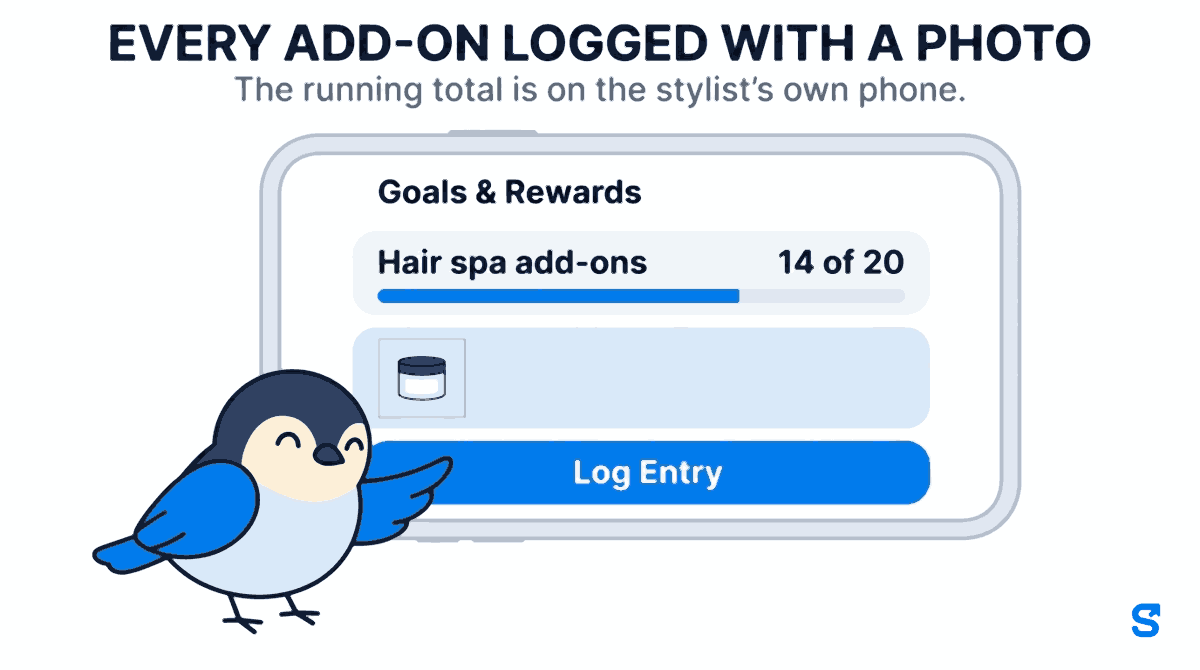
That running total is what ends the notebook argument. On the fifteenth, nobody has to ask you where they stand, and nobody can claim a number that is not on the screen.
How the reward reaches the payslip
When the period ends, Shiftelio locks each person's reward automatically, once a day, and the stylist sees it move to "locked, will be paid in your next payslip". You do not have to close anything by hand.
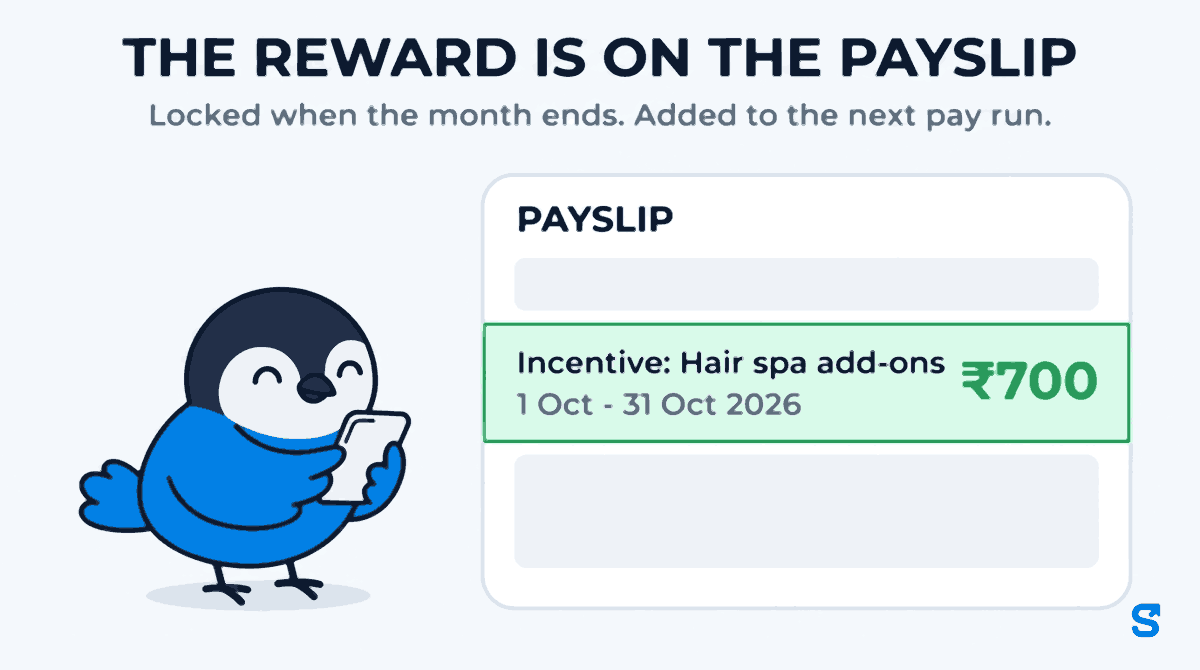
Then, when you run payroll in Shiftelio, the locked reward is added to that person's pay as its own line, with the goal and the dates written on it, for example:
Incentive: Hair spa add-ons (1 Oct - 31 Oct 2026) ... ₹700
Your payroll screen shows the total as including Goals & Rewards, so you can see how much of this month's wage bill came from incentives. Once paid, the reward is marked as paid and cannot be added to a second pay run by mistake.
Two things to know. The money only moves when you run payroll in Shiftelio; if you pay salaries from a spreadsheet, the app will tell you what is owed but cannot put it in the envelope for you. And once a period is settled, its reward is fixed. Changing the goal changes the months that follow, not the one already paid.
A salon and a shop, side by side
A salon in Pune. Six stylists, one festive goal: 20 hair spa add-ons in October, camera photo of the product on the station for each one, every entry approved by the manager, milestones at ₹400 and ₹1,000. The goal repeats in November with progress starting fresh.
A gift shop in Jaipur. Four counter staff plus three festive temporary hires, one goal: 30 Diwali gift boxes sold between 15 October and 10 November, camera photo of the packed box, entries counted automatically, paid for how much they do up to ₹1,500.
Both owners set the goal once. Neither of them makes a salary sheet with a separate incentive column at the end of the month.
Is a target reward the same as the statutory bonus?
No, and it is worth keeping the two apart. The statutory annual bonus, set by the Payment of Bonus Act, 1965 and now carried into the Code on Wages, 2019, follows its own rules on who qualifies and how much. A reward for hitting a target you set is a separate payment you promised for a specific piece of work. Recording it as its own dated line on the payslip, rather than folding it into a vague "festival bonus", keeps it clear what each rupee was for. If you intend a target reward to count towards any statutory amount, take advice from your accountant before you promise it.
Which app runs festive targets and pays them on the payslip?
Can I give a different target to different staff?
Yes. Each person on a goal has their own progress. If a senior stylist should have a higher target, create a second goal with the higher number and assign her to that one.
What happens if someone logs an entry that did not happen?
Choose "I'll approve each one" and ask for a camera-only photo. Every entry then waits for you with its picture, and you can reject it with a reason. Entries that already counted can be undone until the period is settled.
Can a manager approve entries instead of me?
Yes, if their role has permission to manage Goals & Rewards. The owner decides that in the Roles screen.
Does the incentive get paid in cash?
It is added to the person's pay in the next payroll run you make in Shiftelio, as its own line. How you then pay salaries, by bank transfer or otherwise, is up to you.
Can the goal restart every month after Diwali?
Yes. Set it as a monthly goal and turn on Repeat every month. When a person falls short, you choose whether they start fresh or carry their progress into the next month.
Keep reading
Free to use, no signup: Shift roster template.