GPS Time Clock Shows a Fake Location? What to Do When an Employee Fakes a Clock-In
In short
When a GPS time clock flags a fake location, open the shift, call the worker, ask why, and pay the hours they really worked. What you see and what to tap.
- A fake GPS clock-in is a worker's phone reporting a location set by an app instead of where the phone really is, so the time clock shows them on site when they may not be.
- In Shiftelio the shift shows up as a "Simulated location" card on your dashboard, with the app's name when the phone gives it, how long the location was faked and how often it has happened in 30 days.
- Do four things in order: open the shift, look at where the real location went, call the worker, and ask them to explain in the app.
A fake GPS clock-in is when a worker's phone reports a location set by an app instead of where the phone really is, so your GPS time clock shows them at the job site while they may be somewhere else. When it happens, open the shift, see when the real location came back, call the worker, ask them to explain, and pay the hours they really worked.
That order matters more than the app does. A fake location tells you the phone's location could not be trusted for part of the shift. It does not tell you whether the work got done. The rest of this guide shows what an owner of a cleaning company, a home care agency or a field service crew actually sees in Shiftelio when it happens, and what to tap next.
What a fake GPS clock-in looks like on a normal Tuesday
Take a commercial cleaning company with a crew of eight. Marcus is booked at the Oak Street office building from 8:00 AM. He clocks in at 8:00 inside the building's geofence, the circle you drew around the address. At 9:40 his phone starts showing a location set by an app. At 10:50 his real location comes back, still at Oak Street. He clocks out at 4:05 PM.
Nothing on his timesheet looks wrong. The clock-in was on site and so was the clock-out. Without a check, you would never know that for 70 minutes the phone was not telling you where it was.
Workers install these apps for all kinds of reasons. Some want to clock in from the parking lot or from home on a cold morning. Some had one installed for a game. A few use an external GPS receiver for work, which can look the same to a phone. You cannot tell which from the timesheet. You can tell from the shift.
What you see when a phone fakes its location
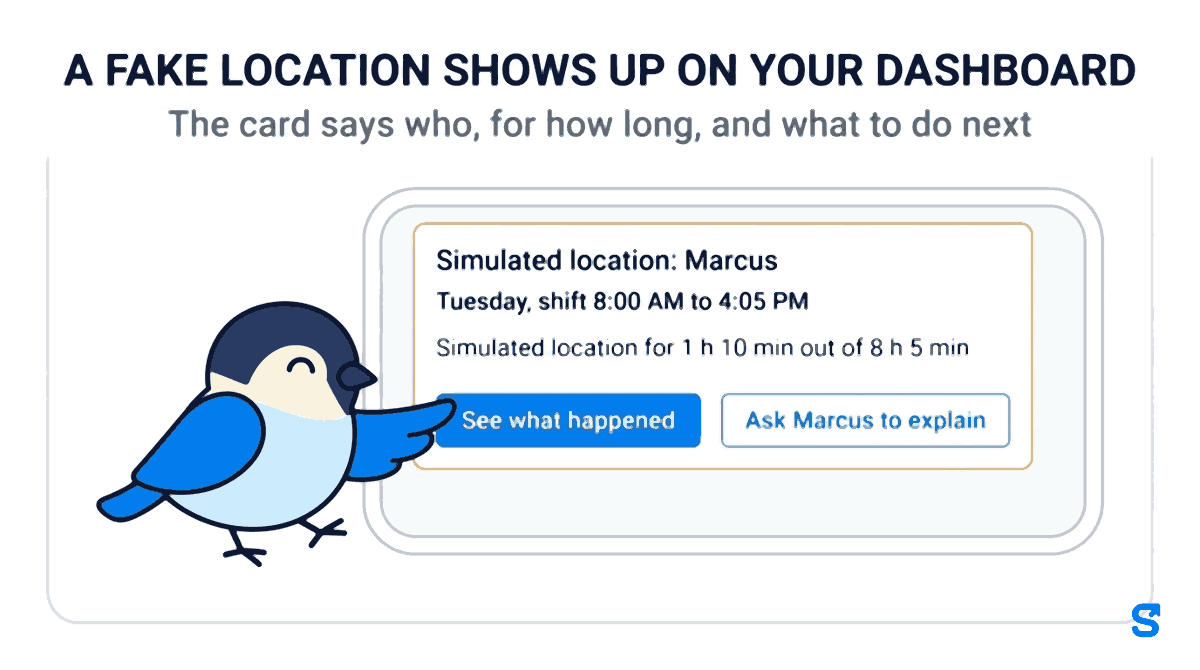
You do not have to go looking. In Shiftelio, a shift where the phone showed a simulated location appears on your dashboard as a Simulated location card, next to the other things waiting for you, with one line per case:
- Who and when: the person, the day and the shift, for example Tuesday, shift 8:00 AM to 4:05 PM.
- How long: "Simulated location for 1 h 10 min out of 8 h 5 min", or "Simulated location now" while it is still happening.
- Which app: the app's name when the phone gives it, or "App not named by the phone".
- How often: "First time in 30 days", or how many times it has happened in the past 30 days.
- Two buttons: See what happened, and Ask Marcus to explain.
If it is still happening during the shift, owners also get a phone notification, "Simulated location: Marcus", that opens the shift with a call button. Managers you have given the live map to get the same alert during the day, never in the middle of the night.
If you use the live map during shifts, the worker's pin carries a badge such as "simulated since 9:40 AM" with the app's name, so a supervisor watching the map sees it at the same moment you do. Location tracking during the shift and the live map are an add-on, priced separately.
What to do next, in four steps
The case page lays the shift out as a timeline: the last real location before it started, when the simulated location started, when the phone named the app, when the real location came back, and when the shift ended. Each real location says whether it was inside your site, such as "inside Oak Street", or how far away it was, and See on map opens it.
This is the part that decides the conversation. If the real location before and after is inside the site, as with Marcus, the person was probably at work and the phone was misbehaving or being played with. If the real location after it ends is miles away, or the shift ended while it was still faked, you have a different conversation.
The case page has a Call button with the number you saved for the person. A two-minute phone call settles most cases faster than any message, and it is a lot less awkward than raising it at the end of the week.
Ask Marcus to explain sends a question to the worker's phone. You can ask once a day per person, so a worker is never flooded. The reply appears on the same case page, next to the timeline, so whoever looks at it later sees both sides.
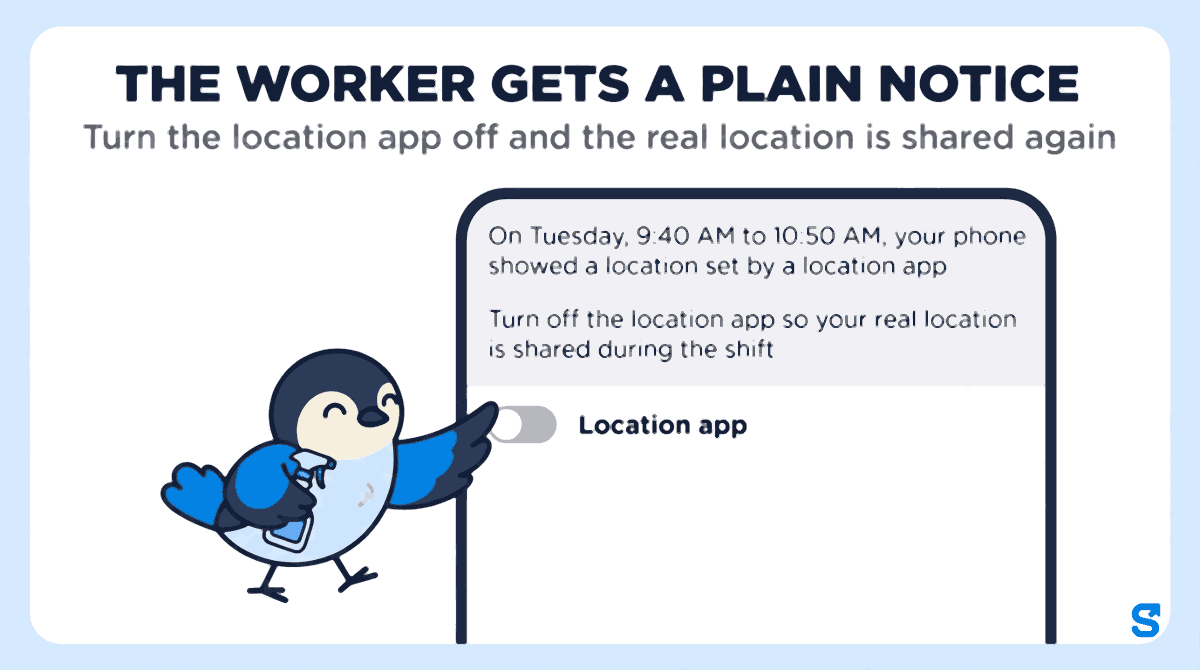
The worker sees a plain notice, not an accusation: the date and times, the app's name if the phone gave it, and one line asking them to turn the app off so their real location is shared during the shift.
When there is an honest reason
Not every flag is somebody trying to get paid for time off. The case page ends with three decisions: Nothing wrong, Uses an external GPS receiver and A real problem. Pick the one that fits and the case closes, with who reviewed it and when kept on the record. The page says it plainly: this records your decision, it does not change pay.
If a worker uses an external GPS receiver for their job, for example a surveying or field crew, choose that decision so the person is marked and it is not raised again for them. You can also add a note that only managers see, such as "spoke on the phone, uninstalled the app", so the next manager does not start from scratch.
If the same person shows up again after a case was closed, the card says so ("Again after review"), along with who reviewed it last time and what they decided. That is the pattern worth acting on, not a single flag.
Pay the hours they worked: what federal law says
A fake location is a timekeeping question, and it is tempting to answer it by deleting the hours. The federal rule points the other way.
The US Department of Labor's Fact Sheet #22 on hours worked says that under the Fair Labor Standards Act, work "suffered or permitted" is work time that the employer pays for, and that "the reason is immaterial." Its Fact Sheet #21 on recordkeeping says employers keep a record of hours worked each day and each workweek for non-exempt workers, may use any timekeeping method, and that any plan "is acceptable as long as it is complete and accurate." (Both checked on 9 October 2026.)
So the question the rule asks is how many hours the person actually worked, not where their phone said it was. In Marcus's case the real location was inside the building before and after, so the 70 minutes look like work time with a phone problem. If the real location showed he was across town, that is a question about the hours themselves, and the record should end up showing what he actually worked.
These are federal rules. Many states add their own on top of them, and your state labor department's website is the place to read them.
This is general information, not legal advice: check with the agency or an employment lawyer for your case.
Put it in your time clock policy before the first flag
The first flag should not be the first time anybody hears that locations are checked. Add four lines to the time clock policy you already have:
- The rule: you clock in and out on your own phone, at the job, with your real location on for the whole shift.
- Location apps: apps that change your phone's location are not allowed during a shift. If you use a GPS receiver for work, tell us and we will mark it.
- What happens if it is flagged: we call you and ask you to explain. An honest reason is closed as nothing wrong.
- Pay: you are paid for the hours you work. A faked location is handled under this policy, not by docking hours.
Read it to the crew once, have them acknowledge it, and leave the rest to the dashboard.
Which time clock app shows you a faked location
The reviewed shift then becomes part of the attendance record you check before payday. If you also plan shifts in the app, see shift scheduling for how the scheduled shift and the clock-in line up.
Questions owners ask
What is a fake GPS clock-in?
It is a clock-in or a stretch of a shift where the worker's phone reported a location set by an app, not its real position. The time clock shows the job site, but the phone may be elsewhere.
Can a GPS time clock catch location spoofing?
Shiftelio does. A shift where the phone showed a simulated location appears on your dashboard with the app's name when the phone gives it, how long it lasted and the timeline of the shift.
Should I dock pay for a fake GPS clock-in?
Settle the hours first. Under the federal FLSA, hours actually worked are paid, so check whether the person was working and handle the fake location under your written policy.
Does every flag mean the worker was cheating?
No. Some workers have a location app installed for other reasons, and an external GPS receiver can look the same. Call them, read their reply, and close it as nothing wrong when it makes sense.
Will my staff know their location is checked?
They should, from your policy, before the first flag. When a case is raised, the worker gets a plain notice with the times and the app's name, and you can ask them to explain once a day.