No Signal at the Patient's Door: Offline Attendance for Home Care Attendants
In short
The patient lives where the phone shows no bars. How a home care attendant starts her shift and visit offline, sees it at once, and loses nothing.
Sunita's first patient every morning is Mrs Iyer, on the ground floor of an old building at the end of a narrow lane. Outside the gate her phone shows two bars. Inside the flat, behind the thick walls, it shows none. Her shift starts at 8, and at 8:02 she is standing beside Mrs Iyer's bed with a phone that cannot reach anybody.
This is ordinary in home care. The patient does not choose a flat for its mobile signal, and the attendant does not get to walk back out to the lane to clock in. So the question every agency ends up asking is simple: when the attendant starts her day at a door with no signal, what does the record say, and what does she see on her own screen?
This piece is about that moment, and about a change in the home care side of Shiftelio: a shift started together with a visit, with no signal, now shows on the attendant's phone straight away, and finishing her last visit offline asks the same End your shift too? question it asks when she is online.
Why the patient's door is where the signal dies
It is not bad luck. Modern mobile networks carry more data on higher frequencies, and higher frequencies do not travel well through walls. The Telecom Regulatory Authority of India said so plainly when it opened its review of how buildings are rated for connectivity: 4G and 5G signals are more susceptible to attenuation from walls, building materials and construction design, and in-building connectivity has become a critical part of service quality (Press Information Bureau, 27 February 2026). TRAI now publishes a rating manual for digital connectivity in properties precisely because the inside of a building is where coverage is worst.
Home care lives inside buildings. Ground floors of old buildings, rooms at the back of a house, basements converted into bedrooms for a parent who can no longer climb stairs. A field salesperson can step outside to find a bar. An attendant with a bedridden patient cannot.
What goes wrong when the app needs a signal to clock in
Agencies that use an attendance app built for the office usually meet one of three failures on day one:
| What happens | What the attendant does | What the office sees |
|---|---|---|
| The app refuses to check in with no signal | Walks back to the lane, or gives up | A late check-in, or no check-in at all |
| The app accepts it but shows nothing | Taps again, and again | Duplicate punches, or a day with no start |
| She calls the coordinator instead | Loses ten minutes on the phone | A verbal note nobody writes down |
The second one is the quiet killer. An attendant who taps Start and then sees an empty screen does the only reasonable thing: she assumes it failed. Some tap again. Some ring the office. All of them stop trusting the app, and an app the attendant does not trust is a register she fills in at the end of the week from memory.
How Shiftelio starts a shift and a visit with no signal
In Shiftelio's home care add-on, the attendant's My Patients screen shows today's round: each patient she visits, in order, with a Start visit button on each card. The round is downloaded to the phone while she still has signal, so when she walks into a flat with none, the screen says so in words:
No signal. This is today's round as downloaded earlier: visits you start are saved on the phone and upload themselves later.
When Sunita taps Start visit at Mrs Iyer's bedside and her rostered shift has not been started yet, the app asks first. Her answer is Start shift and visit, and one photo starts both. With no signal, the phone saves the shift and the visit together, with her photo and her location, and tells her:
Shift and visit started: they will upload when you are back online.
What changed on 25 September 2026 is what she sees next. Until then, the phone remembered the visit but not the shift, so the shift bar at the top stayed empty until the upload, and an attendant looking at it could fairly think her shift had never started. Now the bar appears at once:
On shift since 8:02 AM Saved on this phone. It uploads when you are back online.
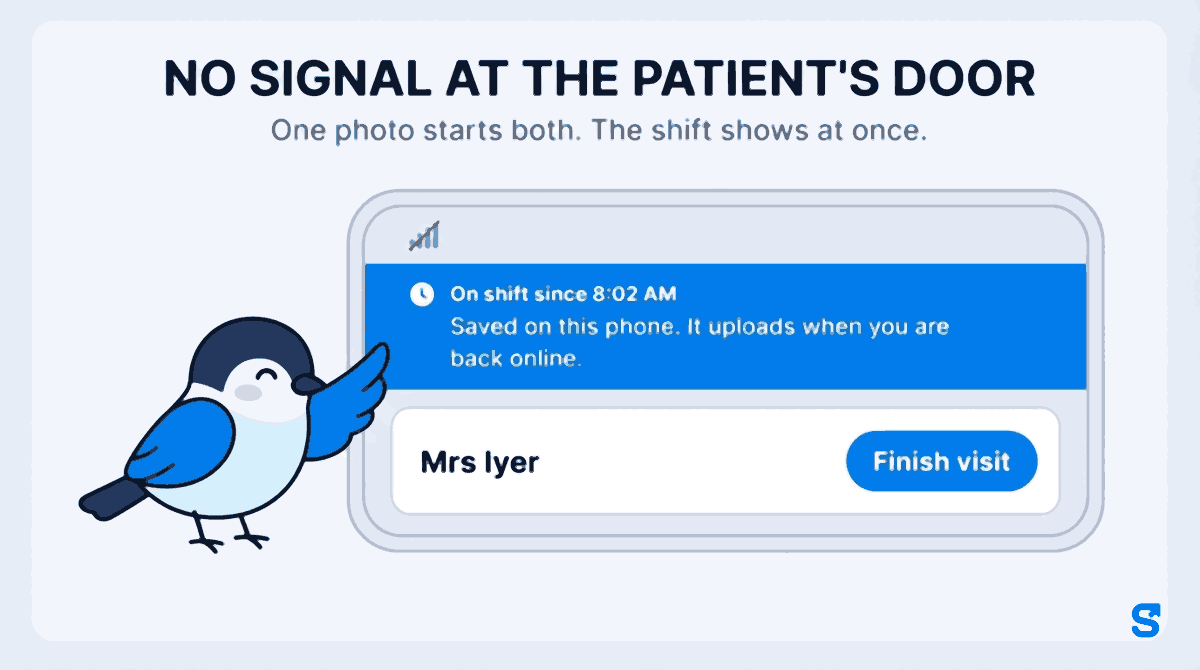
Two details matter here. First, that bar is a display only: it tells Sunita the truth about her own phone, and nothing is sent or closed from it. There is deliberately no End shift button on it, because a shift that has not reached the office yet cannot be ended there; once the upload lands, the ordinary shift bar takes over. Second, the time on it is the real time she started, even if the phone's clock is changed.
When the signal comes back
Sunita does not have to do anything to upload. When her phone finds a signal again, at the next street or on the bus, the saved shift and visit go up on their own, as one item, and the office sees them in the order they happened.
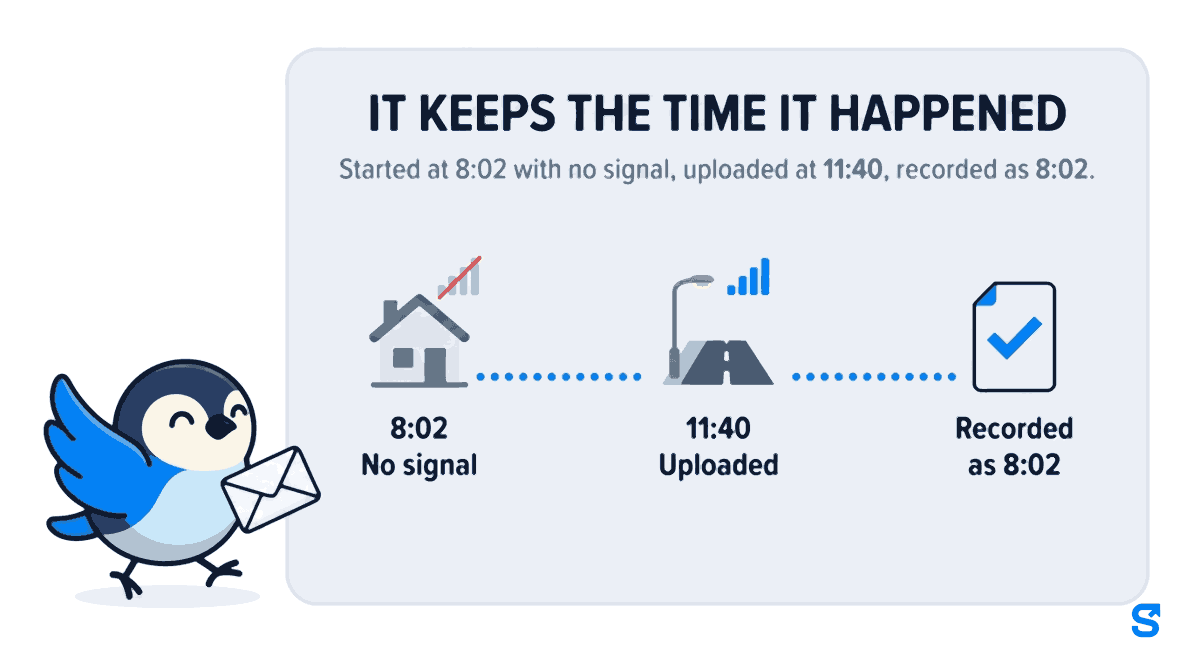
Three things are true of what lands:
- It keeps the time it happened. A visit started at 8:02 and uploaded at 11:40 is recorded as 8:02, not 11:40.
- It is priced as of when it happened. A rate that changed in between does not reach back into it.
- It cannot be backdated. Changing the phone's clock does not change the visit time.
The last visit of the day, offline too
The same patient problem often sits at the other end of the day. Sunita's last visit is Mr Menon, whose flat is also a dead zone, and her shift ends at 4. When she taps Finish visit at 3:45 with no signal, the visit is saved on the phone. And because it is within half an hour of her shift's planned end, the app now asks her the same question it asks online:
End your shift too? Your shift is nearly over. If this was your last visit, end it now. End shift · Not yet
End shift opens the ordinary end-of-shift screen, with its own photo, which also works with no signal. Not yet leaves the shift to close in the normal way. Before this change, the question simply did not appear offline, so an attendant finishing her last visit in a dead zone walked out with her shift still running and nobody asking.
One habit makes all of this work.The round has to reach the phone before the signal goes. If Sunita opens the app for the first time that day inside Mrs Iyer's flat, the screen tells her: You are offline and today's round has not been downloaded yet. Ask attendants to open My Patients once each morning, at home or on the way, while they still have signal.
For the whole home care picture, with patients, cover and charge against pay in one place, see Shiftelio for home care agencies. For how offline attendance works across every kind of team, see offline attendance.
Offline attendance app for home care agencies
A short checklist for agencies with dead-zone patients
- List the patients whose homes have no signal, and tell their attendants the app works there.
- Ask every attendant to open My Patients once each morning while they have signal.
- Tell them to tap Start once and trust the On shift since bar, not to tap again.
- Roster shift times properly, so the End your shift too? question appears at the right time.
- Check the next day that dead-zone visits uploaded, and ask about any phone that did not.
Questions home care agency owners ask
Does the attendant need internet to start a visit?
No. If today's round was downloaded earlier, she can start a shift and a visit with no signal. Both are saved on the phone with her photo and location and upload by themselves when the signal returns.
How does she know her shift really started?
The shift bar shows On shift since and the time straight away, with a line saying it is saved on the phone and will upload when she is back online. She does not need to tap again or call the office.
Can an attendant fake the time by changing her phone's clock?
No. The visit keeps the real time it was made, and changing the phone's clock does not change it.
What happens if she finishes her last visit offline?
The visit is saved on the phone, and if it is near her shift's planned end the app asks End your shift too?, exactly as it does online. End shift opens the ordinary end-of-shift screen, which also works offline.
Is this part of the normal plans?
Offline attendance is. The home care screens, with patients and visits, are an add-on we switch on for your account on request.
The short version
- Home care happens inside buildings, and inside buildings is where mobile signal is weakest.
- In Shiftelio, an attendant with no signal taps Start shift and visit, one photo starts both, and On shift since shows at once.
- When the signal returns, both upload on their own, keep the time they happened and are priced as of that moment.
- Finishing the last visit offline near the shift's end asks End your shift too?, the same question as online.
Sources, and how these were checked
- In-building signal loss on 4G and 5G: the Press Information Bureau release on TRAI's consultation paper reviewing the Rating of Properties for Digital Connectivity Regulations, 2024, dated 27 February 2026, and TRAI's rating manual, both read in September 2026.
- The product behaviour was read from the Shiftelio code as shipped on 25 September 2026: the offline Start shift and visit, the On shift since bar and its note, the offline End your shift too? question and when it appears, and that offline times keep the real time and cannot be backdated.
Keep reading
Free to use, no signup: HR letter formats.