Shift Lead Responsibilities: What to Hand Over in Your Scheduling App, and What to Keep
In short
A shift lead runs the floor when you are away. Let them fix the time clock, approve time off and hand out tasks. Keep payroll, pay rates and roles with you.
- A shift lead's responsibilities are the floor during one shift: opening and closing, covering call-outs, fixing missed punches, handing out side work and keeping the line moving.
- Give a shift lead the app screens that match that job: fix attendance, approve time off, hand out tasks. Nothing that touches pay.
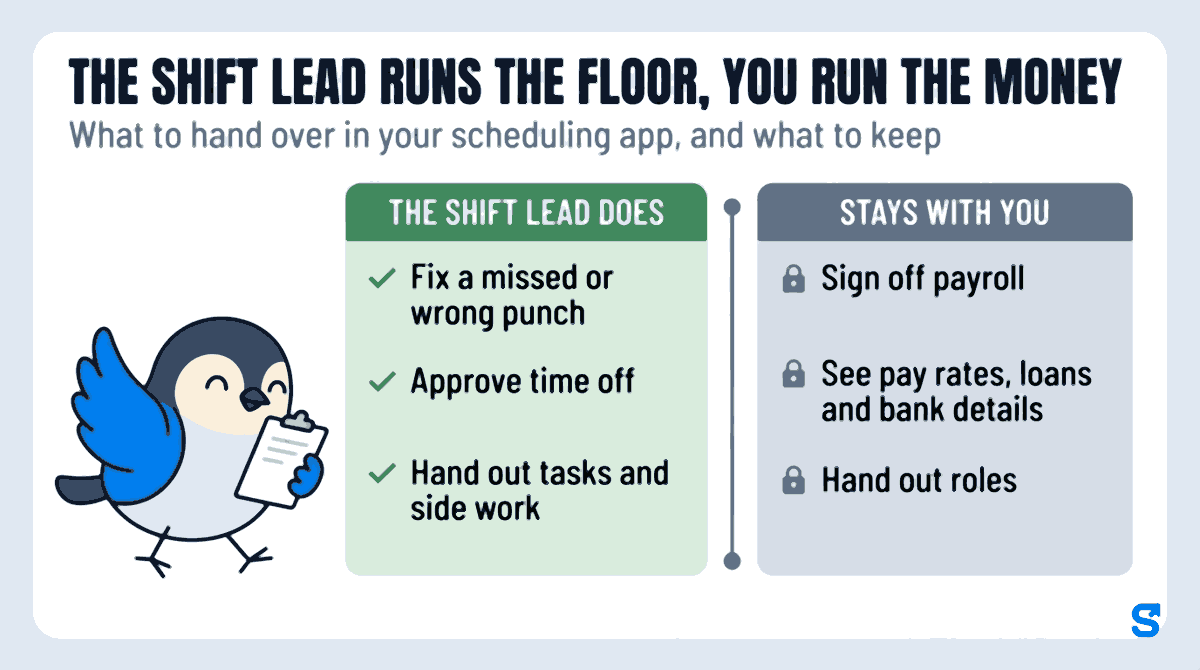
- Keep three things with you: signing off payroll, seeing pay and bank details, and handing out roles.
A shift lead is responsible for running one shift when the owner or general manager is not on the floor: opening or closing, covering call-outs, fixing missed punches and handing out the work. In your scheduling app, give them exactly those powers and nothing past them, so payroll, pay rates and who-gets-which-role stay with you.
Most owners get this wrong in one of two directions. Either the shift lead texts the owner for every missed punch and every swap, or the owner hands over their own login and the shift lead can suddenly see everybody's pay. This guide is the middle path, written for restaurants, coffee shops, retail stores and cleaning crews with hourly staff.
What a shift lead actually does on a shift
Search "what does a shift lead do" and you get job descriptions from big chains. On a normal Friday at a 20-person restaurant it looks like this:
- Opening: unlocks, counts the drawer, checks who is on the schedule and who has clocked in.
- First call-out: a server texts that her kid is sick. The lead finds cover and fixes the schedule for the day.
- Missed punch: a line cook forgot to clock in after his break. The lead corrects it while everybody still remembers when he came back.
- Side work: the lead hands out the closing tasks: restock the walk-in, deep-clean the fryer, roll silverware.
- Time off: a host asks for next Saturday off. The lead approves it or says no, today, not in three days.
- Closing: checks everybody has clocked out, nobody is still on the clock in the parking lot.
Every one of those is attendance, the schedule or tasks. Not one of them needs to see what anybody earns, change a pay rate, or approve a paycheck.
That is the whole design principle: the shift lead runs the floor, you run the money.
Why sharing your login is the expensive shortcut
Handing your owner login to a trusted shift lead feels like the fast fix. It costs you three things:
- They see everything. Every hourly rate, every advance you gave somebody, every bank detail. In a 20-person restaurant, pay is the one thing that turns a good team into a resentful one when it leaks.
- You cannot tell who did what. When a timesheet is changed on your login, the record says you changed it. If a shift ever goes wrong, you cannot see whether it was you or your lead.
- You cannot take it back cleanly. When the lead leaves, you change your password, log out every device, and hope you remembered everything.
The other extreme, keeping every power yourself, means your phone buzzes on your day off for a five-minute missed punch. Both are fixed the same way: give the shift lead their own login with a role that fits the job.
What the shift lead does, and what stays with you
| Job | The shift lead does | Stays with you |
|---|---|---|
| Fix a missed or wrong punch | Yes | You can still review it |
| Approve time off | Yes | |
| Hand out tasks and side work | Yes | |
| See who is clocked in right now | Yes | |
| Change the schedule | Only if you choose | Yes |
| See pay rates, loans and bank details | No | Yes |
| Sign off payroll | No | Yes |
| Add or delete staff | No | Yes |
| Hand out roles | No | Yes |
The one line worth thinking about is the schedule. In a small coffee shop the lead often covers call-outs by changing the day's schedule, so give them that. In a store where the general manager builds the week's schedule, leave it off and let the lead only see it.
There is one more rule many owners already follow without naming it: whoever fixes the hours should not be the person who signs the pay. If your shift lead can edit timesheets, somebody else approves payroll. That is not distrust. It is the same reason a cashier does not count their own drawer at close.
Setting it up with a role template, not a wall of checkboxes
Permission screens in most apps are a long grid of checkboxes. Owners either tick everything or give up. Shiftelio starts from a ready-made template for the kind of manager you are making, and the Roles page shows in plain words what that person can and cannot do before you save anything.
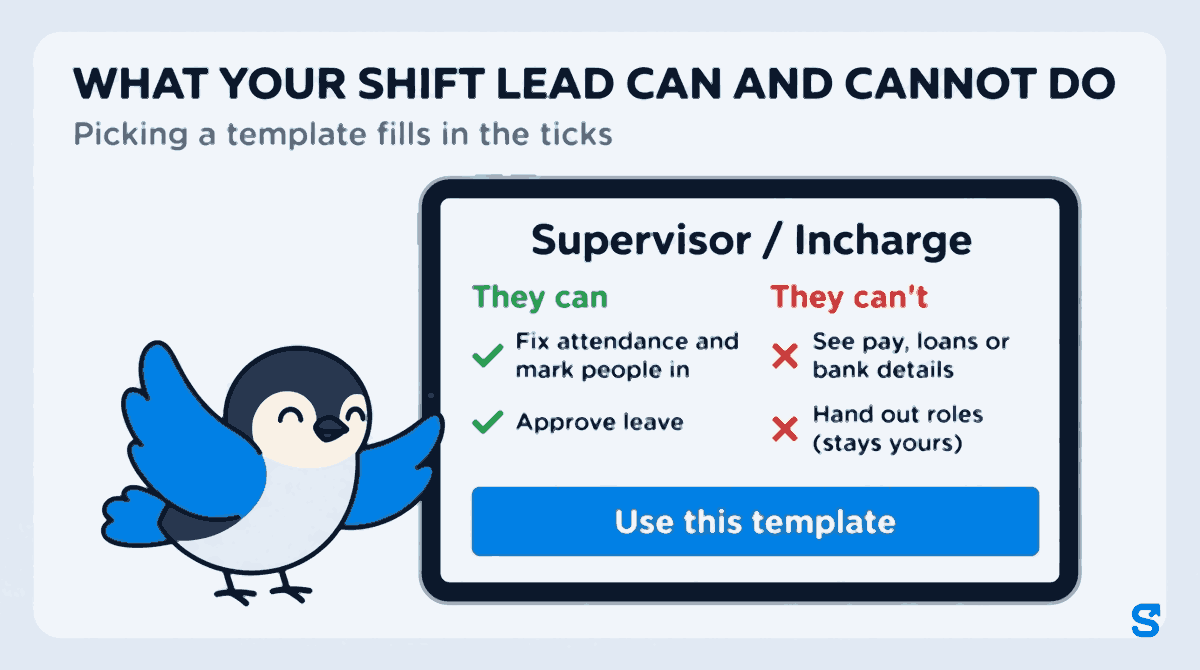
Open Roles and choose a template. For a shift lead, two fit most businesses. Supervisor / Incharge fixes attendance, marks people in, approves leave (time off) and gives and assigns tasks, but cannot change shifts. Manager / HOD does all of that and can also add and edit shifts. Neither sees pay, loans or bank details.
Every template shows two short lists before you use it. For Supervisor / Incharge, the "They can't" list reads: See pay, loans or bank details. Change shifts. Hand out roles (stays yours). If that matches what you want your shift lead to do, use it. If not, change any tick afterwards.
Pick the departments and work locations the role covers, for example the Kitchen at your Main Street store. A lead given that role sees the staff there and nobody else. Leave it open only for a general manager who runs everything.
Give the role to one person or to several at once, so all four of your shift leads get the same powers on the same day. Only you hand out roles, unless you decide to let a trusted general manager do it too.
If you have a person who only builds the weekly schedule and approves nothing, the Shift Planner template does exactly that. For the person who runs payroll, Accounts / Payroll signs off pay runs but cannot change attendance, which keeps the "fix the hours, sign the pay" split for you.
When a role changes later, the change is recorded with who made it and when, so "who gave Jordan access to that?" has an answer.
Does a shift lead title change overtime under federal law?
Owners sometimes assume that a "lead" or "supervisor" title, or giving someone manager screens in an app, changes how they are paid. Under federal law, the title does not decide it.
The US Department of Labor's Fact Sheet #17B on the executive exemption says "job titles do not determine exemption status." It lists all of the conditions the federal rule looks at for the executive exemption from overtime: pay on a salary basis at or above the standard salary level the Department publishes, a primary duty of managing the enterprise or a recognized department, customarily and regularly directing the work of two or more full-time employees or their equivalent, and authority to hire or fire, or hiring and firing recommendations that are given particular weight. (Checked on 7 October 2026.)
Many shift leads are hourly employees who spend most of the shift working the line or the register alongside the team. Your state may have its own rules on top of the federal ones; your state labor department's website is the place to read them.
This is general information, not legal advice: check with the agency or an employment lawyer for your case.
Which app lets a shift lead run the floor without seeing pay
If your shift leads also build the schedule, see shift scheduling for how a planned shift and its pay rate line up with the clock-in.
Questions owners ask
What are the main responsibilities of a shift lead?
A shift lead runs one shift: opening or closing, covering call-outs, fixing missed punches, handing out tasks and keeping service moving while the owner or manager is away.
Is a shift lead a manager?
Usually not in the full sense. A shift lead runs the floor for one shift, while a manager owns the schedule, hiring and pay. Many shift leads are hourly employees.
Should a shift lead be able to edit timesheets?
Yes, for fixing missed and wrong punches on their shift, while memories are fresh. Then have somebody else, usually the owner, sign off payroll so the same person never both fixes the hours and approves the pay.
Should a shift lead see employee pay rates?
No. Nothing a shift lead does on the floor needs pay rates, and pay is the most sensitive thing in your app. Keep it with the owner and whoever runs payroll.
How do I give a shift lead access without sharing my login?
Give them their own login and a role. In Shiftelio, pick the Supervisor / Incharge or Manager / HOD template, narrow it to their store or department, and give it to them.