Shift Supervisor Duties: What App Access to Give, and How to See Who Changed It
In short
Give a new shift supervisor the floor: fix missed punches, mark people in, approve time off, hand out tasks. Keep pay and roles, and check the change log.
- A shift supervisor runs one shift: opening or closing, covering a sick call, fixing missed punches, handing out side work and keeping the line moving.
- Give them app access that matches that job and stops there: fix attendance, mark people in, approve time off, give tasks. Nothing that shows pay.
- Keep three things yourself: signing off payroll, seeing pay and bank details, and handing out roles.
When you promote a server or cashier to shift supervisor, give them the app powers the floor needs, fixing a missed punch, marking someone in, approving time off and handing out tasks, and nothing that touches pay. Then keep an eye on the role itself, because the risk is rarely the first setup. It is the extra tick somebody adds three months later.
This guide is for owners of Canadian restaurants, coffee shops, retail stores and cleaning companies with hourly staff, written around one real-feeling example: a 22-person pizza restaurant in Mississauga, Ontario, where the owner, Marco, has just promoted a server named Priya to shift supervisor for the closing shifts.
What a shift supervisor actually does
Search "shift supervisor duties" in Canada and most of what comes back is job postings from big coffee and fast-food chains. In a 22-person restaurant, a Friday close looks more like this:
- 4 p.m.: Priya checks who is on the schedule and who has clocked in. One line cook has not.
- 4:20 p.m.: the cook texts that his bus broke down. He arrives at 4:50, so Priya notes the late arrival and moves the prep list.
- 6 p.m.: a server calls in sick for tomorrow's brunch. Priya approves her time off and messages a part-timer to cover.
- 9:30 p.m.: a dishwasher forgot to punch in at the start of his shift. Priya marks him in at the time she saw him start.
- 11 p.m.: closing tasks go out: walk-in cooler check, floors, cash drawer count for Marco in the morning.
None of that needs Priya to see what anybody earns. All of it used to need Marco's phone, or Marco's password.
Shift supervisor vs manager: where the line sits
In a small restaurant, the difference is not the title on the schedule. It is what each person is trusted to decide.
| The shift supervisor | The owner or general manager | |
|---|---|---|
| Fixing a missed or wrong punch | Yes, on their shift | Yes |
| Marking a worker in who has no phone on them | Yes | Yes |
| Approving a day off or a sick call | Yes | Yes |
| Handing out closing and side tasks | Yes | Yes |
| Building next week's schedule | Usually not | Yes |
| Seeing pay rates and bank details | No | Yes |
| Signing off the pay run | No | Yes |
| Giving somebody a role | No | The owner only |
The last three rows are the ones that matter. Whoever fixes the hours should not be the person who signs off the pay for those hours, and nobody but the owner should decide who gets which powers.
Setting it up in Shiftelio with a role template
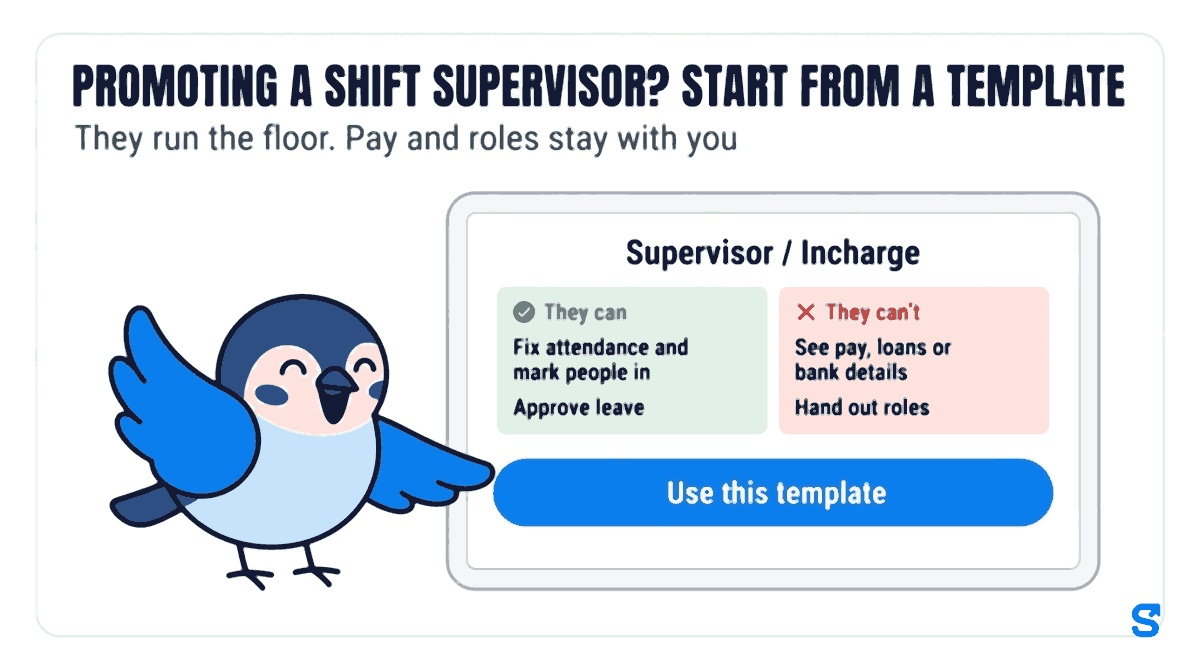
Shiftelio's Roles page does not start you on a blank grid of checkboxes. It asks you to "Pick the kind of manager" and offers ready-made templates, grouped under Most businesses, Money and More. You can also search by job title.
Its card says what it is for: on the floor or on site, fixes the clock, marks people in, hands out work. That is a shift supervisor: they run the floor, while pay and roles stay with you. Tap Use this template.
Before anything is saved you see two plain lists. They can: fix attendance and mark people in, approve leave, give and assign tasks, issue company items. They can't: see pay, loans or bank details, change shifts, hand out roles (that stays yours).
Pick the departments and sites the role covers. If Marco opens a second location in Brampton, Priya's role stays on Mississauga and she never sees the Brampton staff. Leave it open and the role covers everybody in the business.
Handing a role to a person stays the owner's decision. Marco names the role Closing supervisor and gives it to Priya, and to any other closing supervisor, from the same role.
The template only fills in the ticks. You can still change any tick afterwards, and changing a template later never rewrites a role you already saved. If someone only builds the schedule and approves nothing, the Shift Planner template under More fits them better, or see how shift scheduling lines up a planned shift with the clock-in.
The part most owners miss: who changed the role later
Roles drift. Three months after Priya's promotion, Marco's general manager, Dev, decides the closing supervisors should also be able to change tomorrow's schedule when someone calls in sick, and ticks Add & edit shifts on their role. It sounds harmless. But in Shiftelio that power includes each shift's pay rate, which is exactly what Marco meant to keep away from the floor. Without a record, Marco would only find out when something looked odd on a pay run.
Shiftelio keeps a record of this for you:
- Each role card says who made it, and when a manager last changed it, which sensitive powers that change included.
- Before a change to a role that people already hold is saved, the screen says how many people it changes right now, by name, so nobody widens five supervisors' access by accident.
- The Roles page links to a Change log. Each entry shows what changed in plain words, such as "Added: Add & edit shifts", along with departments and sites added or removed, a rename, and who did it and when. You can open one role's history or go back to all roles.
- A manager you trust to edit roles can only give out powers they hold themselves. Anything beyond that shows as needing the owner. And no template, not even Admin / General Manager, can hand out roles: that stays yours.
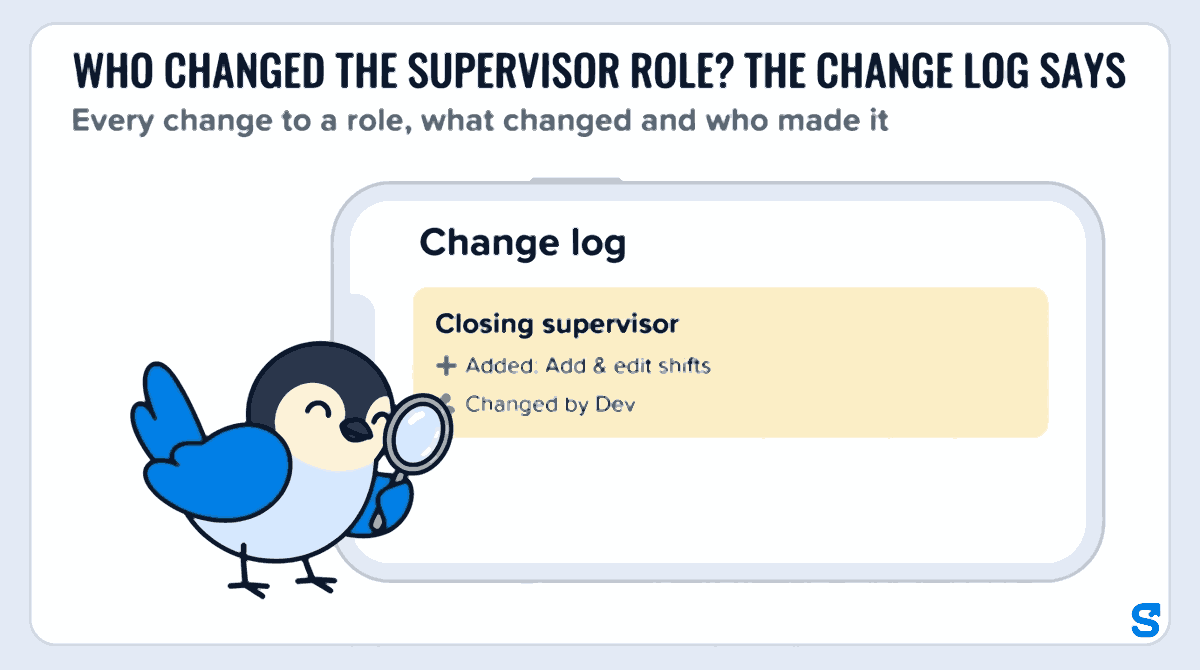
On the Closing supervisor role, the entry reads "Added: Add & edit shifts", changed by Dev. Marco sees it, talks to Dev, and they settle on a middle path: the supervisors call him or Dev for schedule changes, and Add & edit shifts comes off the role again. A five-minute look at the Change log once a month is enough for most small restaurants.
What Ontario's rules say about supervisors and hours
Two parts of Ontario's Employment Standards Act, 2000 (ESA) are worth knowing when you promote someone. Other provinces have their own rules, so if you are in British Columbia, Alberta or Quebec, read your own province's guide.
Overtime. Ontario's ESA guide on overtime pay says that for most employees, overtime begins after 44 hours in a work week, and that managers and supervisors do not qualify for overtime if the work they do is managerial or supervisory. The same page says that doing non-supervisory tasks only on an irregular or exceptional basis does not change that, and it has a separate rule for people who do more than one kind of work. The guide looks at the work done, not the title on a name badge. Checked on 10 October 2026.
Records of hours. Ontario's ESA guide on record keeping says the employer must record the dates and times each employee worked and the hours worked each day and each week, and keep them for three years. Checked on 10 October 2026. When a supervisor fixes a punch in Shiftelio, the edit is logged with who made it and when, so the hours you keep have a history behind them.
This is general information, not legal advice: check with the agency or an employment lawyer for your case.
Which scheduling app lets a shift supervisor run the floor without seeing pay?
Questions owners ask
What are the main duties of a shift supervisor?
A shift supervisor runs one shift: opening or closing, covering sick calls, fixing missed punches, approving time off and handing out side work while the owner or manager is away.
What is the difference between a shift supervisor and a manager?
A shift supervisor runs the floor during a shift. A manager or owner owns the schedule, hiring, pay and who gets which powers in the app.
Should a shift supervisor be able to edit timesheets?
Yes, for missed or wrong punches on their own shift, while the details are fresh. Somebody else, usually the owner, should then sign off payroll, so one person never both fixes the hours and approves the pay.
Should a shift supervisor see staff pay rates?
No. Nothing on the floor needs pay rates. Keep pay and bank details with the owner and whoever runs payroll.
How do I know if someone changed a supervisor's access?
Open the Change log from the Roles page. It lists each change to a role in plain words, with who made it and when.
Is a shift supervisor in Ontario owed overtime?
It depends on the work they actually do, not the title. Ontario's ESA guide sets out when managers and supervisors are exempt; check it, or ask the Ministry of Labour, for your case.