Holiday Requests at Work: Approve Several at Once and Book Holiday for the Whole Team
In short
Answer every staff holiday request from one list that shows the days counted, what is left and who else is off, then approve them together.
- Put every holiday request in one place, and answer the waiting ones together once a week rather than one by one.
- Before approving, check three things per request: the days it really uses, the days left after it, and who else is off.
- gov.uk says an employer who refuses or cancels leave must give as much notice as the leave asked for, plus 1 day (checked on 14 October 2026).
The quickest way to handle staff holiday requests is to answer them all from one list that shows, for each request, how many days it really uses, how many the person has left and who else is already off. Then approve the clear ones together, and refuse or move the clashing one while there is still time to give notice.
Most small UK cafés, shops and cleaning firms do the opposite. A request arrives by text, another is mentioned at the till, a third is scribbled on the wall planner, and the owner answers each one on its own, often days later, without checking the rota or the person's balance.
Why holiday requests go wrong in a small team
The trouble is rarely the request itself. It is that three small facts live in three different places:
- How many days the request really uses. A request for "Monday to Friday" is five days for someone who works weekdays and three for someone who works Monday, Wednesday and Friday. A bank holiday in the middle should not count at all.
- How many days the person has left. If the balance is in a spreadsheet nobody updated since spring, you approve days that are not there.
- Who else is off. Half-term week, the August bank holiday and the run-up to Christmas are when everybody asks, and the rota has gaps before anyone notices.
A staff holiday planner on the wall shows the third fact and none of the first two. A holiday request form shows the request and none of the other three. That is why the same owner can approve two baristas for the same Saturday without meaning to.
What gov.uk says about asking for and refusing holiday
This is background to running requests, not advice on your contracts. Everything below is from gov.uk's holiday entitlement page on booking time off, checked on 14 October 2026. The statute behind it is the Working Time Regulations 1998.
- Notice from the worker. gov.uk says the general notice period for taking leave is at least twice as long as the amount of leave the worker wants to take, plus 1 day, so 3 days' notice for 1 day's leave.
- Refusing or cancelling. gov.uk says an employer can refuse a leave request or cancel leave, but must give as much notice as the amount of leave requested, plus 1 day. Its example: 11 days' notice if the worker asked for 10 days.
- The contract can change this. If the contract says something different about notice, gov.uk says what is in the contract applies.
- Refusing a time is not refusing the leave. gov.uk says employers can refuse leave at a certain time, but cannot refuse to let workers take the leave at all.
- Telling staff when to take it. gov.uk says employers can tell staff to take leave, for example bank holidays or Christmas, or restrict it at busy periods. The notice for this is at least twice as long as the leave, given before the notice period begins.
The practical point for a small business: a request left unanswered for a week can quietly run out the time you have to say no. Answering requests on a fixed day each week keeps you inside it.
This is general information, not legal advice: check with gov.uk, Acas or an employment lawyer for your case.
A simple holiday request policy you can actually keep to
You do not need a long document. Five lines, pinned where staff see them, cover most of it:
- Ask for holiday in the app, not by text or at the till, so every request is in one list.
- Ask at least twice as many days ahead as you want off, plus 1 day, unless your contract says otherwise.
- Requests are answered every Monday. Anything for the next two weeks is answered the same day.
- At busy times (name them: half-term, the August bank holiday, December) only a set number of people can be off at once.
- If a request is refused, you will be told why, and a different date will be offered.
The fourth line is the one that saves arguments. Write the number down: "no more than two front-of-house staff off in any one week in December" is a rule people accept. "We'll see" is not.
Answering several holiday requests at once in Shiftelio
Shiftelio is a staff rota, clocking in and leave app for small businesses. Staff ask for holiday from Leaves in their own app. You answer from the Leaves screen, where a line at the top called Waiting for you says how many requests are waiting.
Tap Leaves, then Requests. Each waiting request is one row with the person, the dates and the leave type.
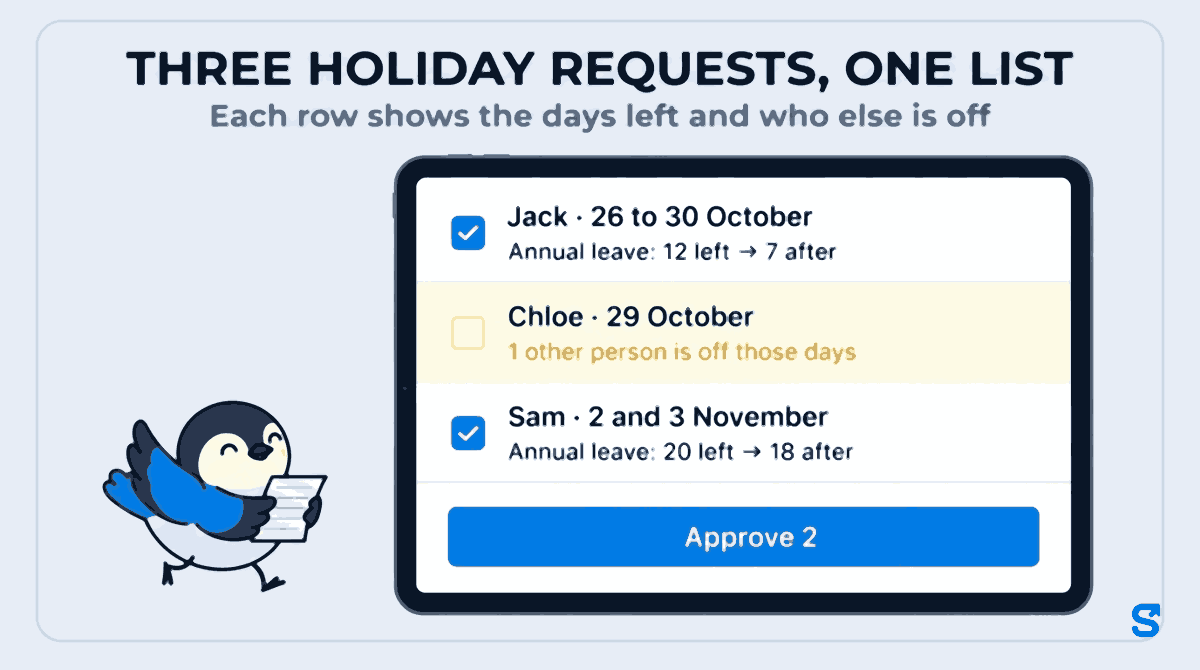
Under the dates, the row shows the days counted (a weekly off or a holiday inside the dates is shown as not counted), the balance before and after, such as Annual leave: 12 left → 7 after, and, if someone else is already off on any of those days, 1 other person is off those days with their names.
Tap Approve many, then Select all 3 waiting or tick the rows you want, and tap Approve 3. Each one is approved in turn, and you see how many were approved and which, if any, were skipped and why. If you stop half way, the rest stay ticked.
For the request that clashes, tap Reject and tell them why in the optional note, such as a different date you can offer. Do it now: gov.uk's notice for refusing is the length of the leave plus 1 day, so a 5-day request refused 3 days before is too late.
If you approved something you should not have, open it in Requests and tap Cancel leave. The paid days go back to the person, the leave is marked Cancelled and they are told. The same gov.uk notice applies to cancelling as to refusing.
Booking holiday in for staff yourself
Some holiday never comes as a request: a member of staff tells you in person, or you close for a few days and want everyone's leave booked. For that, use Add leave on the Leaves screen. It is saved as approved, added by you.
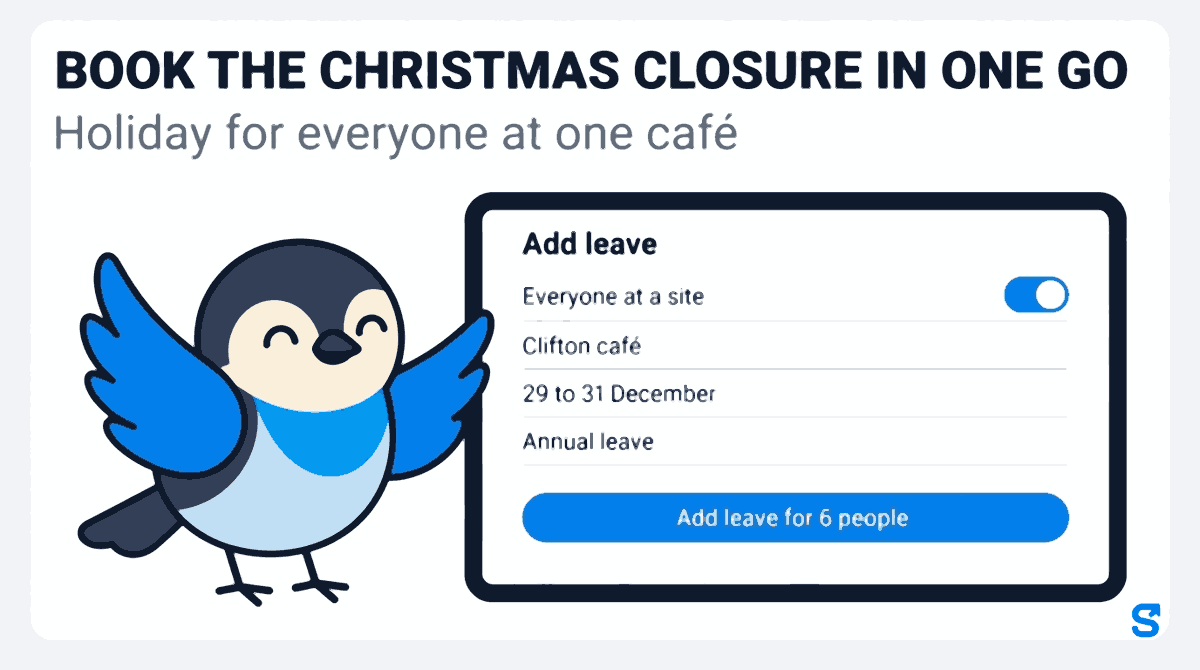
Pick One person, Several people or Everyone at a site. Everyone at a site shows how many people work there and their names before you go on.
Pick the dates. For a single date you can choose Half day, first half or second half. Then pick the leave type: for one person the list shows the days left, such as Annual leave with 12 left. Weekly offs and holidays inside the dates are not counted as leave.
What happens to each person lists everyone with the days counted and their balance before and after. Anyone who cannot be given the leave is shown as skipped with the reason. Nothing is saved until you add it.
The button says how many people get the leave. The result shows how many were added and how many skipped.
If any of those days are bank holidays you have set up as holidays, they are not counted, so nobody loses a day of annual leave for a day you were closed anyway. If you have not set those up yet, start with UK holiday entitlement and bank holidays in one go.
A worked example: two cafés in Bristol
Gemma runs two cafés in Bristol with eleven staff between them. On Monday 12 October she opens Leaves and the Waiting for you line says 3 requests waiting.
- Jack asks for 26 to 30 October, half-term week. The row reads Annual leave: 12 left → 7 after.
- Chloe asks for 29 October. Her row reads Annual leave: 9 left → 8 after, and underneath, 1 other person is off those days: Jack. Both work front of house at the same café.
- Sam asks for 2 and 3 November. Annual leave: 20 left → 18 after.
Gemma's policy says no more than one front-of-house person off at a time in half-term. She ticks Jack and Sam and taps Approve 2. She rejects Chloe's with a note offering 5 November instead, 17 days before the date asked for, well inside the 2 days gov.uk's rule would need for a 1-day request. Chloe asks again for 5 November that afternoon and it is approved the same day.
Then Gemma books the Christmas closure. The Clifton café shuts from 29 to 31 December, so she opens Add leave, picks Everyone at a site, the Clifton café, 29 to 31 December and Annual leave. The preview shows six people, each losing 3 days. She taps Add leave for 6 people in October, far more than the 6 days' notice gov.uk describes for telling staff to take 3 days. She also adds the closure to the staff rota so nobody is put on a shift there.
Which app answers holiday requests and books holiday for the team?
If the end of your holiday year is coming up, the next job is checking who keeps and who loses days before it closes, and you can see how it all fits a UK business on the Shiftelio UK page.
Questions owners ask
Can an employer refuse a holiday request in the UK?
Yes, for a particular time. gov.uk says an employer can refuse a leave request with as much notice as the leave asked for, plus 1 day, but cannot refuse to let workers take their leave at all.
How much notice should staff give for a holiday request?
gov.uk's general rule is at least twice the length of the leave, plus 1 day, so 3 days for 1 day off. A contract that says something different takes priority.
What if a holiday request is not answered?
Answer on a fixed day each week. A request left waiting can use up the notice you need to refuse it, and in Shiftelio the Waiting for you line shows how many are open.
Can I book holiday for staff without them asking?
gov.uk says employers can tell staff to take leave, for example at Christmas, with notice at least twice as long as the leave. In Shiftelio, Add leave books it for one person, several or everyone at a site.
Can I approve several holiday requests at once?
Yes. In Requests, tap Approve many, tick the requests or select all waiting, and tap Approve. Clashing requests can be left unticked and answered on their own.