A Staff Noticeboard That Tells You Who Has Not Read It
In short
Your WhatsApp group shows who read a message. It cannot show who on your payroll did not. That gap is what a staff noticeboard with read receipts closes.
- WhatsApp group read receipts do work, and cannot be switched off. They just answer a question about the group, not about your payroll.
- A blue tick records a thumb passing over a message. An acknowledgement records a person pressing a button that said they read it.
- The useful report is built from the roster outwards, so that people with nothing recorded against them appear as rows marked Not seen rather than as absences.
You changed the Sunday shift timings. You typed it into the staff WhatsApp group at nine in the evening, a few people sent a thumbs up, and you went to bed.
On Sunday two people turned up at the old time. One of them had left the group in March when her phone was stolen and nobody added her back. The other joined last week and was never added at all. Neither of them was being difficult. Neither of them ever saw the message.
This is the most ordinary failure in a small Indian business, and it is not a discipline problem. It is a counting problem, and the group chat cannot count the thing you need counted.
What the group chat can actually tell you
Be fair to WhatsApp here, because the usual complaint about it is wrong.
WhatsApp groups do have read receipts, and they cannot be switched off. A member can disable blue ticks for their one-to-one chats, but WhatsApp's own help page is explicit that read receipts are always sent for group chats. Long-press your own message, open Info, and you get a list of who has read it.
So the group does answer a question. The trouble is that it answers a different question from the one you asked.
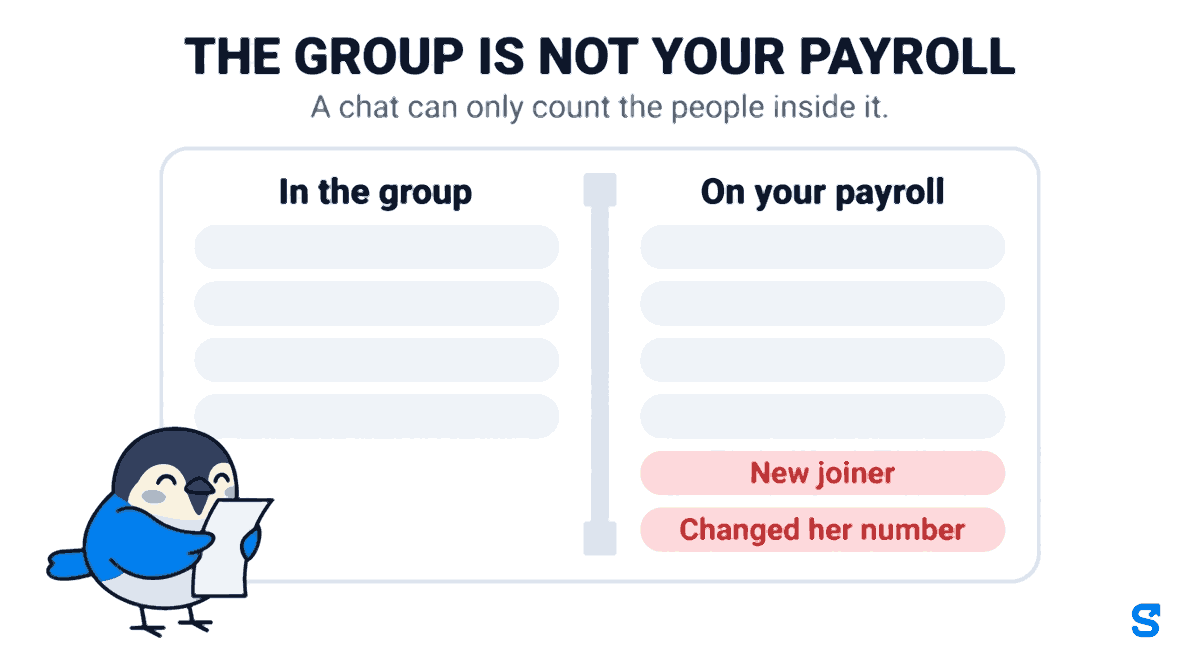
The group tells you who in the group read it. You needed to know who on your payroll read it. Those two lists are never the same list, and the gap between them is invisible from inside the chat.
The people who make the gap are exactly the people you would worry about. The new joiner nobody added. The one who changed her number. The person who left in a huff and was removed. The night-shift worker who is in the Andheri group but not the main one. None of them appear in the Info screen as a problem. They do not appear at all, and an empty space looks identical to a full house.
There are three smaller cracks underneath that one.
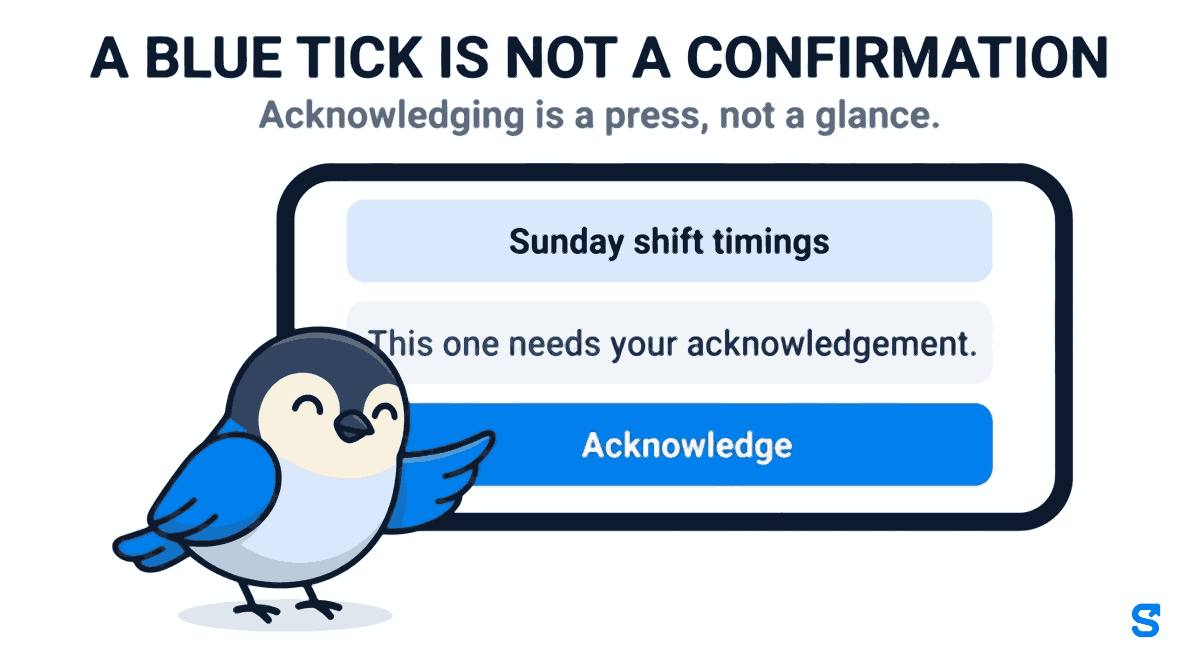
A blue tick is not a confirmation. Opening a chat marks every message in it as read, including the forty you scrolled past to reach the photo of somebody's dog. Nobody has told you they understood the new shift timing. They have told you their thumb passed over it.
There is no targeting. One group is the whole company. Either the driver in Pune reads the notice about the Andheri kitchen rota, or you keep six groups by hand and the new joiner ends up in four of them.
There is no record afterwards. Three months later, when a wage dispute turns on whether somebody was told about a policy, the evidence is a chat thread on a personal phone, in a group that person may no longer be in.
The board at the gate has the same blind spot
Indian workplaces have had a notice-display duty for decades. Section 108 of the Factories Act, 1948 requires every factory to display an abstract of the Act and the rules, in English and in a language understood by the majority of the workers, at a conspicuous and convenient place at or near the main entrance, kept clean and legible.
That duty did not go away when the labour codes arrived. The Occupational Safety, Health and Working Conditions Code, 2020 consolidated thirteen statutes including the Factories Act and came into force on 21 November 2025, with state rules still being notified through 2026. Displaying things where workers can read them is still your job.
But read the old wording again and the assumption underneath it is visible. At or near the main entrance. It was written for a workplace where every single person walks through one gate, twice a day, past one wall.
Your business is probably not that workplace any more. The housekeeping staff go straight to site. The delivery riders never come to the office at all. The attendant on a 24-hour home-care posting has not seen your wall in a month. A board at the gate is a broadcast to whoever happens to walk past it, which is the same design as the group chat and fails in the same direction.
What a noticeboard built on the payroll does instead
The fix is not a better chat app. It is a noticeboard that already knows who works for you, because it is the same system that pays them.
Send it to the people it is about
A post in Shiftelio goes to everybody by default, or to named sites and departments. The rota for the Andheri kitchen goes to the Andheri kitchen. The Pune driver never sees it and never learns to ignore the feed, which is the thing that actually kills a company noticeboard. Not that people cannot see the notices, but that they have seen four hundred irrelevant ones and stopped looking.
Ask for an acknowledgement, not a blue tick
Some notices are ordinary and some are not. A post can be pinned to the top, marked urgent so it buzzes everyone's phone, and set to require a confirmation. When it is, the post carries a line reading This one needs your acknowledgement. and a button marked Acknowledge that the reader has to press. Ordinary updates do not push at all.
That press is a different fact from a read. Seen means the post appeared on a screen. Acknowledged means a person put their thumb on a button that said so. When a policy change matters, the second one is the record you want, and it is the one the group chat has never been able to produce.
Two days later, anybody who still has not confirmed gets one reminder. One, per person, per post, ever. It is a nudge rather than a nag, and an owner who thinks a single ask is enough can switch it off.
The report starts from the roster, not from the readers
This is the part that is genuinely different, and it is worth being precise about why.
There are two ways to build a report on who read something. The easy way starts from the list of people who opened the post and shows you their names. Every chat app does it that way, and it can only ever list people who were there to open it.
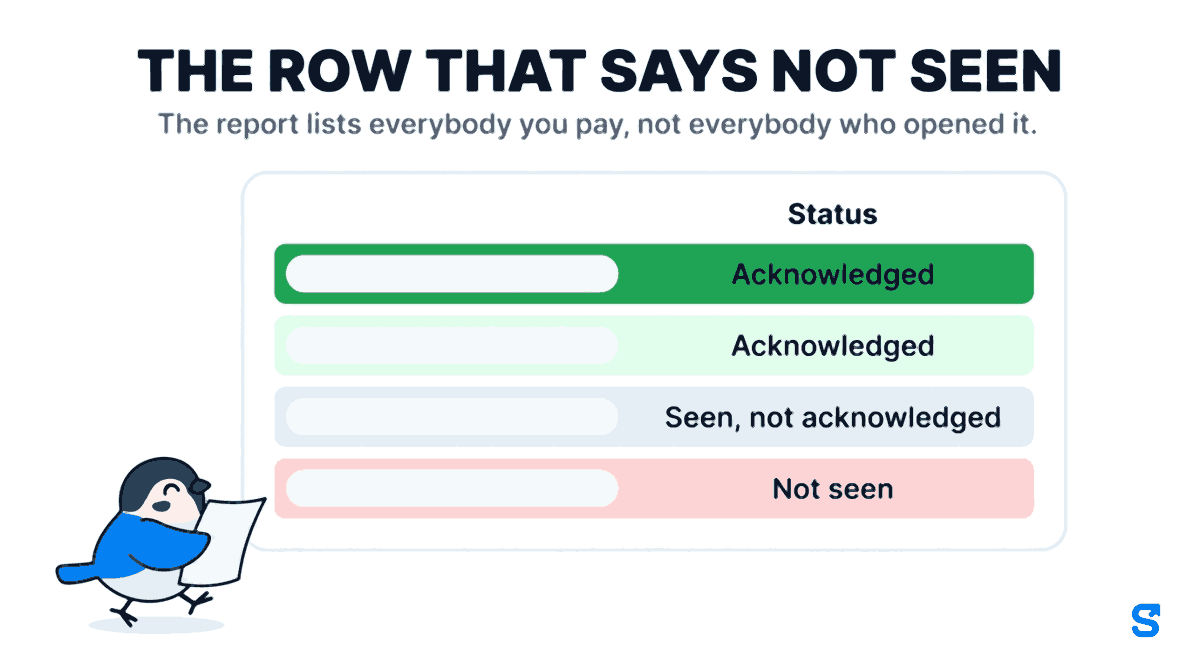
The acknowledgement export starts from the other end. It begins with your active roster, every person on your payroll, and hangs the read time and the acknowledgement time off each name as a blank or a timestamp. Five columns, Name, Role, Seen at, Acknowledged at and Status, and the Status column only ever says one of three things.
- Acknowledged they pressed the button
- Seen, not acknowledged it reached their screen
- Not seen the row you actually needed
The row that matters most is the last one, because that person is not a slow reader. That person never got the notice, and until the report is built this way there is no screen anywhere that will tell you they exist.
The export is a spreadsheet, so it is still there in March when somebody asks what the staff were told in September.
Who is allowed to be loud
Everybody can post. That is deliberate, and it is why the feed also carries polls, reactions, threaded comments and kudos rather than being a one-way pipe from the office. A noticeboard only the owner writes on is a wall, and people stop looking at walls.
What is not free for everybody is the loud end of it. Three separate permissions, and they are separate on purpose.
| Moderate | Announce | Read reports | |
|---|---|---|---|
| What it allows | Edit or take down anybody's post | Pin, mark urgent, demand a confirmation, or send to one site | See who has read and acknowledged, by name |
| Why it is its own tick | Taking a post down is the part nobody guarded before | A site supervisor may need to pin the rota without policing everybody's posts | Knowing who read what is knowing where everybody was and when |
Without the reports tick, a manager still sees the seen-by count on every post, and the full list of names on posts they wrote themselves. What they do not get is the names on somebody else's.
All three are real limits, not just hidden buttons. An ordinary employee cannot mark a notice urgent or pin it, even by going round the screen.
New permissions default to off for every existing role. If you have already set up manager roles, tick these on yourself, or the feature will look broken to exactly the people it was built for.
Where this is the wrong tool
A noticeboard is for things the company is telling people. It is not a replacement for a conversation, and it is not a chat app. If what you actually need is two colleagues sorting out a delivery between themselves in real time, that is WhatsApp, and it should stay WhatsApp.
It also does nothing for a workforce with no smartphones. If most of your staff share one handset at the site office, the board at the gate is still your primary channel and this is a supplement to it.
The one thing we do that the alternatives do not
What to do this week
- Open your staff WhatsApp group and count the members. Then count your active employees. Write both numbers down.
- Find the last genuinely important notice you sent and check the Info screen against your roster, name by name.
- Pick one notice type that has to be acknowledged, usually a safety rule or a pay or timing change, and move only that one off the group chat first.
- Check that your managers actually hold the announce permission before you tell them the feature exists.
- Keep the wall at the gate. The statutory display duty is not satisfied by an app.
Does WhatsApp really show who read a group message?
Yes. Long-press your own message and open Info. Read receipts cannot be disabled for group chats, unlike one-to-one chats. The limitation is not the receipts, it is that the list can only contain members of the group.
What happens to somebody who has no smartphone?
They will not appear as acknowledged, which is correct and useful. The report shows them as Not seen so you know to tell them in person, rather than assuming the notice reached everyone.
Can a manager see who read a post without being able to delete posts?
Yes. Reading the reports and moderating the feed are separate permissions. A manager can hold either one without the other.
Does an app satisfy the legal notice-display requirement?
No. The display duty carried over from the Factories Act, 1948 into the OSH Code, 2020 is about a physical notice at the workplace, and you should keep the board at the gate. The noticeboard in the app is for making sure the message actually reaches the people who never walk past that board.
Does every post buzz everybody's phone?
No. Ordinary updates appear in the feed without a push. Only announcements and posts marked urgent send a notification, which is what stops people muting the whole thing in the first week.
Keep reading
Free to use, no signup: Shift roster template.