An Attendance App Your Staff Can Actually Read
In short
Staff who cannot read the check-in screen get marked absent. How to run attendance, alerts and payroll in Hindi, Tamil and seven more.
- A worker who cannot read the check-in screen does not check in. They ask the supervisor to do it, which is buddy punching with a kinder motive, and it lands in your payroll.
- Translating the screens is the easy half. The alert that tells somebody their shift moved is the half that usually stays in English.
- Three people can set a person's app language: you at hire, you later, and the person themselves. Only one of those can win, and it has to be the person.
The failure is a wrong attendance record, not a confused worker
Owners describe this problem as a training problem. "They will pick it up." Sometimes they do. What actually happens in the first fortnight is narrower and more expensive than confusion.
A housekeeping worker on her second week cannot find the check-in button, so she hands her phone to the supervisor at the gate, who taps it for her. Now two things are true. She is marked present, so nothing looks wrong. And the one control you bought the app for, that a check-in belongs to the person who made it, is gone, quietly, for that worker, permanently. Nobody will report it, because from where they stand they solved a problem for you.
The second version is worse because it is visible. She does not hand the phone over. She is marked absent, and you find out at the end of the month when a day of pay is missing and she is standing in your office. You fix it by hand. You do that for four people. You have now spent more time on corrections than the app was meant to save, and your attendance history has your own edits in it rather than her check-ins.
Neither of these is a language problem in the abstract. Both are a language problem that arrived as a payroll problem.
What "available in Hindi" has to cover before it means anything
Most software will tell you it supports regional languages. The question worth asking is which surfaces, because the ones vendors translate first are the ones that matter least.
There are four, and they fail independently.
- The screens the worker touches every day: check in, check out, my attendance, my leave, my pay.
- The screens you touch. If your supervisor reads Marathi and your dashboard does not, you have moved the problem up a level rather than solved it.
- The alerts. A push notification, a WhatsApp message, a Telegram approval.
- Whatever you typed. Department names, task descriptions, the notice you posted. These are your words and no system can translate them for you.
In Shiftelio the first two are covered by 8,850 translated strings across nine languages: English, Hindi, Marathi, Bengali, Tamil, Telugu, Gujarati, Punjabi and Kannada. The worker screens and the owner dashboard are both in there, which is the part that matters if your site supervisor is more comfortable in Hindi than you are. Seven fonts cover the nine, because Hindi and Marathi share the Devanagari script, and each one loads only when somebody actually reads in it. A Tamil user downloads Tamil and nothing else.
The fourth is honest and permanent. If you name a department "Housekeeping", it says Housekeeping to everybody, in every language. That is not a gap to be fixed later, it is what the words are.
The third is the interesting one.
The alert is where this usually breaks
A screen has somebody in front of it. The app knows who made the request, so it knows what language to render in. That is one language, and it is easy.
A notification has nobody in front of it. It is written by a scheduled job at six in the morning, or by somebody else's approval, and it goes to a list of people who do not share a language. One event. One owner who reads English, one supervisor who reads Hindi, one worker who reads Tamil. If the system renders that message once, somebody is getting it in a language they cannot read, and it will be the worker, because the message is written in the language of whoever built the system.
Shiftelio groups the recipients by language and writes the message once per group. A company-wide reminder to sixty people costs at most nine renders and usually one, because most businesses are one language. The shift reminder that tells your Tamil-reading attendant their duty moved arrives in Tamil, from the same event that told you in English.
This is not a setting. There is nothing to switch on, and there is no separate language field for notifications, which is the point: a message that arrived in a language the person's app does not use would be worse than one that arrived in English.
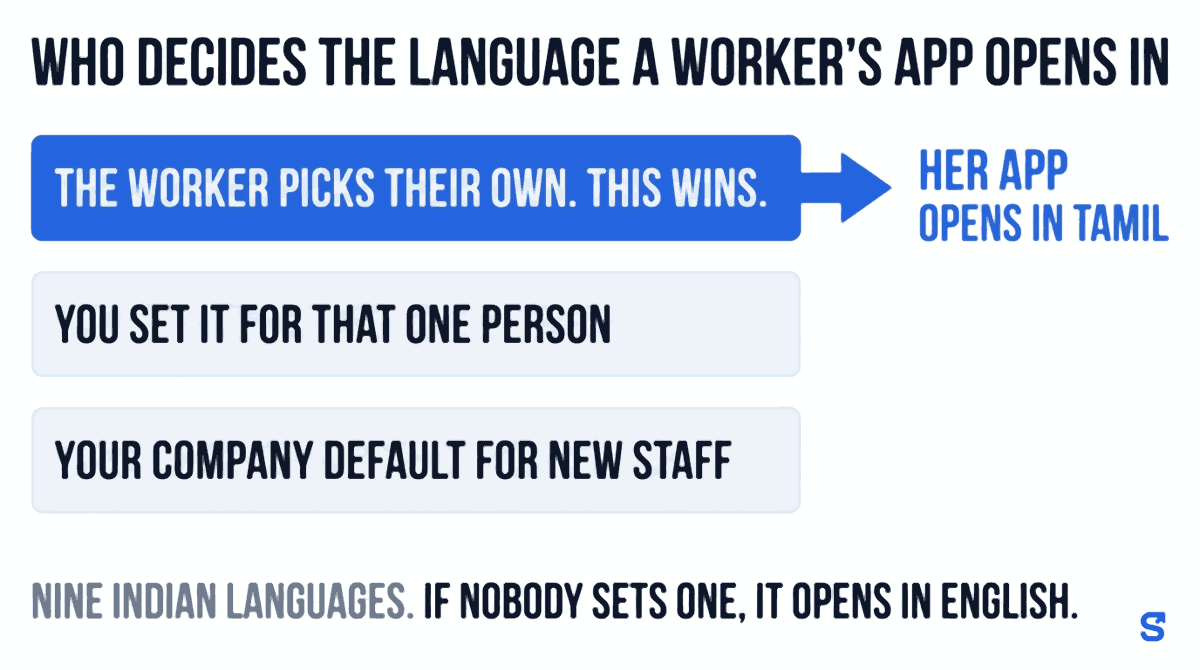
Three people set the language, and the worker wins
This is the design decision worth understanding before you set anything up, because getting it backwards is how a worker's own choice gets silently overwritten by your next bulk update.
There are three ways a language gets attached to a person.
Settings has a field called Default app language for new staff. Everybody you add from then on starts in that language. It does not move anybody already on your account, and it does not change your own dashboard.
Each employee has their own language, which you can set when you add them or change afterwards. The bulk CSV import carries a language column too, so a forty-row upload can arrive with the languages already in it. The picker accepts the English name, the two-letter code, or the language's own name: type "Tamil", "ta" or "தமிழ்" and you land on the same row.
One picker, on their own phone, no permission needed from you.
Step three beats step two, which beats step one. Always, in that order, with no exception and no way for you to lock it. A worker's own choice is stored in a different place from your assignment, so your next bulk update cannot land on top of it.
The reason is not politeness. It is that you are guessing and they are not. You hired somebody, wrote Hindi against their name because the last four people from that district read Hindi, and this one reads Bengali. Under any other resolution order, she now has to ask you to change it, through a supervisor, in a language neither of them is comfortable in, about a setting she cannot see the name of. She will not ask. She will use the app in Hindi badly for two years.
A language nobody has set resolves to English, which is also what a typo resolves to, and what an unrecognised code resolves to. Nothing errors and nothing shows you a blank screen: a string with no translation comes out as its English original. That matters more than it sounds. It means a half-translated release degrades to English word by word rather than breaking, so you never open the app to find a key like attendance.checkIn.title where a button used to be.
What stays in English
Worth knowing before you promise anything to your team.
| In their language | Stays English | |
|---|---|---|
| Worker app screens | Yes, all nine | |
| Owner and supervisor dashboard | Yes, all nine | |
| Push, WhatsApp and Telegram alerts | Yes, per recipient | |
| Downloaded payslip PDF | Hindi, Marathi, Gujarati, Tamil, Telugu, Kannada | Bengali, Punjabi |
| Offer, appointment and experience letters | Yes | |
| Department names, task text, your notices | As you typed them |
The payslip row changed in October 2026: a staff member whose app is set to Hindi, Marathi, Gujarati, Tamil, Telugu or Kannada now downloads their payslip PDF in that language, while Bengali and Punjabi payslips still print in English. How it works, and what stays in English on the slip, is in salary slip in Hindi: give staff a payslip they can actually read. Offer, appointment and experience letters still come out in English whatever the reader's app is set to, and you should know that before you tell your team otherwise.
It is also worth saying what the law already asks of you here, separately from any software. Section 108(2) of the Factories Act, 1948 requires every statutory notice displayed in a factory to be in English and in a language understood by the majority of the workers there. That obligation is about the notice board, not the app, and an app does not discharge it. But the principle behind it is the one this whole article is about, and it has been settled law in India for seventy-eight years: a rule somebody cannot read is not a rule you have communicated.
Which language, if you do not know
Two practical answers.
Ask at hire. It takes one question and it is the only reliable method. The person telling you is the only one who knows.
Failing that, the app guesses from the phone. A worker who signs in on a handset already set to Hindi gets a Hindi app, because the phone's own language is checked before English is assumed. This is a decent guess in practice: somebody who set their phone to Bengali reads Bengali. It is still a guess, and it is why step three above exists.
If you are hiring across states, the Census of India's mother-tongue tables will tell you what a district actually speaks, which is often not what its state's official language is. The nine in the app were chosen against that data rather than against a list of official languages, which is why Marathi and Punjabi are in and several official languages with fewer speakers are not.
The product answer
Questions owners actually ask
Does switching the language change anything about pay or attendance?
No. It changes the words on the screen and in the alerts. Hours, rates, deductions and attendance records are the same data whichever language you read them in, and switching back and forth does not touch them.
Can I stop a worker changing their own language?
No, and this is deliberate rather than missing. Their own choice is stored separately from your assignment precisely so that your bulk updates cannot overwrite it. If you could lock it, the common case, you guessing wrong at hire, would have no way out.
Do I have to pick one language for the whole company?
No. The company default only applies to people you add after you set it. Everyone's language is their own, and a single business commonly runs three or four at once. Payroll, reports and attendance are one set of records regardless.
What if a worker's language is not one of the nine?
They use the app in English. There is no partial state: an untranslated language falls back to English rather than showing blanks or key names. The nine are English, Hindi, Marathi, Bengali, Tamil, Telugu, Gujarati, Punjabi and Kannada.
Will they see English words mixed in?
Sometimes, and there are two reasons. Anything you typed appears as you typed it, so an English department name stays English. And a string added in a recent release before its translation lands shows as English until it does, which is by design: the app never shows a broken placeholder.
If you do one thing
Ask the next person you hire which language they read, and set it before you hand them the app rather than after they have failed to use it for a week. Every problem in this article starts in the gap between those two moments.
Keep reading
Free to use, no signup: Shift roster template.