Comp Off for Overtime and Sunday Work: Track Every Day Earned on the Phone
In short
Comp off is a paid day off for extra work. Shiftelio turns overtime hours and worked Sundays into comp-off days each pay cycle, and staff see them.
- Comp off is a paid leave day given for extra work, such as a worked weekly off, a holiday, or overtime hours that add up to a day.
- In Shiftelio, Comp-off from overtime turns overtime into paid leave days after each pay cycle, and leftover hours carry to the next cycle.
- A worked weekly off or holiday can count as one full comp-off day on its own.
Comp off, short for compensatory off, is a paid day off that a staff member earns by working extra: a Sunday, a holiday, or enough overtime hours to add up to a day. In Shiftelio you switch on Comp-off from overtime in Settings, and after each pay cycle the app adds the comp-off days each person earned to their leave balance, where they can see them and take them like any other leave.
The hard part of comp off in a small business was never the idea. It is the counting. Who worked last Sunday, who stayed back three evenings in a row, and whether Ravi already took the day he was promised in August. This article shows how to stop keeping that in your head or in a notebook, and where the law draws a line you should know before you switch anything on.
What comp off means in a company
In most Indian offices, shops and restaurants, comp off works on a promise. A supervisor says "come in on Sunday, take Wednesday off", and the promise lives in a WhatsApp chat or in somebody's memory. Three problems follow from that, and every owner who has run staff for a year has met all three:
- The day is forgotten. The worker remembers it in March. Nobody else does, and there is no record to settle it.
- The day is taken twice. Two managers each think they approved it, and nobody can show what was owed.
- Overtime is half counted. Two hours on Monday and three on Thursday never feel like a day, so they are neither paid nor given back.
A comp off that is real has three parts: a record of the extra work, a balance the worker can see, and a rule for what happens to days that are never used. That is what the feature below gives you.
The law, briefly, before you switch it on
This is the part to read first, because comp off is not a free way to avoid paying overtime.
Under the Occupational Safety, Health and Working Conditions Code, 2020 (checked on 27 Nov 2026), section 27 says overtime work is paid at twice the rate of wages, and the worker's consent is needed for overtime. Section 26 is about rest: when a worker loses a weekly holiday under an exemption, the Code gives compensatory holidays of equal number. So in law, rest and money are two separate questions. A day off answers the rest question. It does not, by itself, answer the overtime wage question. We go through both sections in detail in our weekly off and comp off rules guide.
The Code mostly covers establishments with ten or more workers. Below that, your State Shops and Establishments Act sets the rules for your location, and those differ from state to state. The labour codes page of the Ministry of Labour lists the Codes and their rules as they are notified.
What that means in practice:
- A worked Sunday or holiday given back as a day off is the cleanest use of comp off. It gives the rest day back.
- Overtime hours turned into leave instead of money is a choice the worker has to agree to, and whether it can replace overtime pay depends on the law that covers your location. Shiftelio asks you to tick that staff agreed before it saves the setting, and the screen tells you to keep their written agreement.
This is general information, not legal advice: check with your state labour department or an employment lawyer for your case.
How Comp-off from overtime works in Shiftelio
You find it in Settings, in the card called Comp-off from overtime. Its one line says what it does: give overtime as paid leave days instead of money. Every so many hours of overtime becomes one comp-off day, and leftover hours carry to the next pay cycle.
The choices on the card:
- How staff get overtime. Pay as money, or give as comp-off days.
- Overtime hours for 1 comp-off day. The screen gives a tip worth keeping: 4 hours = 1 day matches paying overtime at double rate, and 8 hours = 1 day gives one normal day for one day of extra work.
- Worked a weekly off or holiday = 1 full comp-off day. Turn this on and a worked Sunday counts as a whole day by itself, whatever the hours.
- Count half days. On, half a day is added once the hours reach half; off, only full days are added and the rest carries over.
- Comp-off days expire. Never, or after a number of days you choose.
- Start from. Today or later. Overtime already worked is not changed, so pick the start of a pay cycle.
- Staff agreed to take comp-off instead of overtime pay. The consent tick. The setting does not save without it.
The days go into a paid leave type. If you do not have one yet, the card offers Add a Comp Off leave type: a paid leave type that starts at 0 days and never lapses at year end.
One limit to know: comp-off from overtime works only with daily overtime. If your business pays overtime by the week, the card tells you to turn weekly overtime off first.
A worked example
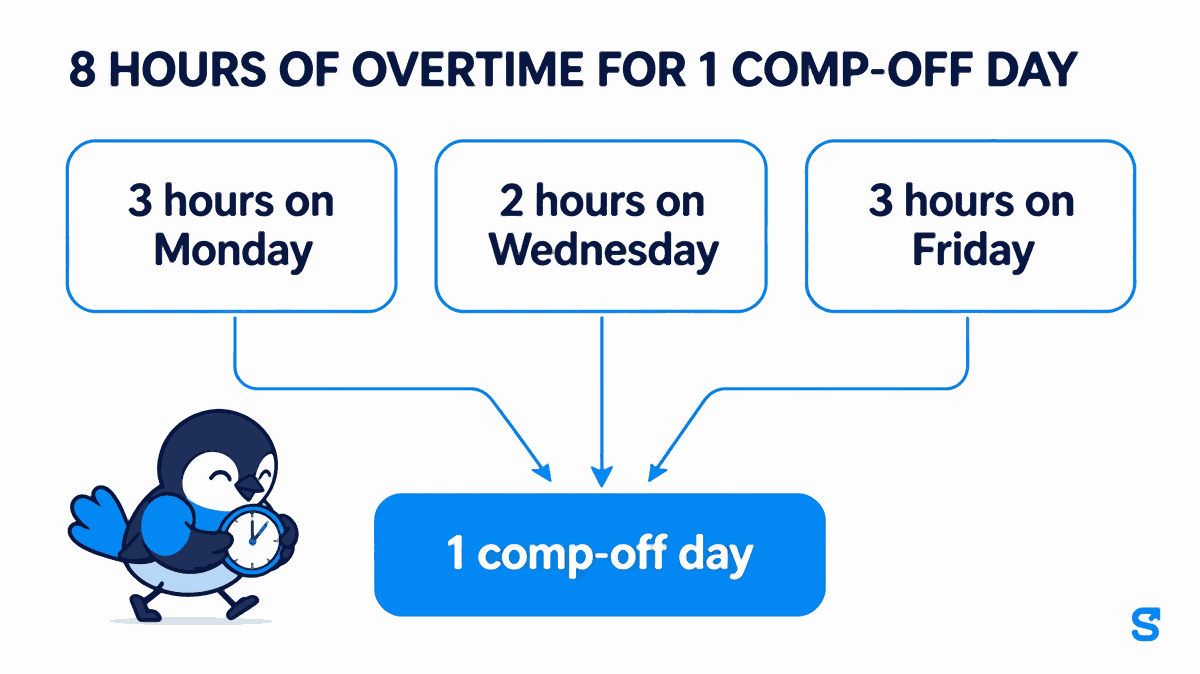
A restaurant sets 8 hours of overtime for 1 comp-off day and turns on the weekly off rule. In one pay cycle, Ravi stays back 3 hours on Monday, 2 hours on Wednesday and 3 hours on Friday. That is 8 hours, so he earns one comp-off day. He also works his weekly off on Sunday for the stock count, which is one more full day. When the cycle ends, two comp-off days are ready for him, and nothing else is changed in his salary for those hours.
If he had stayed back only 6 hours, no day would be added and the 6 hours would carry into the next cycle, where 2 more hours make the day.
The owner's screen: Leaves, then Comp-off from overtime
Once it is on, open Leaves and tap Comp-off from overtime, whose line reads "Turn overtime into leave days after each pay cycle". The page lists the pay cycles that have ended, and under Ready to add each person with the comp-off days their overtime earned.
- Add comp-off days puts them in each person's Comp Off balance. You can add for everyone or for one person.
- Pay as money instead pays that person for the overtime on the next payslip, and the screen shows what it is worth as pay before you choose.
- An Undo is there if you added the wrong days: the days are taken back and the overtime goes back to waiting.
- If the app closed a shift for someone who forgot to check out, that overtime is not counted until you tick it, unless you turned on Count overtime from automatic check-outs in Settings. So a forgotten check-out never becomes a free day off.
- If you set a quarterly limit, a person who passes it is flagged on this page, so long hours show up before they become a habit.
The same page shows staff requests for comp-off waiting for a decision, so a manager has one place to look.
Who can do it. The owner always can. A manager needs the Comp-off from overtime tick in Roles to add or undo comp-off days. It is off for every role until you turn it on.
What staff see on their phone
On the staff member's Leaves screen a Comp-off from overtime card shows the overtime they have worked in this cycle, the hours towards the next day, and the days they have earned. Tap See days for each day's hours, including any day that was not counted because the app closed the shift for them. If days are about to lapse, the card says how many and by when, so nobody loses a day by surprise.
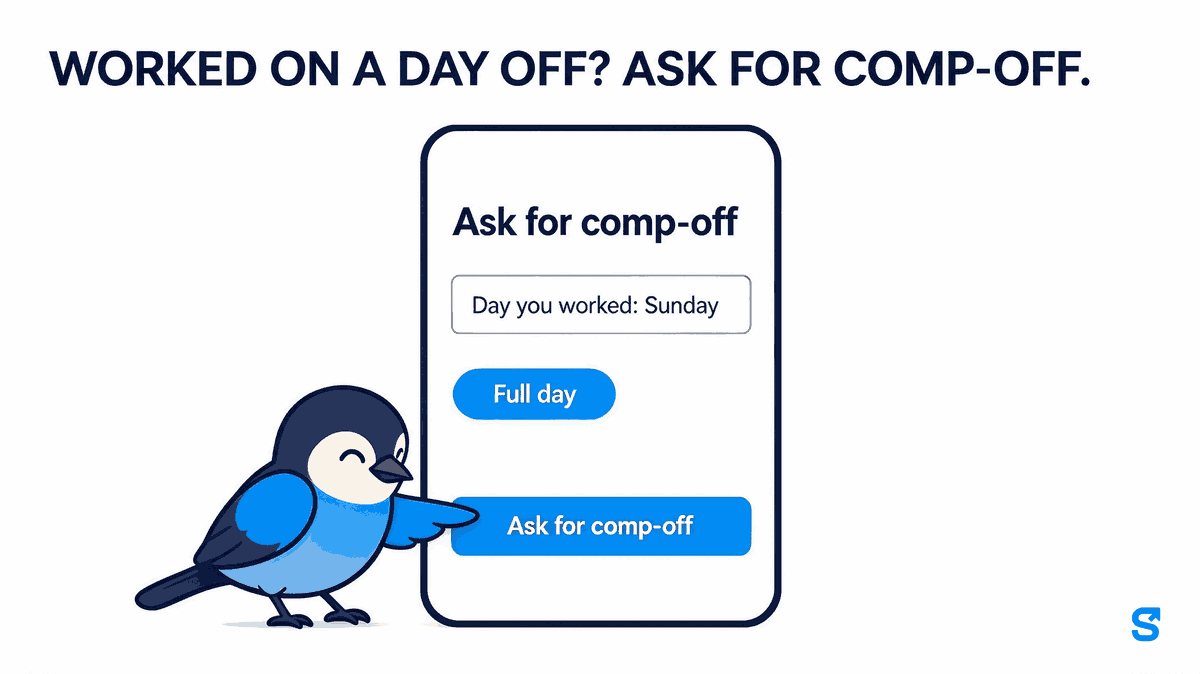
When they worked on a day off that the overtime does not cover, the card reads "Worked on a day off? Ask for comp-off." They tap Ask for comp-off, pick the day they worked, choose Full day or Half day, and write a short reason, for example "worked the Sunday stock count". The request shows as Waiting, then Approved or Not approved, under My comp-off requests. An approved request adds the day to their Comp Off balance.
Then they take the day like any other leave, from the same leave screen they already use.
One person, a different rule
Not everybody in a business wants comp off. A young cook may want the day; a worker sending money home may want the cash. On each person's pay settings there is Comp-off from overtime for this person:
- Follow the company setting.
- Always give comp-off days: their overtime becomes leave days, even if the company pays money.
- Always pay as money: their overtime is paid, even if the company gives comp-off.
When you set comp-off for one person, you tick that this person agreed to take comp-off instead of overtime pay. You can also give them their own number of hours for one day.
When someone leaves, or days are never used
Unused days do not have to vanish. On the person's pay settings, Pay unused comp-off days as money adds the days to the next payslip, with an amount suggested from their daily rate that you can change. Hours that have not yet become a day can be paid, rounded up to one day, or let go, and the screen asks which. Use this when a person leaves or moves to another business.
If you set an expiry, unused days lapse after that many days, and the staff card warns them before it happens.
A routine that takes five minutes a cycle
Agree how many overtime hours make a day, and whether a worked Sunday is a full day. Keep their written agreement, as the Settings card asks.
In Settings, open Comp-off from overtime, add the Comp Off leave type, choose the start of a pay cycle and save.
Open the pay settings of anyone who wants money instead, and set Always pay as money.
Open Leaves, then Comp-off from overtime, check Ready to add, tick any automatic check-out days that really were worked, and tap Add comp-off days.
Requests from staff who worked a day off wait on the same page. Approve or turn them down while the day is still fresh.
Which app turns overtime and Sunday work into comp-off days?
See everything else the app does on the features page.
Frequently asked questions
What is comp off?
Comp off, or compensatory off, is a paid day off for extra work. It is given for a worked weekly off, a holiday, or enough overtime hours to make a day.
What is comp off for Sunday?
It is a day off given back to someone who worked their Sunday weekly off. In Shiftelio, the rule "Worked a weekly off or holiday = 1 full comp-off day" adds that day automatically after the pay cycle.
Can I give comp off instead of paying overtime in India?
Only with the worker's agreement, and only where the law for your location allows it. Under section 27 of the OSH Code, overtime is paid at twice the rate of wages, so check your state rules first.
How many hours of overtime make one comp-off day?
You choose. The Settings card suggests 4 hours for 1 day to match double-rate overtime, or 8 hours for 1 day to give one normal day for one day of extra work.
How does an employee ask for comp off?
On the Leaves screen they tap Ask for comp-off, pick the day they worked, choose full or half day and add a reason. The request shows as Waiting until it is approved.
Do comp-off days expire?
Only if you set it. Comp-off days expire either never or after the number of days you choose, and staff are warned on their phone before days lapse.
What happens to unused comp-off days when someone leaves?
You can pay them as money on the next payslip. The amount is suggested from their daily rate, and you choose what happens to hours that have not yet become a day.
Can a manager add comp-off days?
Only with the Comp-off from overtime tick in Roles, which is off for every role at first. The owner can always add and undo days.
Keep reading
Free to use, no signup: Payroll calculators.