Geofence Attendance for Field Staff: Stop Every Check-in Showing "Outside the Zone"
In short
Field staff check in at a customer's address, so a geofence flags them outside the zone daily. How to stop the false alarm without losing the proof.
- A geofence is right for staff who work at a site and wrong for staff paid to travel.
- Mark the travelling staff as Works in the field; their rows lead with the place name.
- Shiftelio suggests who to mark: 3 or more check-ins in 14 days, 60% away from every site.
A water purifier service company in Pune has one office and six technicians. Every morning the technicians check in from the first customer's flat, because that is where the work starts. And every morning the owner's Activity Log fills up with the same warning against their names: 2.4 km outside the zone, 5.1 km outside the zone, 800 m outside the zone. By the second week the owner has stopped reading the warnings. That is the real damage: on the day the office receptionist checks in from home, the one warning that matters looks exactly like the six that do not.
Geofence attendance was built for staff who work at a site. Field staff are paid to be away from it. This article explains why the two collide, how to keep the location proof for travelling staff without the false alarm, and how the Works in the field switch in Shiftelio's Field staff add-on does it.
Why geofence attendance flags every field check-in
A geofence is a circle drawn around a place, usually the office, the shop or the site, with a radius such as 200 metres. When someone checks in, the app measures where the phone is. Inside the circle, the check-in is quiet. Outside it, the app says by how much, so an owner can see who checked in from home, from the bus stop or from the tea stall down the road.
That is exactly what an owner wants for a cashier, a cook or a site supervisor. For a service technician, a sales rep or a collection agent it produces the wrong answer every single day:
- The first job is the check-in point. A technician who starts at a customer's flat at 9:30 is working, not skipping the office.
- The warning cannot tell work from absence. "2.4 km outside the zone" reads the same whether the person is at a customer or at home.
- Warnings that are always on are never read. Once every field row is flagged, the owner trains themselves to ignore the flag, including on the office staff it was meant for.
The usual workarounds each give something up. Drawing a huge radius around the city makes the fence meaningless for everyone. Switching location checks off for field staff removes the only proof of where they were. Asking them to come to the office first wastes an hour of travel a day. What the owner actually needs is the same measurement, read differently for the people whose job is to travel.
Mark who works in the field
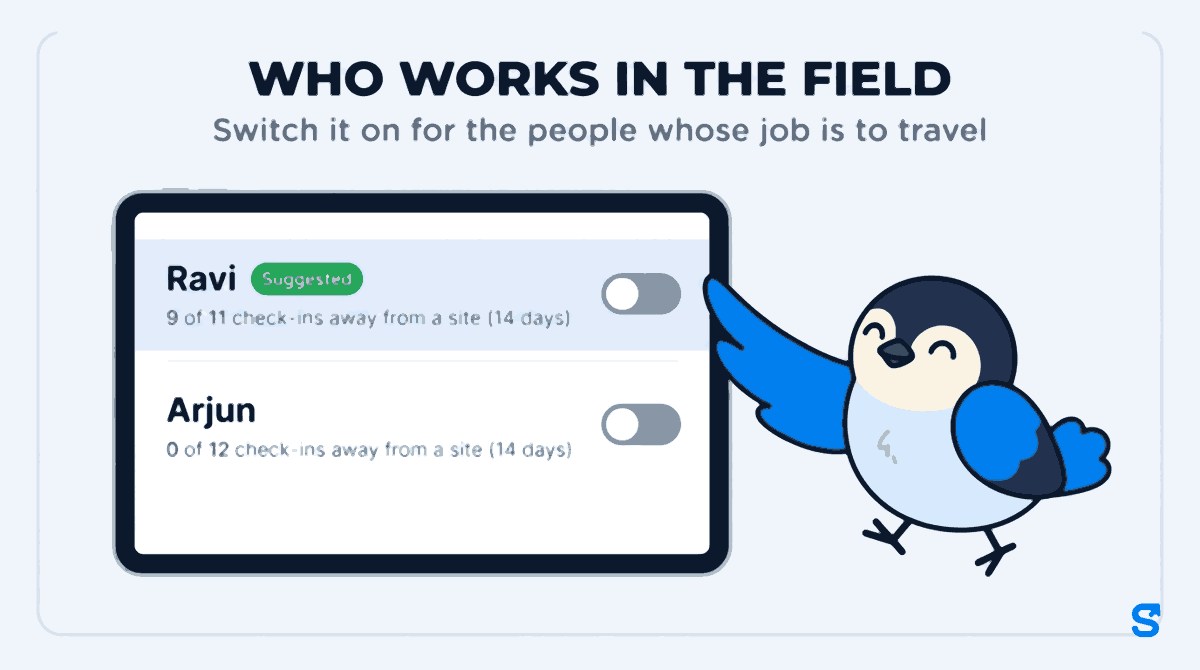
The Field staff add-on adds a list called Who works in the field to its settings page (Settings, then Field staff). Every active employee is on it with a switch beside their name. Switch it on for the people whose job is to travel. The card's own hint says what happens next: the Activity Log then shows where they are, without an "away from site" warning.
How Shiftelio suggests who to switch on
You do not have to work out who travels. Next to each name the list shows a line such as 9 of 11 check-ins away from a site (14 days). Anybody with at least 3 check-ins in the last 14 days, 60% or more of them outside every site's zone, carries a Suggested tag and sorts to the top of the list. Someone whose check-ins all landed in the office reads 0 of 12, and stays where they are.
The suggestion is only a suggestion. A delivery rider who works from the shop on weekdays and from the road on Saturdays might not cross 60%, and the owner can still switch them on. A store manager who happened to cover another branch for two weeks might cross it, and the owner can leave them off.
What changes on the Activity Log
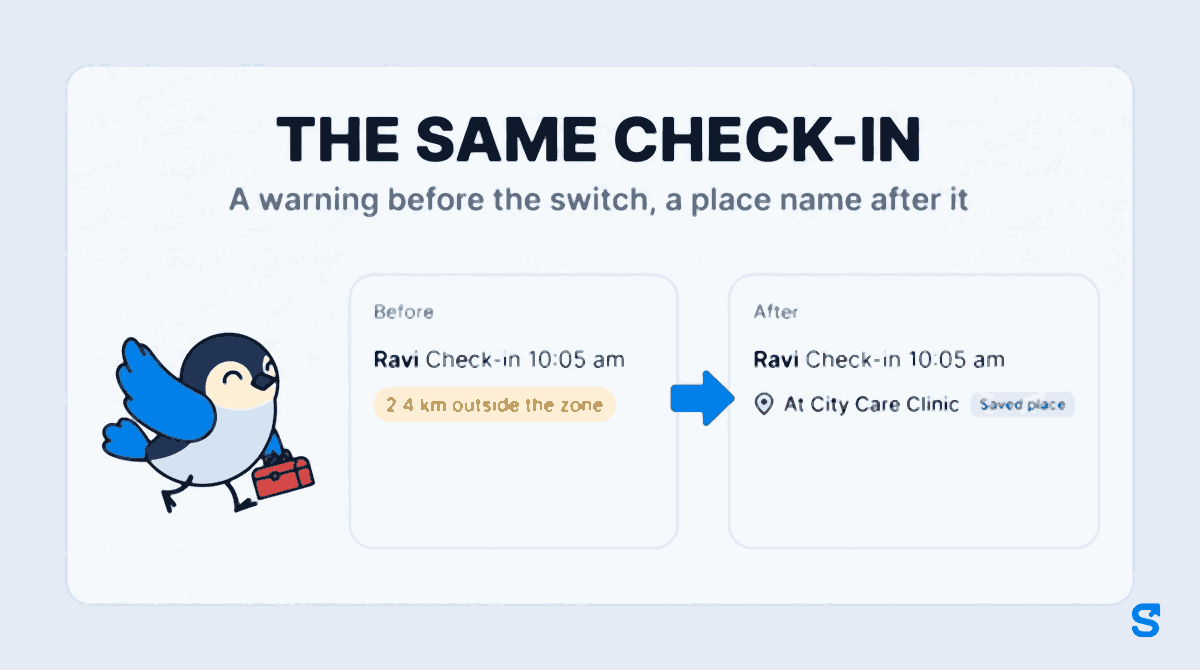
For a person marked as working in the field, a check-in or check-out row on the dashboard Activity Log now leads with the place, not the distance:
- At City Care Clinic instead of "2.4 km outside the zone", when the place has a name.
- Out in the field when it has none.
- No outside-the-zone chip on that row.
- They are left out of the count at the top that reads "2 of 14 clocked in outside their site", so that number goes back to meaning what it says: people who should have been at a site and were not.
A saved place stops being "outside" for everyone
Field staff visit the same customers again and again. The add-on lets an owner name a place once, a clinic, a dealer, a warehouse, and every later stop there shows that name. Those are saved places, and they matter here too: a check-in or check-out at a saved place drops the outside-the-zone chip for everyone, not only for people marked as working in the field. The row shows the name with a small Saved place tag beside it.
So if your office accountant checks in at the bank on the last working day of the month and the bank is a saved place, the row reads "At the bank" rather than "1.8 km outside the zone". If the same accountant checks in from somewhere nobody has named, the warning stays, because that is the case the warning was built for.
The check-out row tells you the day
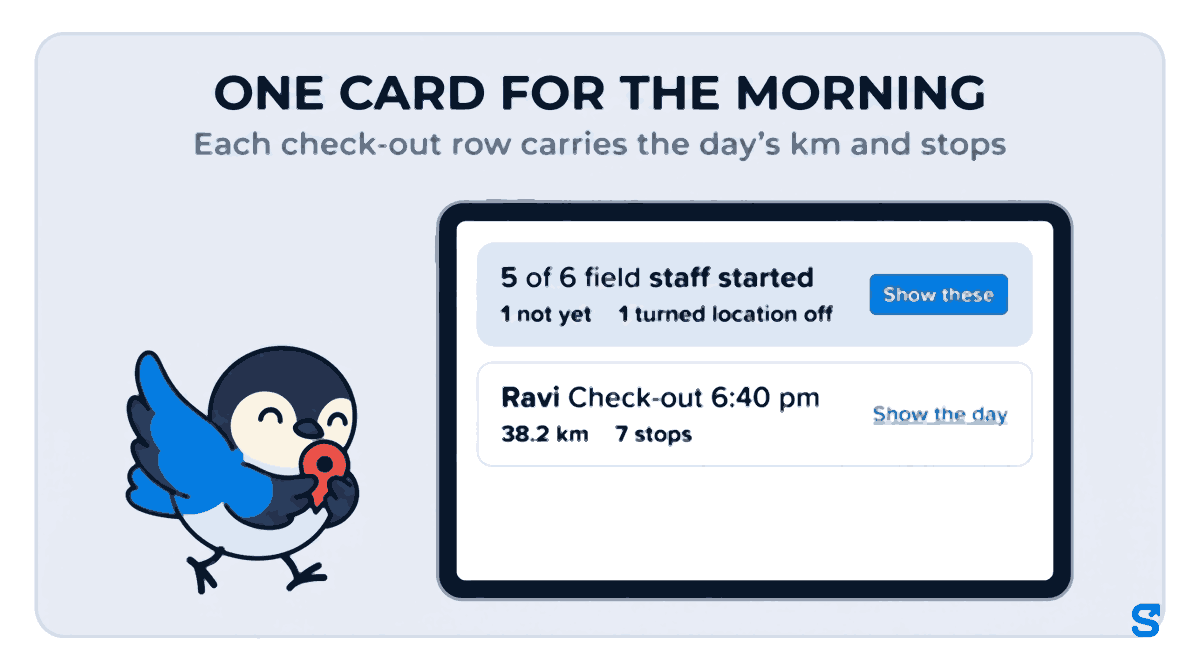
For a field worker the check-out row now carries the day in one line: the km travelled, the number of stops, and a Show the day link that opens the full timeline of named stops and drives. A row might read "Check-out 6:40 pm, 38.2 km, 7 stops". When the GPS that day makes no sense, it says Distance unclear instead of a wrong number, so nobody pays travel against it.
At the top of the log, an owner with field staff gets one card for the morning: 5 of 6 field staff started, how many have not yet, and how many turned location off, with Show these to filter to them.
When a field worker turns location off
Being away from the site is no longer a warning for field staff. Switching location off while on duty still is. When a person marked as working in the field turns location off during their shift, the Activity Log shows a Turned location off row, because the trail of their day stops while it is off. If the phone flips location on and off several times within 15 minutes, that becomes one row reading "3 times in a few minutes" rather than three rows. The activity filter has a Location turned off option to see only these.
This is the distinction that makes the switch safe. The owner stops being told something they already know, that a field technician is away from the office, and keeps being told the thing they cannot see any other way. If a phone's location settings are confusing your staff, Google's own guide to Android location settings is a good thing to forward to them.
What the switch does not do
- It does not stop the measurement. The check-in is still located and still stored. The switch changes how the Activity Log reads it, not what is recorded.
- It does not track anyone off duty. Location is recorded between check-in and check-out, as before. India's Digital Personal Data Protection Act, 2023 lets an employer process an employee's data for employment purposes under Section 7(i), but tell your staff in writing what is recorded and when. The Ministry's data protection framework page carries the Act and its rules.
- It does not change pay. Attendance, late marks and payroll read the check-in exactly as before.
Who can see it and who can change it
The owner and co-owners see the list and can flip any switch. A manager sees it only with the Field staff View permission, and only for the staff they manage; flipping a switch needs Save places as well, the same permission that lets them name a place. Without the add-on, or without that permission, the Activity Log is exactly as it was.
The app for geofence attendance with field staff in it
If your team mixes office and travelling staff, the employee tracking app page shows how check-in proof works across the whole team, and the field teams page covers the rest of the Field staff add-on. For the full visit report a field employee's day turns into, see Daily Visit Report for Field Staff.
Frequently asked questions
Can I switch off geofencing only for field staff?
You do not need to switch it off. Mark them as working in the field and their check-ins stop showing the outside-the-zone warning, while the location is still recorded and the office staff keep the warning.
Does the switch hide where my field staff checked in?
No. It shows it better: the row leads with the place name, such as "At City Care Clinic", or "Out in the field" when the place has no name.
Why is someone marked Suggested?
They had at least 3 check-ins in the last 14 days and 60% or more of them were outside every site's zone. The line under their name shows the count, such as 9 of 11.
Will I still know if a field worker switches location off?
Yes. A Turned location off row appears on the Activity Log, and the top card counts how many field staff did it.
Is this included in my plan?
No. It is part of the Field staff add-on, which Shiftelio switches on per business. Ask Shiftelio to turn it on.
Keep reading
Free to use, no signup: Attendance register generator.