When a Live-In Attendant Leaves Mid-Stay: Send a Replacement for the Whole Stay
In short
When a live-in attendant leaves mid-stay, place one replacement for every day left in the stay, then call the family yourself before they call you.
- A live-in attendant who leaves is not one missed visit. The patient needs somebody for every remaining day of the stay.
- Hear it from the attendant's phone, not from the family. The leaving time she gives is the one you pay and bill by.
- Pick the replacement for the whole range at once, from the people who are free for all of those days.
When a live-in attendant leaves in the middle of a stay, the job is to put one replacement on that patient for every day that is left, not to find someone for today and worry about tomorrow tomorrow. Then call the family yourself, with the new attendant's name, before they have to call you.
Most Indian home care agencies do the opposite without meaning to. The attendant leaves at dawn, the office finds out when the patient's son phones at ten, somebody is sent for one day, and the same scramble happens again the next morning. This article walks through how to handle the leaving properly, and how Shiftelio's home care add-on turns it into four taps.
Why a live-in attendant leaving is worse than a missed visit
A visiting attendant who misses a visit leaves a gap of an hour or two. A live-in attendant who leaves takes the whole arrangement with her. The patient may be bedridden, the family may be at work or in another city, and the stay was sold to them as somebody in the house, day and night.
Live-in attendants leave for ordinary reasons: a call from home, a quarrel with a family member, an illness, a better offer. You cannot stop that. What you can control is how many hours the patient spends alone and who tells the family.
The usual pattern costs you on both counts:
- The office hears last, often from the family, so the first conversation is an apology.
- Relief is arranged one day at a time, so every morning starts with the same phone calls to the same attendants.
- Nobody writes down when she actually left, so at month end her last day is argued over.
How the office finds out, and from whom
There are two ways the news reaches the office in Shiftelio, and both end in the same place.
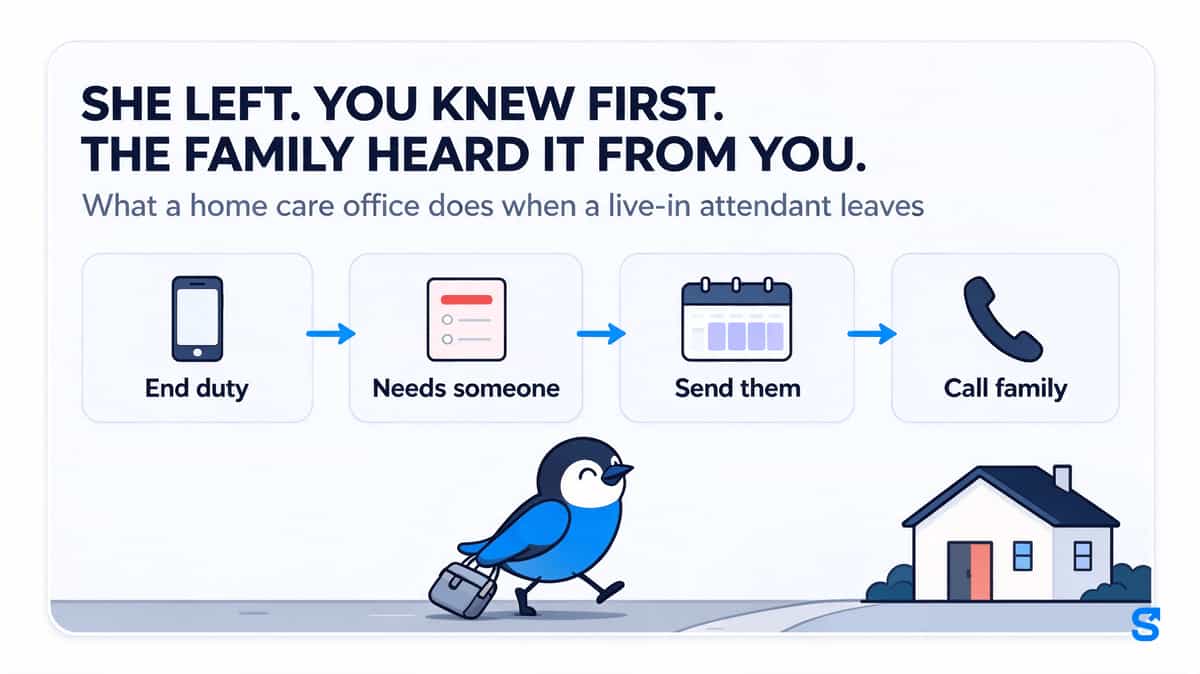
She tells you on her phone. A live-in attendant ends her duty with End duty. The app asks whether she handed over and when she left: I am leaving now, or Left earlier with the time she really walked out. The office gets an alert straight away, and the patient appears under Needs someone as live-in attendant left. The leaving time is hers, not the time somebody noticed, which is what her last day is paid from. The live-in stays article covers that end-of-stay step in full.
The family tells you. Sometimes she simply goes. When the family rings to say nobody is there, the office taps Family says nobody is there on that patient. The app asks Mark the patient as nobody there now? and says plainly that it does not change pay or the bill. The patient then shows under Needs someone as reported nobody there.
Either way, the row has one button that matters: Send a replacement. Only the owner or a care manager can press it; anyone else sees a line saying who can.
Send a replacement for the whole stay, not for today
Send a replacement opens the cover sheet already filled in for that patient, with the attendant who left as the person being stood in for. For a live-in patient it asks for a First day and a Last day, not a single date.
Set the last day to the end of the stay the family booked, or to the day a permanent attendant can join. The quick picks (a few days, A week, 2 weeks) save typing. The sheet then says what it is doing: Live-in: showing who is free for the whole stay, with the two dates.
That is the important part. Every attendant in the list is judged against all of those days, not just the first one:
- Free the whole period means she can take the entire range.
- On leave 2 of the 3 days (or whatever the count is) means she cannot, whatever she told you on the phone last week.
- Rostered on a number of days, or a count of other visits, means she has work already in that range.
- Already visits them marks someone the patient and family already know, which is usually the kindest choice.
Say Meena has left Mr Sharma's house. The list might show Sunita as Free the whole period, Rekha as On leave 2 of the 3 days, and Kavita as Already visits them but rostered elsewhere on two of the days. Sunita is the one to send.
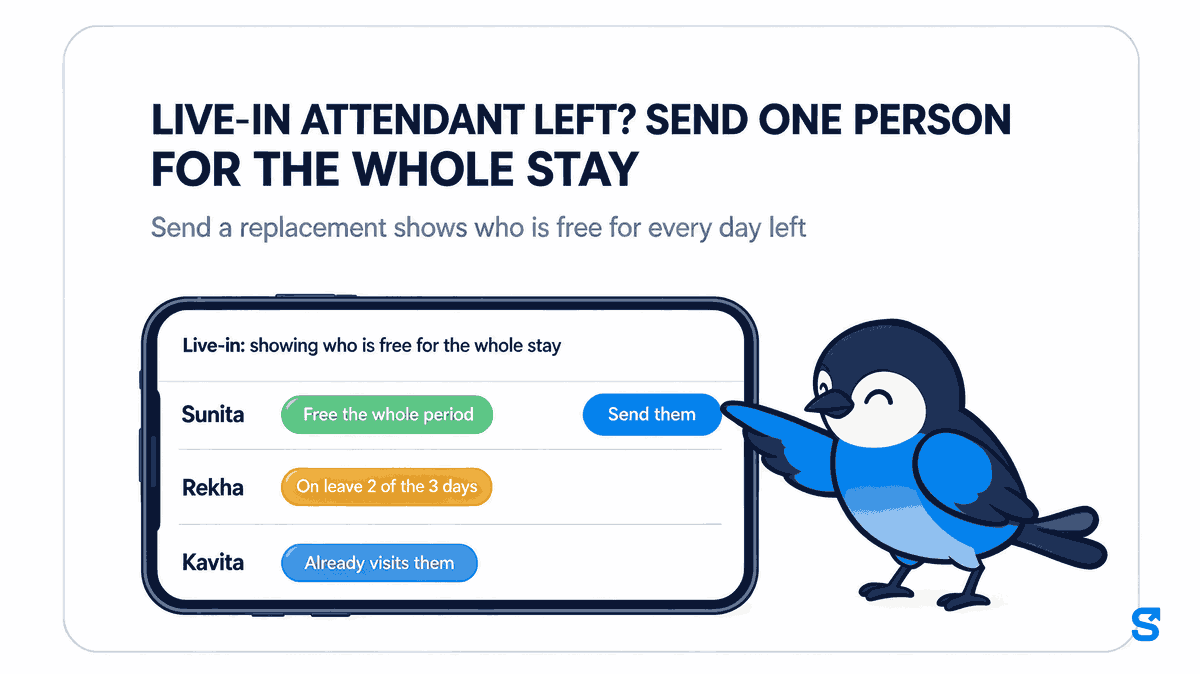
Pick the person, add a reason if you want one (left the placement, family asked for a change), and tap Send them. The patient's address goes onto the new attendant's phone for those days only, so she can clock in at the house, and it disappears again afterwards. If you picked the wrong person, the confirmation carries an Undo.
What the replacement is paid, and what the family is billed
The sheet has one money box: What the substitute is paid. Leave it blank and the new attendant gets what she was last paid for home care, or, if she has never done home care, what this stay pays. Type a figure if you have agreed a different rate with her, for example a little extra for taking a placement at a few hours' notice.
Underneath it the sheet says: What the family is billed does not change either way. That is deliberate. The family booked a live-in attendant at a price. Who stands in, and what you pay her, is your agency's business. The bill keeps being worked out per care day from the days someone was actually there, as before.
Call the family before they call you
When the replacement is placed, the sheet changes to a single line: the new attendant's name, the patient's name, and tell the family, with a Call family button that dials the number saved on the patient's record.
That call is the most valuable thirty seconds in the whole process. A family that hears "Meena has had to leave, Sunita is coming at two o'clock, she will stay until the 30th" from you has a problem that is already solved. A family that discovers an empty room and rings you has a complaint.
Placing the replacement also closes the open report that nobody is with that patient, so the Needs someone list empties as the work gets done, and the morning list only shows what is still uncovered.
Paying the attendant who left, on time
The attendant who left is owed her wages, and the deadline is short. Under Section 17(2) of the Code on Wages, 2019, when an employee is removed, dismissed, retrenched or resigns, "the wages payable to him shall be paid within two working days". The government made the four labour codes, including the Code on Wages, effective from 21 November 2025, as announced in a Press Information Bureau release. Both checked on 19 November 2026.
Whether a live-in attendant is your employee or works on some other arrangement depends on your agreement with her, and that is a question for your own adviser. What this section is about is practical: an agency that already has her care days counted, up to the time she gave when she left, can work out what she is owed the same day. One that has to reconstruct the stay from phone calls cannot.
What the office still decides
The app shows who is free and remembers the dates. It does not choose for you, and some of the judgement is not the kind a list can carry:
- Whether the patient needs someone with particular experience (a bedridden patient, dementia, a feeding tube) that only some of your free attendants have.
- Whether the family would accept a male attendant, or someone who speaks their language.
- Whether the replacement is a stand-in until a permanent person joins, or the new permanent attendant.
- What to tell the family about why the first attendant left. Keep it short and kind, and never blame the patient's household on the phone.
Which home care app sends a live-in replacement for the whole stay?
The one thing it does that a register and a WhatsApp group cannot: it checks every day of the range against every attendant's leave and work before you pick, so the person you send on Monday is still free on Thursday.
A checklist for the morning a live-in attendant leaves
- Save each patient's family phone number on the patient record, so Call family has a number to dial.
- Tell every live-in attendant, on her first day, to use End duty when she leaves and to give the real time.
- When a family rings to say nobody is there, mark it with Family says nobody is there before you start phoning.
- Open Send a replacement and set the last day to the end of the stay, not to today.
- Prefer someone marked Free the whole period, and someone who already visits the patient if there is one.
- Agree the replacement's rate before you tap Send them, and type it in if it differs.
- Tap Call family as soon as she is placed, and give the family her name and arrival time.
- Work out what the attendant who left is owed from her care days, and pay it within the legal deadline.
Questions home care agencies ask
What should an agency do when a live-in attendant leaves suddenly?
Place one replacement for every remaining day of the stay, then call the family. Find someone free for the whole range rather than one day at a time, and record the time the first attendant actually left.
Can I send a replacement for just a few days until a permanent attendant joins?
Yes. Set the last day to the day the permanent attendant starts. The address leaves the stand-in's phone after that day, and you can place the permanent person from that date.
Does sending a replacement change what the family pays?
No. The sheet says so in as many words. You set what the substitute is paid; the family's bill is still worked out per care day from the days someone was there.
Who can send a replacement?
The business owner, a co-owner, or a manager whose role has Manage ticked for Home Care Patients. Anyone else sees the patient under Needs someone with a line saying only the owner or a care manager can send a replacement.
What if the family says the attendant has gone but she never pressed End duty?
Mark the patient with Family says nobody is there. That does not change pay or the bill. It puts the patient under Needs someone with Send a replacement, and placing someone closes the report.
Is this part of the normal plans?
No. It is part of the home care add-on, which is switched on per business on request and priced separately from the plan.
The short version
- A live-in attendant leaving leaves the patient alone for every remaining day of the stay, not for one visit.
- In Shiftelio's home care add-on the office hears it from End duty or marks it from the family's call, and the patient shows under Needs someone.
- Send a replacement asks for a first and last day and lists who is free for the whole period, so one person is placed for the rest of the stay.
- The substitute's pay is set on the spot, the family's bill does not change, and Call family is the next button.
Sources, and how these were checked
- Wages due on resignation or removal: The Code on Wages, 2019, Section 17(2), Gazette of India, read on 19 November 2026.
- The four labour codes in force from 21 November 2025: Press Information Bureau, Ministry of Labour and Employment, read on 19 November 2026.
- The product behaviour was read from the Shiftelio app as shipped by 19 November 2026: End duty for live-in attendants, Family says nobody is there, the Needs someone rows for a live-in attendant who left, Send a replacement with First day and Last day for live-in patients, the Free the whole period and On leave labels in the list of attendants, What the substitute is paid, the note that the family's bill does not change, and Call family after placing.
Keep reading
Free to use, no signup: HR letter formats.