Masked Aadhaar for Staff Files: Keep Only the Last 4 Digits of Every Employee's Aadhaar
In short
To mask a staff member's Aadhaar, hide the first 8 digits and keep only the last 4 before the copy is stored, then mask the old copies you already hold.
- A masked Aadhaar shows only the last 4 digits of the number; the first 8 are hidden.
- The safest staff file holds only the masked copy, not a full photocopy you mean to mask later.
- Ask for a clear photo, not a PDF or a scan of a scan: a photo is what can be masked.
To mask a staff member's Aadhaar, cover the first 8 digits of the 12-digit number so only the last 4 can be read, and do it before the copy goes into your staff file. Then go back through the copies you already hold, because those old full photocopies are the ones most likely to be lying in a drawer or a WhatsApp chat.
Why a full Aadhaar photocopy in a staff file is a problem
Almost every Indian shop, restaurant, security agency and home-care agency asks a new joiner for an Aadhaar copy. It is the one identity document nearly everybody has, and it carries the name, photo, date of birth and address on one card. So the copy gets taken on day one, often on the manager's own phone, and then it lives for years in places nobody tracks: a gallery, a WhatsApp group with the accountant, a box file under the counter, an email to the payroll person.
The trouble is that a full copy is more than you need. For a staff file you need to know that the person showed you a real Aadhaar and that the name and photo match the person standing in front of you. You almost never need all 12 digits again. Every full copy you hold is one more place where somebody else's complete number can leak, and when a staff member asks "who has my Aadhaar?", the honest answer in most small businesses is "we are not sure".
A masked copy keeps what the file is for and drops what it is not. The name, photo, and the last 4 digits still let you match the card to the person and to their other papers. The first 8 digits, which are what makes the number usable by somebody else, are simply not there.
What a masked Aadhaar is
A masked Aadhaar is a copy of the card where the first 8 digits of the number are covered and only the last 4 digits are visible, so a number reads like XXXX XXXX 4821. UIDAI lets every resident download a masked e-Aadhaar from the myAadhaar portal for their own use.
That download is for the card holder. As an employer you face a different job: the staff member hands you, or photographs for you, the card they already have, and the masking has to happen on your side, on every copy, every time. That is the gap this article is about.
What the rules say (short version)
The Aadhaar (Targeted Delivery of Financial and Other Subsidies, Benefits and Services) Act, 2016, in Section 29(4), says no Aadhaar number, demographic information or photograph collected under the Act shall be "published, displayed or posted publicly", except for purposes set by regulations. Checked on 25 Oct 2026.
In May 2022 a UIDAI press release advised people to share a masked Aadhaar instead of a photocopy. The Ministry of Electronics and IT then withdrew that release the next day, saying it could be misread, and that card holders are "only advised to exercise normal prudence" in sharing their number. The same clarification describes a masked Aadhaar as one that "displays only the last 4 digits". Checked on 25 Oct 2026.
Beyond Aadhaar itself, the Digital Personal Data Protection Act, 2023 is the wider framework for personal data an employer holds about staff. Checked on 25 Oct 2026.
None of this tells a small employer, line by line, what to keep in a staff file. What it does make clear is that an Aadhaar number is treated as something to be careful with, and that the masked form exists for exactly this kind of everyday sharing. This is general information, not legal advice: check with UIDAI or a lawyer for your case.
How to mask staff Aadhaar copies by hand, if you have no app
If you are doing this on paper or in a phone gallery, the method is simple. It is just easy to skip.
Ask the person to lay the card flat, in good light, and take one sharp photo of the front and one of the back. A photo can be masked in a minute. A faded photocopy, a PDF or a scan pasted into a Word file is much harder, and is often left as it is.
Use any photo editor's draw or blur tool and put a solid box over the first 8 digits, everywhere the number is printed. On many cards it appears more than once, so check the front, the back, and any small print near the photo. Keep the last 4 digits readable.
The masked copy is pointless if the full photo is still in the gallery, the WhatsApp chat and the email you sent the accountant. This is the step everybody forgets.
Make a list of every staff member whose Aadhaar you hold, and where. Mask the old ones the same way, starting with the people who have left, whose papers nobody is looking after any more.
It works, but it depends on one careful person doing four steps for every joiner, and on nobody ever forwarding the original first.
How Shiftelio masks staff Aadhaar for you
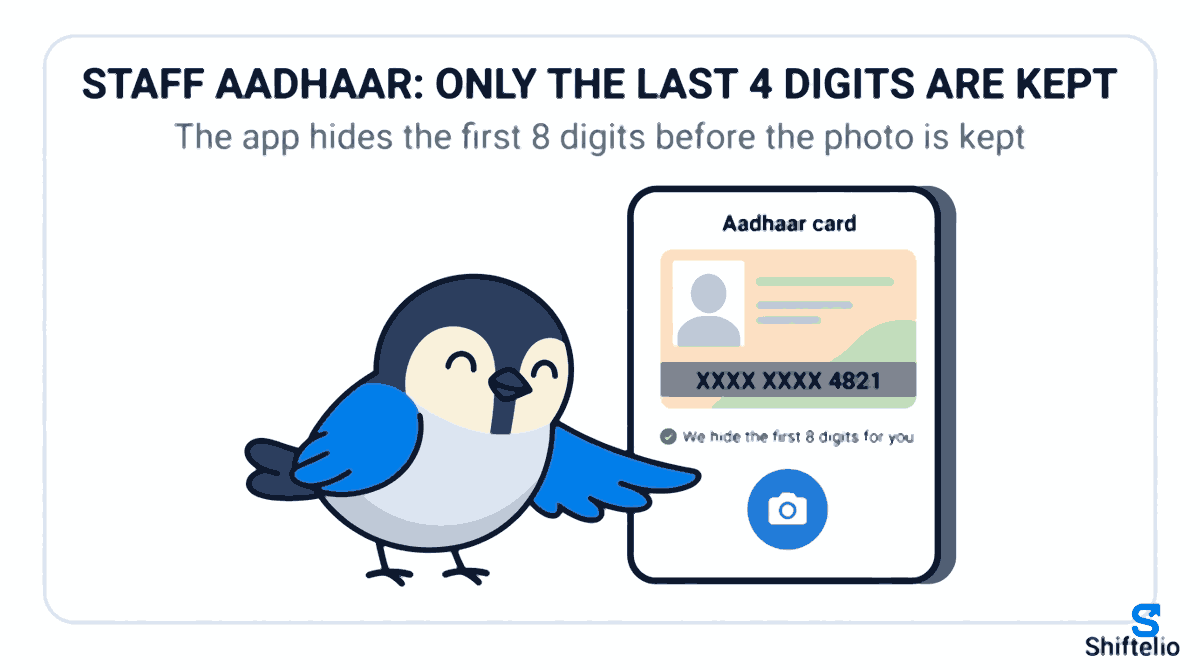
In Shiftelio, staff documents live in Staff documents, the same place you ask new joiners for their papers and check them off. When the checklist asks a staff member for their Aadhaar card, the Aadhaar tile on their phone says "We hide the first 8 digits for you. Only the last 4 are kept." and asks them to fit the whole card inside the photo, flat and sharp.
They take the photo, and the app hides the first 8 digits before the picture is kept. The copy in your staff file, the one you and your managers open when you review it, is the masked one. Nobody on your side has to remember to blur anything, and the full number never sits in your files waiting for somebody to get round to it.
The same happens when a manager collects documents for staff on site, for a guard or an attendant who has no smartphone: the Aadhaar photo taken on the manager's phone is masked the same way.
What happens to the Aadhaar copies you already have
Masking new uploads only fixes the future. Most businesses already hold dozens of full copies, and some photos are too blurry or too dark for the app to find the number in. Those are not quietly left alone.
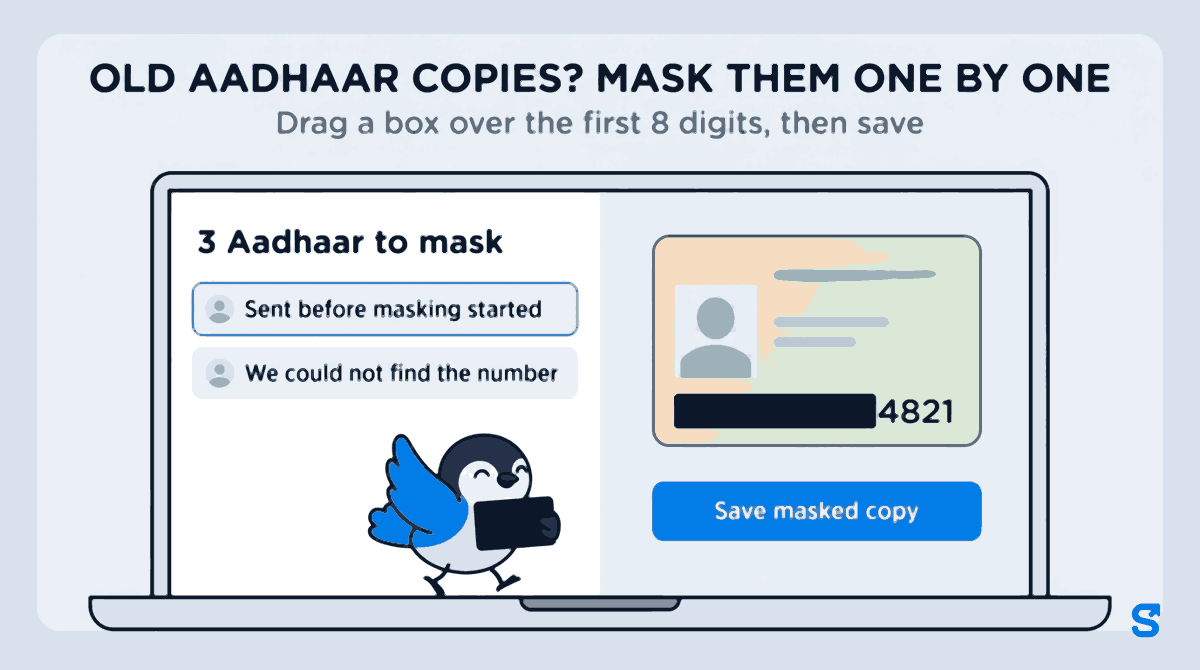
The Staff documents page shows a chip such as "3 Aadhaar to mask" to the owner and to managers who can review documents. Tap it and you get the list: each row names the staff member and says why it is there, either "Sent before masking started" or "We could not find the number". A file the app could not mask stays private and waits on this list.
Open a row and the card appears with a simple tool: drag a box over the first 8 digits of the Aadhaar number, adding one box for each place it is printed, then tap Save masked copy. From then on staff and every screen see the masked copy. You can do the same from a person's review screen with the Mask button. When everything is done the list reads "Every Aadhaar is masked."
If some of the old copies are PDF or Word files, the list says so and tells you to ask the person for a photo instead, because those cannot be masked here.
A day at a security agency, before and after
Take a security agency in Pune with 60 guards across 9 sites. Every guard's Aadhaar was collected at joining, mostly as WhatsApp photos sent to the field officer, then forwarded to the office. The owner cannot say how many full copies exist, only that there are "a lot".
After switching to Staff documents, each new guard photographs their Aadhaar on the joining checklist and only the masked copy is kept. For the 60 old copies, the owner uploads them through the guards' checklists over a week, opens the Aadhaar to mask list each evening and masks five or six in a few minutes. The field officer's WhatsApp photos can then be deleted, because the staff file now holds a copy that does the job without the full number.
Which app hides the first 8 digits of staff Aadhaar copies?
You can see how Staff documents fits with check-in, rosters and salary on the Shiftelio features page. If you are still deciding what to ask new joiners for, our guide to collecting new hire paperwork before day one walks through the whole checklist.
Questions owners ask
What does masked Aadhaar card mean?
A masked Aadhaar shows only the last 4 digits of the 12-digit number; the first 8 are hidden, usually as XXXX XXXX. The name, photo and other details on the card stay visible.
Can an employer ask for a masked Aadhaar instead of a full copy?
Yes, an employer can ask for a masked copy. For most staff files the name, photo and last 4 digits are enough to match the card to the person; check with your own adviser if a specific scheme or client needs the full number.
How do I mask an Aadhaar card a staff member already gave me?
Cover the first 8 digits with a solid box in any photo editor, everywhere the number is printed, then delete the unmasked original. In Shiftelio, open the Aadhaar to mask list in Staff documents, drag a box over the digits and tap Save masked copy.
Does Shiftelio keep the full Aadhaar number anywhere?
For a photo staff upload or a manager collects in Staff documents, only the masked copy is kept. When you mask an old copy by hand, the original file is kept and every screen shows the masked copy.
What if the Aadhaar was sent as a PDF?
A PDF or Word file cannot be masked in the app. It appears on the Aadhaar to mask list with a note to ask the person for a photo of the card instead.
Do staff need to download a masked Aadhaar from UIDAI first?
No, staff do not need to download anything. They photograph the card they already have on the Staff documents checklist, and the app hides the first 8 digits for them.
Keep reading
Free to use, no signup: Shift roster template.