Salary Arrears: Paying a Backdated Pay Rise Without Reopening a Paid Month
In short
Salary arrears from a backdated pay rise, worked out day by day: how to calculate them, which months can change, and what to do about a month already paid.
- Arrears = (new rate minus old rate) × the days or hours actually worked since the agreed date. Nothing else.
- A month you have already paid should never be recalculated. Pay its arrears as a separate line on the next payslip, named for the period it belongs to.
- A month that is still open should simply be re-priced, day by day, so the payslip is right the first time.
You told your cook in the last week of August that he would get ₹60 more a shift from 1 August. Then the month closed, salaries went out at the old rate, and nobody changed anything in the system. It is now late September. He has worked most of this month at the old rate too, and he has started asking, politely, when the raise is coming.
What you owe him now is salary arrears: the difference between what he was paid and what he should have been paid, for every day since the date you agreed. The arithmetic is simple. The hard part is doing it without breaking a month that is already paid and closed.
What salary arrears are, in one sentence
Arrears are wages that belong to an earlier period and are paid later. The glossary entry on arrears has the longer definition; the part that matters to an owner is that arrears are not a bonus. They are the same wage, late. That changes how you should show them on a payslip, and it is why an employee's tax on them can be spread back over the years they were earned in (more on that below).
Arrears come from three places in a small business:
- A pay rise agreed from a date that has already passed. The most common one, and the subject of this article.
- A minimum wage revision notified late. A state can notify new rates weeks after the date they take effect from. Our minimum wage revision article describes Maharashtra notifying on 5 August 2026 with effect from 1 July, which puts a closed month into arrears for every employer who waited for the notification. The next revision date is 1 October 2026, so this is about to happen again.
- A rate entered wrong. Somebody typed the old shift rate into a new shift, and nobody noticed for three weeks.
How to calculate salary arrears
Work it out per day, not per month. A month total hides the days that actually changed.
The date you agreed with the employee, or the date in the government notification. Write it down. Every later step counts from it.
Shifts, days or hours actually worked, split by pay period. Paid leave and paid holidays in that stretch count too, because they are paid at the rate that applies to them. Absent days do not.
New rate minus old rate, times the units from step 2. For a monthly salary, work out the day rate for each month the way your payroll already does, and apply the difference per day.
A period already paid gets an arrears line on the next payslip. A period still open gets re-priced so the payslip carries the right rate from the start.
Here is the cook's case, worked through.
- ₹700 → ₹760: rate per shift, agreed from 1 August
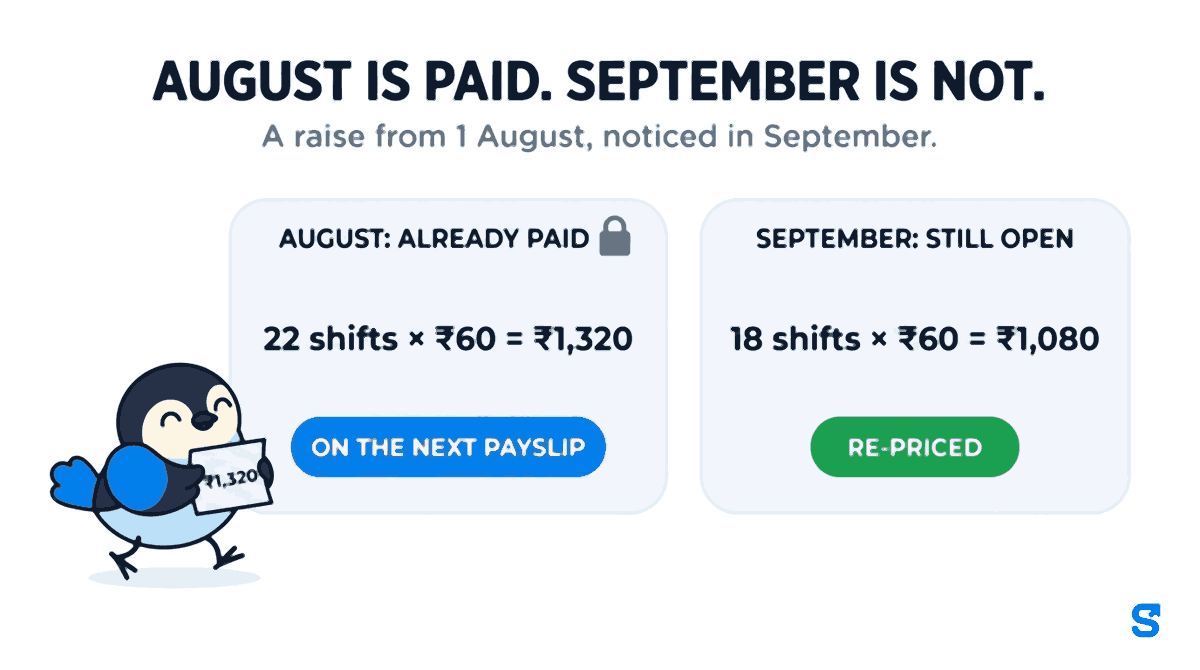
- 22 shifts × ₹60 = ₹1,320: August, already paid at the old rate
- 18 shifts × ₹60 = ₹1,080: 1 to 22 September, month still open
- ₹2,400: total arrears
A raise from 1 August, noticed in September. August is paid. September is not. Two numbers, and they need two different treatments. That split is the whole problem.
The month already paid: leave it closed
It is tempting to open August, change the rate and run the month again. Do not. August's payslip has been handed over, the money has left your account, and PF and ESI for August have been worked out from it. Recalculating August now produces a second version of a month the employee already holds, and the two will never agree.
The clean way is to leave August exactly as it was and pay its ₹1,320 on the next payslip, as its own line, with the period in its name: Arrears, rate change from 1 August. The employee can see what it is for, and your records still say what really happened in August.
Two things follow from paying it through payroll rather than as a separate bank transfer:
- PF. If the raise is to basic wages, the arrears are wages for PF purposes too. A transfer outside payroll is the usual way that contribution gets missed.
- The employee's income tax. Arrears received this year for an earlier year can push somebody into a higher slab. Section 89 of the Income Tax Act lets them claim relief by filing Form 10E; the Income Tax Department's Form 10E FAQ explains who can. An arrears line with the period in its name is what lets them prove which year it belongs to.
And pay it promptly. The time limit for paying wages under the Code on Wages, 2019 (section 17) does not pause because a rate was agreed late.
The month still open: re-price the days, do not add a line
September is different. Nothing has been paid, so there is no reason for an arrears line at all. The right fix is to change the rate on the days themselves, from 1 September, so that when September's payroll runs, every shift already carries ₹760 and the payslip is simply correct.
That is where most small payrolls go wrong. A shift rate changed today applies from today. The eighteen shifts already worked this month stay at ₹700, the payslip comes out ₹1,080 short, and somebody adds a manual line to cover it, which is exactly the kind of number nobody can explain in March.
How Shiftelio handles a backdated pay change
In Shiftelio the pay rate lives on the shift, and payroll prices each day from the shift that governed it. A change normally starts today. To reach back, you say so, and the app checks the whole stretch before it writes anything.
On Shifts, click the person's shift card and change the rate. The drawer says it plainly: Changes apply from today, unless you tick "Also change pay for days already worked".
Tick Also change pay for days already worked and pick the first day the new rate applies. It has to be a date before today; a future date is refused.
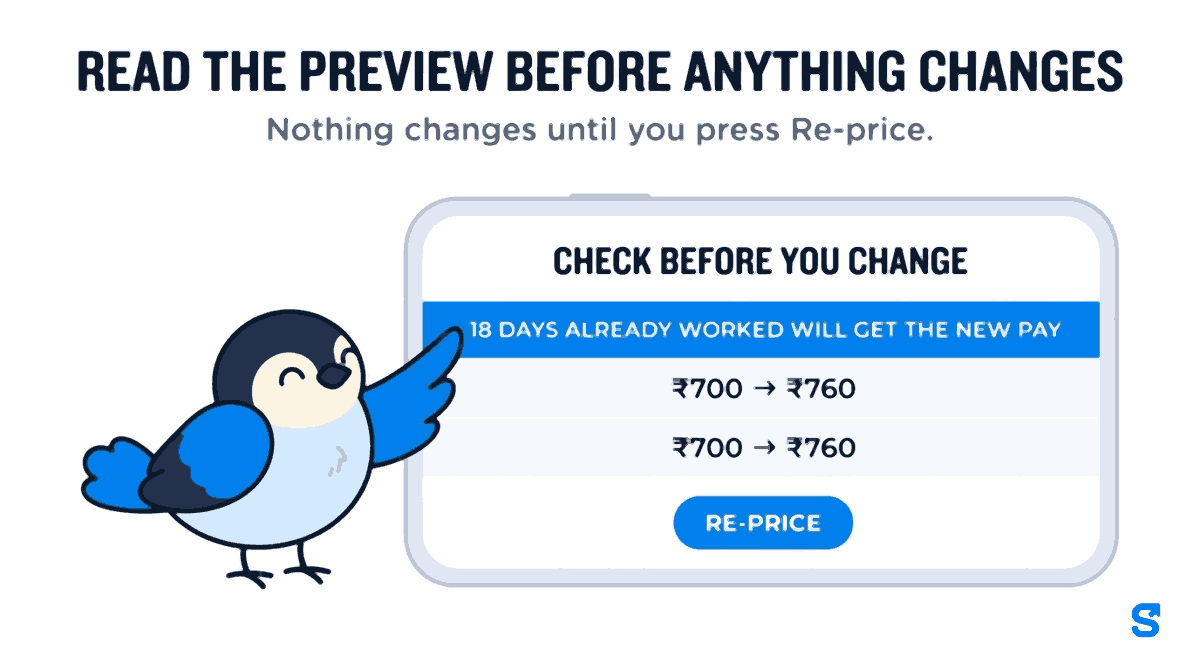
A sheet opens, headed Check before you change and the person's name. It lists what will happen: how many days already worked will get the new pay, how many already have it, and each changed day with its rate before and after. It says Nothing changes until you press Re-price.
Press Re-price. The result tells you how many past days were re-priced, and which open pay period to re-run so the payslip uses the new pay.
Now the cook's case. Pick 1 August and the app refuses before writing a thing:
Pay for 1 Aug – 31 Aug is already signed off, so days in it cannot change. Pick 1 Sep or later.
Shiftelio, the message on a paid period, with this example's dates
That refusal is the point. A period that has been paid, partly paid or revised is closed, and no backdate reaches into it, from any screen. So you pick 1 September. The preview says 18 days already worked will get the new pay and lists each of them moving from ₹700 to ₹760, and you re-price them. August's ₹1,320 goes on the September payslip as an allowance line with the period in its description, exactly as the section above describes.
The details that decide whether the numbers come out right:
- Paid leave and holidays follow the new rate. A paid holiday on 17 September is priced from the shift that governed that day, so it moves to ₹760 with the worked days.
- Late marks and fines already given stay as they are. A backdate changes pay, not discipline.
- A day where you set the pay type by hand keeps it. The preview counts those days separately so you can see they were left alone.
- An approved but unpaid month is reachable only by the owner or a payroll approver, and the preview warns that the approved payroll will be worked out again. Anyone else is refused.
- If the shift had different times back then, the app asks, period by period, whether to use the new pay, the new times, or both. Tick neither and the change starts the day after that period.
- If the date is before the shift's first day, the preview warns that working days with no attendance before it would count as absent, and offers to start from the shift's first day instead.
- Another shift at the same time is refused, because it would pay those days twice.
- Every backdate is recorded. The shift's History tab keeps a log of backdated pay changes, and a version that a backdate ended says so.
One more guard sits in front of all of it. Changing pay on days already worked is its own permission, Backdate pay changes, and it is off for every manager role until the owner ticks it. A manager who can edit shifts can still change a rate from today; only a role with that tick can reach back. The hint beside that tick says it plainly: Rewrites pay on days already worked. Grant with care.
You can see how shift rates feed payroll on the shift roster page.
A checklist for the next backdated raise
- Write down the date the new rate starts, and where it came from (your agreement or a notification).
- Split the days since then into periods already paid and periods still open.
- Re-price the open periods so the payslip is right, and re-run that payroll.
- For each paid period, add one arrears line to the next payslip with the period in its name.
- Pay arrears through payroll, not as a side transfer, so PF and the payslip trail follow.
- Tell the employee the amount and the months it covers, in writing.
Are salary arrears taxable?
Yes. Arrears are salary, taxed in the year they are received. If that pushes the employee into a higher slab, they can claim relief under section 89 by filing Form 10E before their return.
Should arrears be shown separately on the payslip?
Yes, for a period already paid. A separate line naming the period is what lets the employee, PF and anybody auditing later see that it belongs to an earlier month. For a period still open, there is nothing to show separately: the days are simply priced at the new rate.
Can I change the rate for a month I have already paid?
You should not, and Shiftelio will not. It names the paid period and the first date you can pick instead. Pay the difference for that month on the next payslip.
What if the minimum wage goes up from a date that has already passed?
Treat it exactly like a backdated raise. Change the rate from the date in the notification for every period still open, and pay the difference for any period already paid as arrears on the next payslip.
The short version
A backdated pay rise is two jobs, not one. The days in an open month should be re-priced so the payslip is right; the days in a paid month should stay exactly as they were, with the difference paid on the next payslip under its own name. Do both through payroll, and every rupee of arrears can be traced back to the day it was earned.
Keep reading
Free to use, no signup: Payroll calculators.