Do Vacation Days Carry Over in Ontario? See Who Carries Forward and Who Loses Days Before the Year Closes
In short
Ontario's guide says earned vacation is taken within 10 months after the year ends. See each person's carry forward and lapse before your leave year closes.
- Ontario's Employment Standards Act guide says vacation time earned for a vacation entitlement year must be taken within 10 months after that year ends.
- The same guide says an employee can give up earned vacation time only with the employer's written or electronic agreement and the approval of the Director of Employment Standards.
- Extra days you give on top of the minimum, such as floater days, follow your own policy: they can carry forward, carry forward up to a limit, or lapse.
In Ontario, vacation time earned in a vacation entitlement year does carry into the next one: the province's guide says it must be taken within 10 months after that year ends. What happens to any days you give on top of the minimum is your own company rule, and the safe moment to check both is before the year closes, person by person, not after.
The week in December when vacation turns into an argument
Picture a café in Kingston with 14 staff and a leave year that runs from January to December. Everyone gets their Ontario vacation, and the owner also gives three floater days a year, which the staff handbook says are "use them or lose them".
In the second week of December the questions start. A barista asks whether her four unused vacation days are gone on 1 January. A cook wants to know why his floater days disappeared last year when a co-worker's did not. And the owner, who keeps the balances in a spreadsheet, is not sure either, because the spreadsheet has one column for "left" and nothing that says what happens to those days next year.
That is the gap this article is about. The days themselves are usually recorded somewhere. What is missing is a clear answer, before 31 December, to two questions for every person: which of my days move into next year, and which do I lose?
What Ontario's rules say about unused vacation
This section is a short summary of the province's own guide, not the whole rule. Checked on 12 October 2026 against Your guide to the Employment Standards Act: Vacation on ontario.ca.
The vacation time earned for a vacation entitlement year or a stub period must be taken within 10 months after completing that year or stub period.
In Ontario, the guide describes a vacation entitlement year as the 12-month period over which employees earn vacation. It can be a standard one that starts on each person's date of hire, or an alternative one the employer chooses, such as January to December, with a shorter "stub period" for someone hired part way through. It says employees with less than five years of employment are entitled to two weeks of vacation time after each vacation entitlement year, and three weeks from five years.
On giving days up, the guide says an employee can give up some or all of their earned vacation time with the employer's electronic or written agreement and the approval of the Director of Employment Standards. And on records, it lists what an employer keeps for each year: the vacation time earned, the vacation time taken, and the balance of vacation time remaining at the end of the vacation entitlement year.
Put those together and the year end matters in Ontario for two reasons. The days earned this year are the days people take next year. And the balance left at the end of the year is a number the province expects you to have on record.
Other provinces set their own vacation rules, so a business outside Ontario reads its own province's employment standards page. This is general information, not legal advice: check with the Ministry of Labour, Immigration, Training and Skills Development or an employment lawyer for your case.
Two kinds of days, two different year-end rules
Most small Canadian businesses end up with two kinds of paid time off, and they behave differently at the year end.
| Vacation (the province's minimum) | Extra days you give (floater days, birthday day) | |
|---|---|---|
| Who sets the rule | Your province's employment standards | You, in your own policy |
| In Ontario | Taken within 10 months after the year ends, per the guide | Whatever your handbook says |
| Typical year-end setting | Carry forward all | Carry forward up to a limit, or lapse |
| What staff need to know | How many days move into next year | Whether unused days are lost, and when |
The trouble starts when both live in one spreadsheet column. A "use it or lose it" habit that is fine for floater days gets applied to vacation as well, and nobody notices until somebody asks.
The year-end preview: see the close before it happens
Shiftelio keeps vacation under Leaves, with one leave type per kind of day. Each leave type carries its own At year end rule: Unused days lapse, Carry forward up to a number of days you set, or Carry forward all. If you are setting up vacation for the first time, our guide to a vacation tracker for employees walks through the leave types; this article starts where that one stops, at the end of the year.
In Leaves, open Settings. The Leave year card shows your year and when it ends, with a link: See the year-end preview. You can open it any time; it is most useful in the last weeks of the year, and the app sends you a reminder before the year ends with how many days will carry forward and how many will lapse.
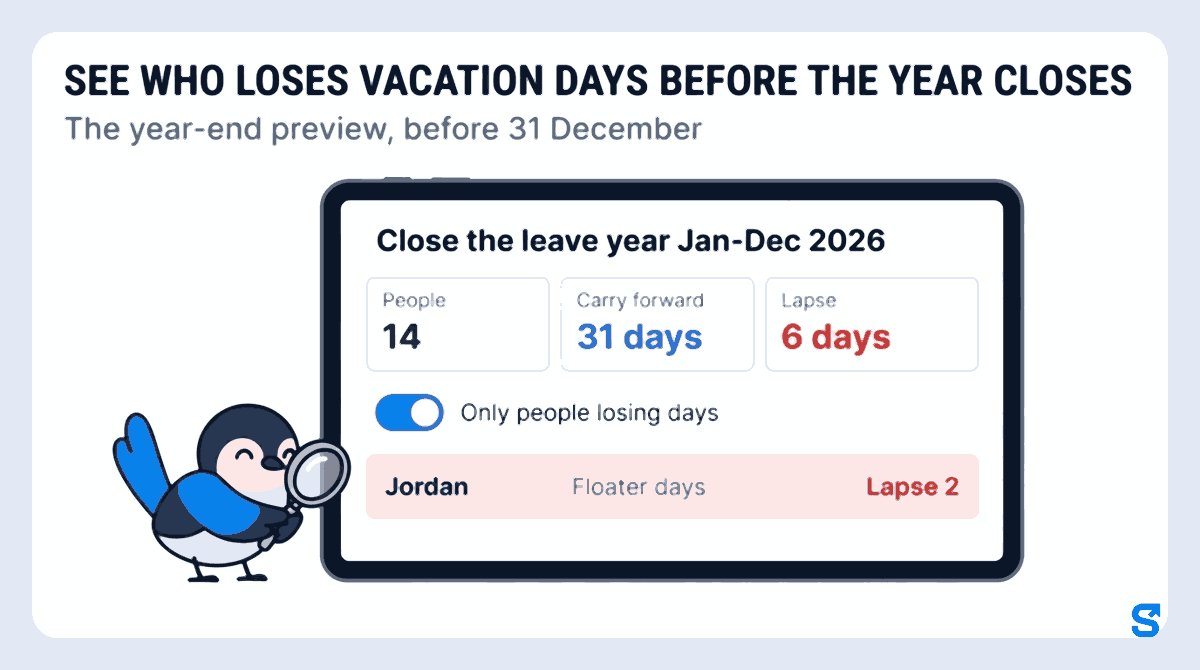
The screen is headed Close the leave year Jan-Dec 2026 and shows four totals: People, Carry forward, Lapse and New year opens. For the Kingston café that reads 14 people, 31 days carry forward and 6 days lapse.
Below the totals is a table with one line per person and leave type: Left now, Carry forward, Lapse, and what they start the new year with. Tap Only people losing days and the café's list drops from 14 people to the 4 who still hold floater days. Jordan, a line cook, is one of them: his line reads Floater days, Lapse 2. Those are the four conversations to have this week, not in January. That is the point of the year-end preview, before 31 December: you see who loses vacation days before the year closes, while they can still book them.
Under the year-end rules, tap Change a rule on any leave type and pick a different setting. The totals change straight away to show the result, and nothing is saved until you press Save rules. If the owner tries Carry forward up to 1 day for floater days, the preview shows how many of the 6 lapsing days would move instead.
When the numbers match your policy, tap Looks right. That marks the year as reviewed, and you can still change a rule until the year closes.
One detail that saves an argument: leave that crosses the year end counts by the date of each day. A server off from 29 December to 3 January takes the December days from this year and the January days from next year, without anybody splitting the request by hand.
What happens on the first day of the new year
You do not press a button to close the year. On the day the new leave year starts, it opens on its own with the numbers the preview showed, and the app tells you how many days were carried forward and how many lapsed. Staff are told their leave for the new year is ready, so the barista from the opening sees her four vacation days waiting in January without asking.
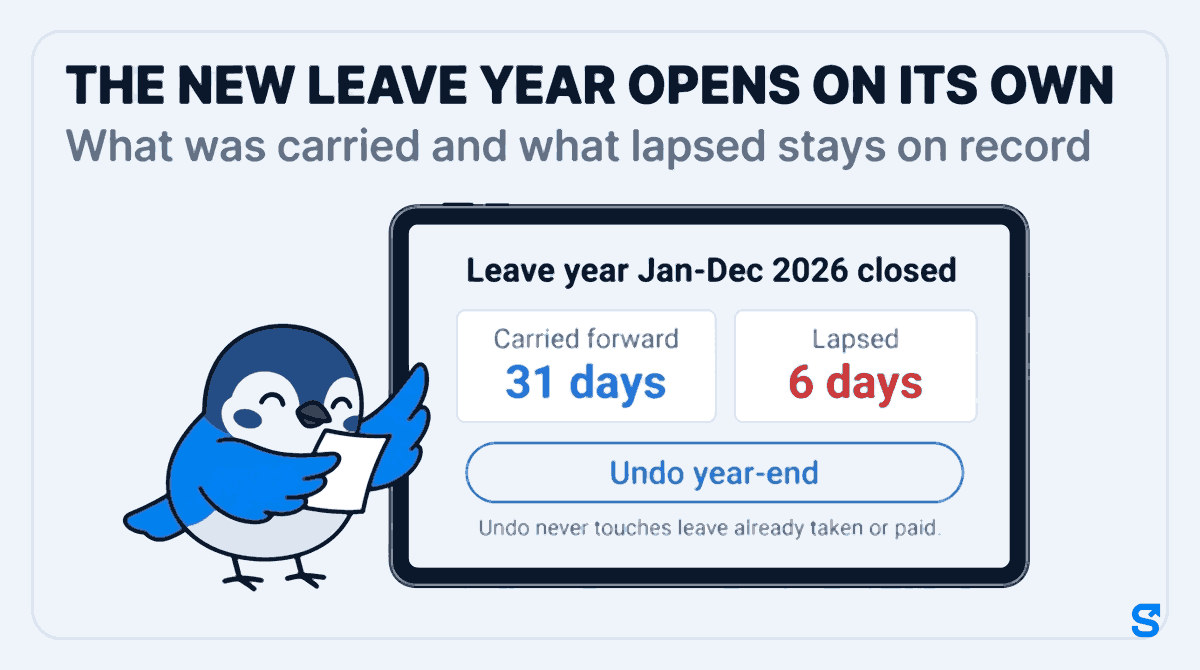
The closed year keeps its own page: Leave year Jan-Dec 2026 closed, with the number of people, the days Carried forward and the days Lapsed. What was carried and what lapsed stays on record, per person: that is the end-of-year balance, which is what Ontario's guide lists among the vacation records an employer keeps.
And if a rule was wrong, Undo year-end reverses the carry forward, the lapse and the new days for a short time after the close, as long as nobody has used next year's leave yet. Undo never touches leave already taken or paid. Once that window has passed, single numbers are fixed with Adjust, which asks for a reason the person can see.
A year-end checklist for a small Ontario team
- Keep vacation and any extra days as separate leave types, each with its own At year end rule.
- Open the year-end preview in the last weeks of the year and switch to Only people losing days.
- Talk to each person on that list now, while they can still book the days.
- Try a different rule in the preview before saving it, and press Save rules only when the totals look right.
- Tap Looks right, let the new year open on its own, then read the closed year's carried and lapsed totals.
- Check your province's own vacation page for anything your policy has to follow.
Which tool fits a small Canadian team at year end
A spreadsheet can hold a balance, but it cannot show you next year's numbers before they exist, and it cannot tell four people this week that their days are about to lapse. Payroll software usually tracks vacation pay, the percentage of wages, rather than the days people actually take. What a small team needs at the year end is the day count, per person, with the rule written next to it.
The one thing Shiftelio does that a spreadsheet and most payroll tools do not: it shows the close before it happens, lets you try a different rule against the real balances, and keeps the closed year's carried and lapsed totals on record afterwards. The full list of what the app covers is on the Shiftelio features page, and how it works for Canadian teams is on Shiftelio for Canada.
Frequently asked questions
Do vacation days carry over in Ontario?
Yes, in the sense that Ontario's guide says vacation time earned in a vacation entitlement year must be taken within 10 months after that year ends. So days earned this year are usually taken next year.
Can an Ontario employer make unused vacation days expire?
Ontario's guide says an employee can give up earned vacation time only with the employer's written or electronic agreement and the approval of the Director of Employment Standards. Extra days above the minimum follow your own written policy.
What is a vacation entitlement year?
It is the 12-month period over which employees earn vacation. In Ontario it can start on each person's hire date, or on a date the employer chooses, such as 1 January, with a shorter stub period for new hires.
When should I check year-end vacation balances?
In the last weeks of the leave year, while staff can still book the days. Shiftelio sends a reminder before the year ends, and the year-end preview can be opened any time.
Does Shiftelio close the leave year automatically?
Yes. The new leave year opens on its own on its start date, using the rules you set. Staff are told their new leave is ready, and you can undo the close for a short time if a rule was wrong.
Does Shiftelio calculate vacation pay?
No. Shiftelio counts vacation days taken, left, carried forward and lapsed. Vacation pay, which Ontario's guide sets as a percentage of gross wages, is calculated by your payroll provider.