Month-End Receipts for a Small Business: Save a Pile of Supplier Bills in One Go
In short
Photograph the month's supplier receipts, pick them all at once, check each bill the app finds, tick the ones to keep and save them together. One sitting.
- Do your receipts in one sitting at the end of each month, or better, each week. Leave them longer and thermal paper fades and you forget what a purchase was for.
- Check every bill before it goes into your records: the shop, the total, the date, that it is a bill and not a statement, and that it was for the business.
- In Shiftelio, the owner adds a bill, picks several photos, PDFs or a spreadsheet at once, sees each bill as a card, ticks the ones to save, picks who paid and saves them all together.
To get a month of supplier receipts into your records in one go, photograph every bill (or gather the PDFs your suppliers email you), pick them all at once, check the shop, amount and date on each bill the app finds, tick the ones you are keeping and save them together. You fill the form once for the whole pile, not once per receipt.
That is the short answer. This guide is for the owner of a small UK business who ends every month with a carrier bag of receipts: the café owner with a dairy delivery note, a coffee roaster's invoice and a cash and carry till roll; the shop owner with stock receipts; the cleaning-firm owner with mop heads and bin bags bought on the way to a client. It covers the habit that keeps the pile small, the five checks worth doing on every bill, and how it works in Shiftelio, step by step.
Why the receipt pile always wins
Most small business owners in the UK handle supplier receipts in one of two ways, and both go wrong in the same place.
The shoebox. Every receipt goes into a drawer, a tin or the glovebox. At the end of the month, or worse at the end of the year, somebody tips it out on the kitchen table. Half the till receipts from the cash and carry have faded to grey, one is from a personal shop, and the invoice the coffee roaster emailed is still sitting in an inbox nobody has opened.
One at a time, every time. The owner types each receipt in the day it happens. It works for a week. Then a busy Saturday comes, three receipts get missed, and the habit is gone.
The fix is a rhythm, not a better shoebox: one batch, at a set time, checked by the person who knows what each bill was for. A month is the longest it should wait. A week is better, because you still remember why you bought two extra crates of oat milk.
Five checks on every supplier bill
Whether you use an app, a spreadsheet or an envelope for your accountant, the same five checks catch almost every problem.
- The supplier name is readable and matches who you bought from.
- The total is what you actually paid, after any discount, not a subtotal.
- The date is right. A bill from last month still counts, but put it in the right month.
- It is a bill, not a card statement. A statement shows you paid somebody; it does not show what you bought.
- It was for the business. A personal item on the same till receipt comes off before you record it.
A bill that fails a check is not a disaster. Recording it without saying anything is. A short note ("roll faded, total was £86.15") saves your bookkeeper an email.
Sam's month end, before and after
Sam runs an independent café in Leeds with four part-time staff. This month's pile is four pieces of paper and one email: a dairy delivery note (£48.60), an invoice from the coffee roaster (£132.00), a cash and carry receipt for cups, lids and napkins (£86.15), and a card statement that slipped in with them. One of the team, Tom, also bought cleaning products for £12.40 with his own money and handed Sam the receipt.
Before. Sam sits down on the last Sunday of the month, types three amounts into a spreadsheet, cannot read the cash and carry total, guesses, and types the statement in as a fourth bill by mistake. Tom's receipt goes in the tin and is forgotten. In March the accountant asks what the statement line was for.
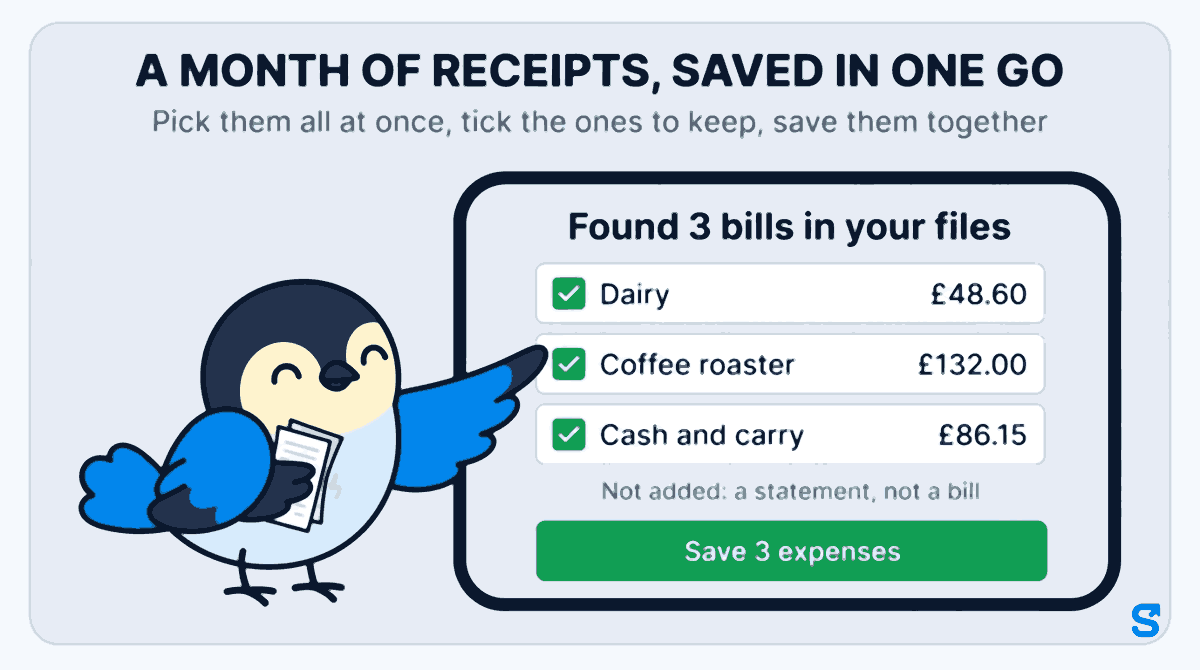
After. Sam opens Shiftelio, goes to Money, then Expenses, taps Add bill, then Choose files, and picks the four photos and the roaster's PDF together. The app shows Found 3 bills in your files: the dairy, the coffee roaster and the cash and carry, each on its own card with the shop, the amount and the date filled in. The card statement is listed underneath as Not added: a statement, not a bill, so it never becomes an expense. Sam taps the cash and carry card to check the faded total, taps Done, chooses Company as who paid, and taps Save 3 expenses.
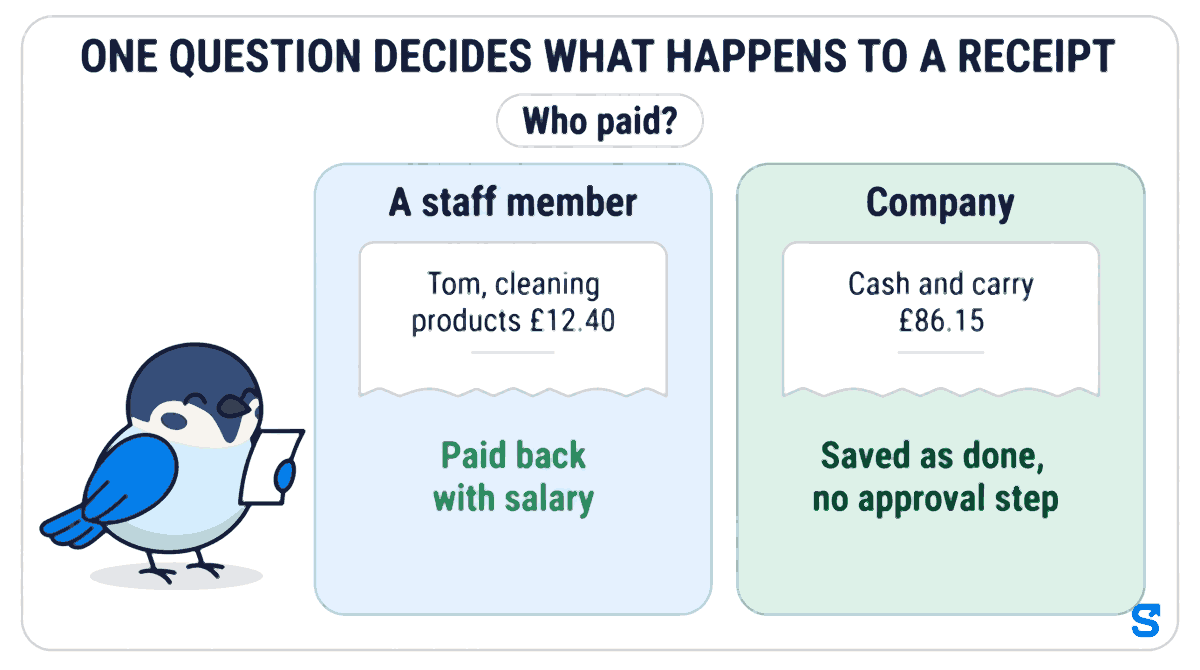
Then Sam adds Tom's receipt on its own, chooses A staff member, picks Tom, and chooses With salary under Pay back how? The £12.40 goes back to Tom with his next pay instead of living in the tin.
How to save several receipts at once in Shiftelio
This is what the owner does, on the phone or on a computer.
Go to Money, then Expenses, and tap Add bill. Tap Choose files and pick several receipt photos at once, a PDF with one bill per page, or a spreadsheet of expenses. A long till roll can be two photos of the same bill, and the app keeps them together as one.
Tap Read 5 files (the number matches what you picked). Each bill the app finds appears as a card: the shop, the amount, the date, the category and which photo or PDF page it came from, with a small picture of the receipt. Anything that is not a bill, such as a refund slip or a card statement, is listed under the cards as not added. A spreadsheet shows as Found 9 rows in followed by the file name.
A bill the app is unsure about carries an amber line, such as Check the amount. Tap the card, fix what is wrong, and tap Done to go back to the list. A bill in another currency, say a supplier who invoices in euros, cannot be ticked until you pick the currency and type the rate.
Under Who paid? choose Company for a bill the business paid, or A staff member and then the person, for a bill somebody paid out of their own pocket. Untick anything that does not belong, add one Note for all bills if you want, and tap Save 3 expenses. Company bills save as done, with no approval step, because you are the one recording them.
If the connection drops while saving, the app tells you how many saved and how many did not, for example 2 saved. 1 could not be saved. Tap Try again. The bills that already saved stay saved and are never added twice.
What you get at the end of the month
- One list for the month. Every bill is on the Expenses screen with its receipt picture, so the drawer can be emptied.
- A file for your bookkeeper. Download Excel on the Expenses screen gives your accountant the list in a spreadsheet, instead of a bag of paper.
- Staff are paid back properly. A bill a member of staff paid is tied to that person and goes back to them the way you chose, so nobody is out of pocket because a receipt got lost.
If your staff also buy supplies during the week, our guide to giving staff a petty cash float and settling it against receipts covers their side, and why no manager should approve their own expense claim covers who signs off.
What GOV.UK says about keeping receipts
This guide is about getting receipts recorded, not about tax, but the reason it is worth doing properly fits in one paragraph.
For people who are self-employed, the GOV.UK guide on what records to keep lists "all receipts for goods and stock" among the proof to keep, and its page on how long to keep your records says records must be kept "for at least 5 years after the 31 January submission deadline of the relevant tax year". Checked on 9 October 2026. A limited company has its own rules, set out on GOV.UK's page on company and accounting records.
This is general information, not legal advice: check with HMRC or an accountant for your case.
Which app saves a month of receipts in one go?
For more on how expenses sit alongside clocking in, rotas and pay, see every Shiftelio feature.
Questions owners ask
How do I keep track of receipts for a small business?
Pick one set time each week or month and record every receipt in one sitting. In Shiftelio, add a bill, choose all your receipt photos or PDFs at once, check each bill the app finds, tick the ones to keep and save them together.
Can I scan multiple receipts at once?
Yes. Photograph each receipt, then pick all the photos together. Shiftelio lists each bill it found as its own card, keeps two photos of one long receipt together, and leaves out anything that is not a bill.
What if a supplier emails me a PDF invoice?
Pick the PDF along with your photos. A PDF with one bill per page shows each page as its own bill, marked with the page it came from, so you can check and save it with the rest.
What happens to a card statement in the pile?
It is not saved as an expense. Shiftelio lists it under the bills as not added, because a statement shows you paid somebody but not what you bought.
How do I pay back a member of staff who bought supplies?
Add their receipt, choose A staff member under Who paid, pick the person, then choose how to pay them back, for example With salary. The amount is then tied to that person rather than left in a drawer.
How long should I keep business receipts in the UK?
GOV.UK says self-employed people must keep records for at least 5 years after the 31 January submission deadline of the relevant tax year. Limited companies have separate rules on GOV.UK.