Multi-Outlet Restaurant Staff Attendance: One Cook, Three Outlets, One Pay Run
In short
When a cook covers at your other outlet, two registers record one person twice or not at all. How to track restaurant staff across several branches.
- A cook covering at your other outlet is one person working one long day, not two people working two normal ones.
- Registers kept per outlet cannot see that, which is how evenings go unpaid and overtime goes missing.
- Keep one profile per person and set where they can clock in, rather than duplicating them per branch.
The festive rush is about to hit every restaurant chain in the country, and this year the staff to meet it are harder to find. Adecco India expects festive temporary hiring to grow 15 to 20 percent in 2026, and puts the gap between demand and supply for frontline roles at 10 to 15 percent at the peak, worst in Bengaluru, Hyderabad, Chennai, Mumbai and Pune (Business Standard, September 2026).
A chain with more than one outlet has an answer a single restaurant does not: it borrows from itself. The quiet outlet lends a cook to the busy one for the evening. It is the right call, and it is also the moment your attendance records stop agreeing with each other.
The evening a cook covers at the other outlet
Take a biryani chain in Bengaluru with three outlets, Indiranagar, Koramangala and HSR Layout, and 22 staff across the three. Each outlet has a manager, a register or a WhatsApp group where people say they have arrived, and a habit of sending the owner a photograph of the month at the end of it.
On a Saturday in October, Koramangala is two cooks short. The owner calls Ravi, who is on a long shift at Indiranagar that started before lunch, and asks him to finish the day at Koramangala instead. Ravi rides across without stopping and is at Koramangala from a little after five until close.
Now look at what each outlet knows. Indiranagar has Ravi down as present and nothing about where he went. Koramangala has him down for the evening, if the manager remembered to write him in, because Ravi is not on Koramangala's list. Nobody has a single line that says Ravi worked a long day across two kitchens.
Nothing dishonest happened. Every record is accurate for the outlet that kept it. They are just not about the same thing: each outlet records its premises, and payroll pays a person.
Three things that go wrong at month end
The evening disappears or is counted twice. If the Koramangala manager did not write Ravi in, his evening is unpaid and he finds out on payday. If both outlets marked him present for the full day, you pay one day twice. Neither mistake is visible from inside one outlet's register.
Overtime hides between two outlets. Each outlet sees a normal shift. The person worked both. Section 14 of the Code on Wages, 2019 requires overtime at not less than twice the normal rate of wages for work beyond the normal working day, and the hours belong to the worker, not to whichever kitchen he was standing in. You cannot pay that correctly from two registers that never meet. We went through the same question for shops in the multi-outlet retail article, and the answer does not change because the premises serve food.
Each outlet's labour cost is wrong. Ravi's evening was Koramangala's cost. If he is simply on the Indiranagar payroll, Indiranagar looks expensive and Koramangala looks lean, and the owner makes staffing decisions for Diwali on numbers that are the wrong way round.
The usual fix makes it worse. Many attendance apps handle a second outlet by making you create the person a second time, once per branch. Now Ravi has two profiles, two salaries to keep in step, and two records that each look complete. You have turned a gap into a duplicate.
One person, one profile, several outlets
The fix starts with the data model: Ravi should exist once, and the question should be where can he clock in, not which outlet does he belong to.
In Shiftelio every employee has one profile, and on it the owner answers exactly that question, Where can they clock in?, with one of three choices:
- Only their base branch. The one outlet on their profile. Right for most staff.
- These branches. You tick the outlets. They can clock in at any of them. Right for a cook who covers Indiranagar and Koramangala.
- Any of our branches. Every outlet the business has, including ones you add later. Right for an area manager or a floater.
No duplicate record, no transfer between outlets when the week changes, and the same salary and the same attendance history wherever the person works.
The outlet is worked out from where the phone is
Each outlet has its own location and its own geofence radius, set per outlet and 100 metres where you have not chosen one. When Ravi checks in, the app measures his distance to every outlet he is allowed to use and records the one he is standing in. The Confirm Check-In screen shows him the match before he submits: Location Verified, followed by the outlet's name, Koramangala in Ravi's case that evening. He never picks from a list, so he never picks the wrong one, and a manager cannot quietly move his evening to a different kitchen.
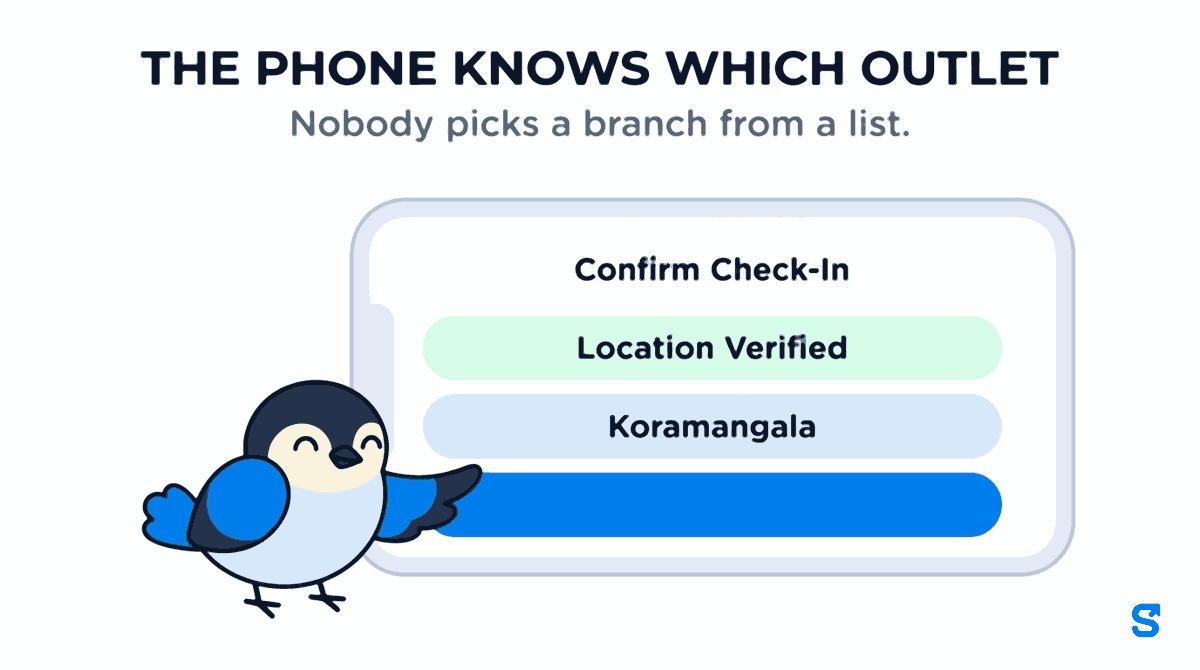
That matters more for restaurants than for most trades, because outlets cluster. Two of your counters in the same food court, or two outlets on the same high street, can have overlapping fences. The rule is deliberate rather than nearest wins: the app compares how far inside each fence the person is, not how far they are from each centre, and breaks a tie toward the smaller, more specific fence. The same position gives the same answer every time, which is what makes it defensible when somebody disputes a day.
A day that crosses outlets is recorded as it happened
Ravi did not work at Indiranagar or at Koramangala. He worked at both, on one day, with a ride across town in between.
When staff have location sharing on during a shift, Shiftelio records the day as a timeline rather than a single place. One shift holds a segment for each outlet with the minutes spent there. Stops shorter than ten minutes are treated as passing through rather than a visit. Time spent getting from one outlet to the other is counted as travelling between sites, paid, and shown on its own line so it never inflates either outlet.
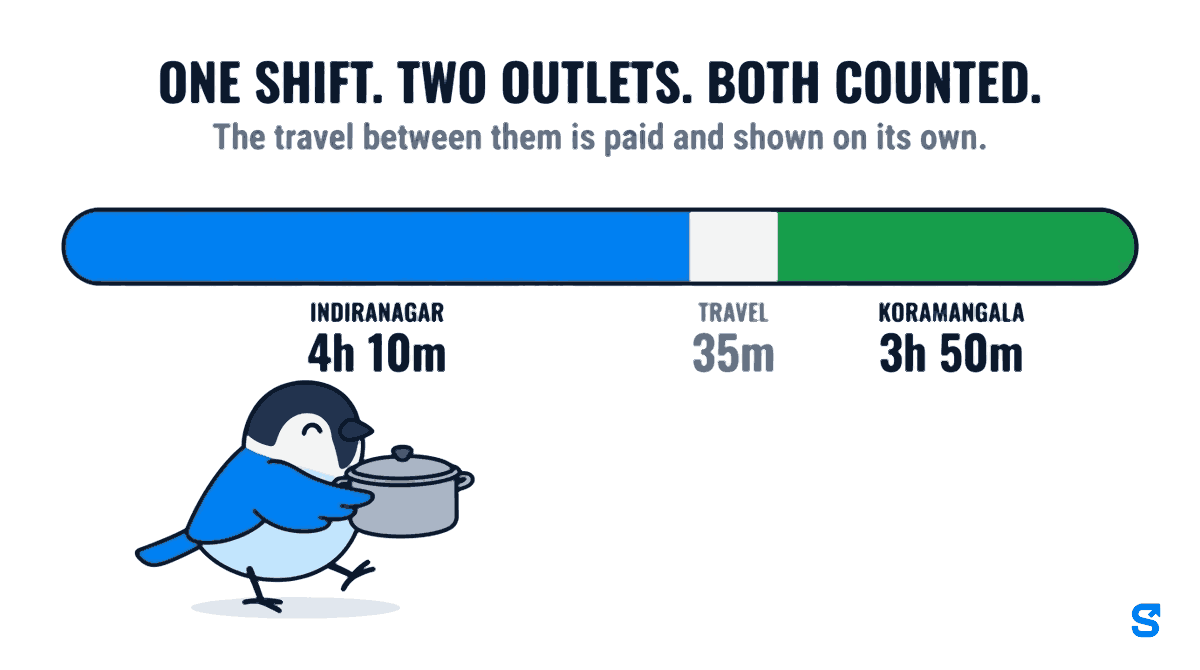
If the phone loses its location mid shift, the minutes are not dropped and are not called travel. The last confirmed outlet is carried forward and the stretch is marked unconfirmed, so a manager can see which part of the day is proven and which is assumed.
For the owner, this is the difference between a register that says present and a record that says 4h 10m at Indiranagar, 35 minutes travelling, 3h 50m at Koramangala. The first starts an argument at month end. The second ends one.
Hours by site, and one pay run for everybody
Two different questions need answering at the end of the month, and a chain needs both.
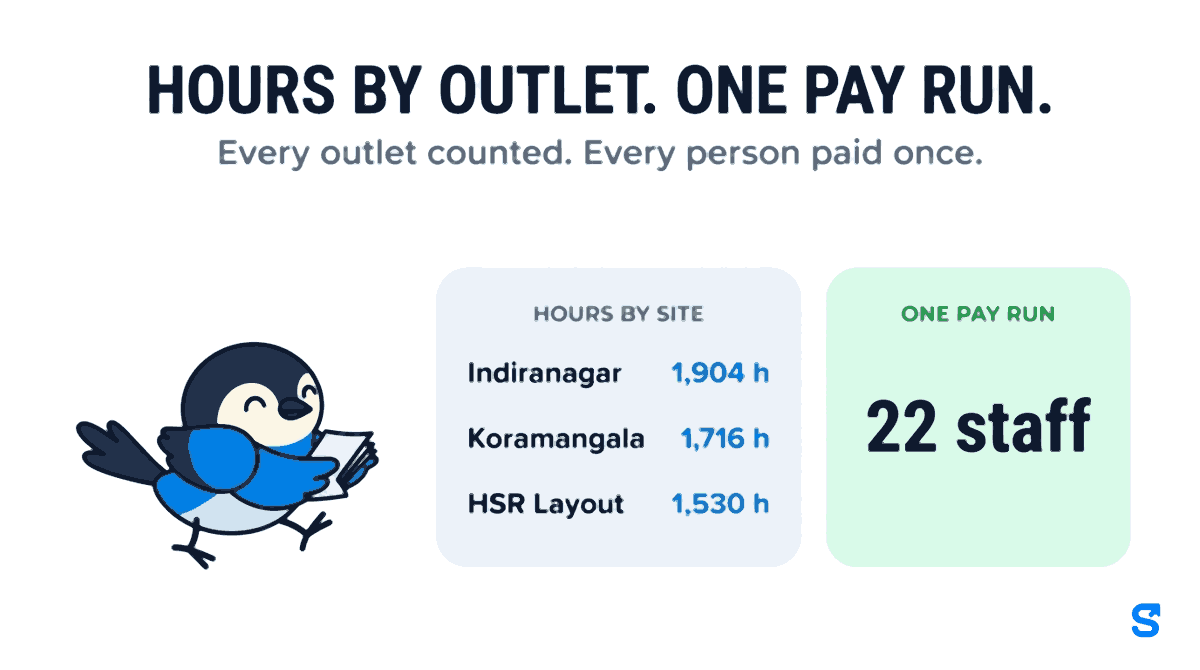
The first is what did each outlet use? In the attendance report there is an Hours by site view. For the month it lists every outlet with the time staff were present there, including breaks, plus travel between sites as its own line and any time where no site matched. A site marked not assigned is one of yours the person was not set up to work at that day, which is worth a look. For the example chain, a month might read 1,904 hours at Indiranagar, 1,716 at Koramangala and 1,530 at HSR Layout.
The second is what does each person get paid? That is one pay run across all three outlets. Ravi appears in it once, with all his hours, whichever kitchens they were worked in, which is the only place his overtime can be worked out properly.
Outlet managers do not need to see each other's kitchens. A role can be limited to particular locations, so the Koramangala manager sees Koramangala's people and attendance while the owner keeps the view across everything.
What this does not do
A chain owner deciding on software in October deserves the limits as plainly as the features.
It counts hours per outlet, not rupees per outlet. Hours by site tells you where the time went. It does not yet split each person's wage into an outlet by outlet cost figure. You multiply hours by rate yourself, or read it as a share of the wage bill.
The timeline needs location sharing. The outlet a person checks in and out at is always recorded. The minute by minute split across outlets is built from the location trail, so days where somebody had location sharing off show the check-in outlet only.
Strict or flexible is set per person, not per outlet. Whether an out of fence check-in is blocked or allowed and flagged is a setting on the employee. You cannot make one outlet strict and another relaxed for the same cook.
It is not a restaurant POS. It does not take orders, run a kitchen display or track stock. It is attendance, rosters and payroll for the people who do those things.
Which app handles staff across several outlets?
The full detail of how outlets, fences and overlaps work is on the multi-site attendance page. If you are still choosing how to take attendance at the counter at all, start with restaurant staff attendance without a biometric machine.
Before the festive rush: a setup checklist
- Add every outlet as a location, with its pin on the actual kitchen entrance, not the building's street address.
- Set a radius per outlet. Tighter for outlets in a mall or food court, wider for a standalone outlet with parking at the back.
- Leave most staff on Only their base branch. Move only the people who genuinely cover to These branches.
- Put area managers and floaters on Any of our branches, so a new outlet you open in November needs no changes to their profiles.
- Limit each outlet manager's role to their own location.
- Ask staff who cover between outlets to keep location sharing on during their shift, and tell them why: it is what credits their evening to the right kitchen and gets their overtime paid.
- At month end, open Hours by site before you open payroll. If an outlet's hours look wrong, the day is still easy to find.
Questions chain owners ask
Do I have to create a cook twice if they work at two outlets?
No. One profile, and you choose which outlets they can clock in at. Their pay, leave and history stay in one place.
Can staff choose which outlet they are checking in at?
No, and that is deliberate. The outlet is matched from the phone's position against the fences of the outlets that person is allowed to use.
Two of our outlets are in the same mall. Will it confuse them?
Overlapping fences are handled by a fixed rule: the outlet the person is most clearly inside wins, and a tie goes to the smaller fence. The same spot always gives the same answer.
Is travel between outlets paid?
Yes. It is counted as paid time and shown on its own line as travelling between sites, so it is not added to either outlet's hours.
Does a cloud kitchen with several brands in one kitchen count as several outlets?
Only if they are at different addresses. Brands cooked in one kitchen are one location. Separate kitchens in different places are separate outlets.
Keep reading
Free to use, no signup: HR letter formats.