PTO Tracker for Hourly Staff: See Every Balance on One Screen Before Year-End
In short
A PTO tracker for hourly staff shows each person's days left, what they earned and what carries over, so year-end rollover is decided before December 31.
- A PTO tracker should show each person's days left as "N left of M", where M is what they were given plus what carried over from last year.
- The federal FLSA does not require payment for time not worked, such as vacation, per dol.gov, checked on 12 October 2026. PTO is a policy you choose, and some states add rules.
- Decide your year-end rule (carry all, carry up to a limit, or let unused days lapse) before December 31, and preview who loses days before the year closes.
A PTO tracker for hourly staff is one screen that shows, for every person, how many paid days they have left, how many they were given or have earned so far, and what happens to the rest at year-end. Keep it where you and your staff both see the same number, and set your rollover rule before the year closes, not after.
That sounds obvious until you look at how most small US businesses track paid time off today: a spreadsheet the owner updates when they remember, a payroll provider that only hears about time off after the fact, and a group text where a server asks "how many days do I have left?" three weeks before Christmas. This guide is for owners and managers of restaurants, retail stores, cleaning companies and home care teams with hourly staff.
Why PTO balances drift when staff work shifts
Hourly teams make time off messy in ways a nine-to-five office does not. People join in March and in August, so they do not all have the same days. A cook trades a Saturday and takes a day off in the middle of the week. A manager approves a request by text on a busy Friday night and forgets to write it down. By October, the spreadsheet says one thing, the employee remembers another, and nobody can say which is right.
The usual result is one of three conversations, all of them bad for an owner:
- "I thought I had more days." The employee planned a trip on a number you never agreed to.
- "You never told me they would expire." Days lapse on January 1 and the person finds out from their first paycheck of the year.
- "Why does Kevin have more than me?" Two people on the same job see different balances and nobody can explain the difference.
A tracker fixes all three if it does one thing well: show the balance, where it came from, and what will happen to it, in the same place for you and for them.
What a PTO tracker for hourly staff should show
Whatever tool you use, even a spreadsheet, check that it answers these for every person:
- Days left for each type of paid time off, written as days left of days given, so "3 left of 10" and not just "3".
- Where the total came from: days given this year, days earned so far, days carried over from last year, and any adjustment with its reason.
- When a new hire can start using their days, if your policy has a waiting period.
- Unpaid days taken this month and this year, so payroll is not surprised.
- What the year-end rule is for each type, and who will lose days if nothing changes.
- The same number on the employee's phone, so "how many days do I have?" is never a question for you.
Here is how that looks in a diner with 14 hourly staff, a leave year that runs January 1 to December 31, and 10 PTO days a year:
| Person | Given this year | Carried over | Taken | What the tracker shows |
|---|---|---|---|---|
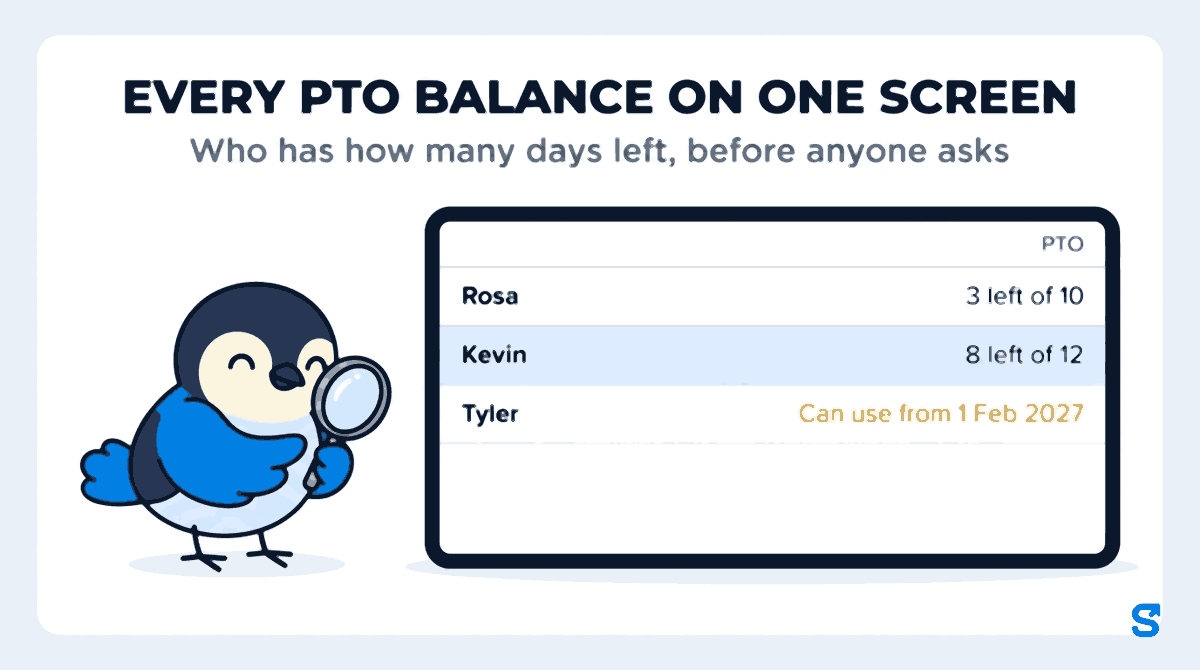
| Rosa, server | 10 | 0 | 7 | 3 left of 10 |
| Kevin, line cook | 10 | 2 | 4 | 8 left of 12 |
| Tyler, host (joined in August) | 10 | 0 | 0 | Can use from 1 Feb 2027 |
Kevin's 12 is not a mistake: it is 10 given plus 2 carried over, and the tracker says so. Tyler's days exist, but the diner's policy says new hires wait six months before using PTO, so the tracker shows the date instead of a number he cannot use yet.
Decide your PTO rollover rule before December 31
Most small businesses that run the leave year with the calendar year hit the same question in December: what happens to unused days? There are three common answers.
| Year-end rule | What happens to Kevin's 8 days | Good for |
|---|---|---|
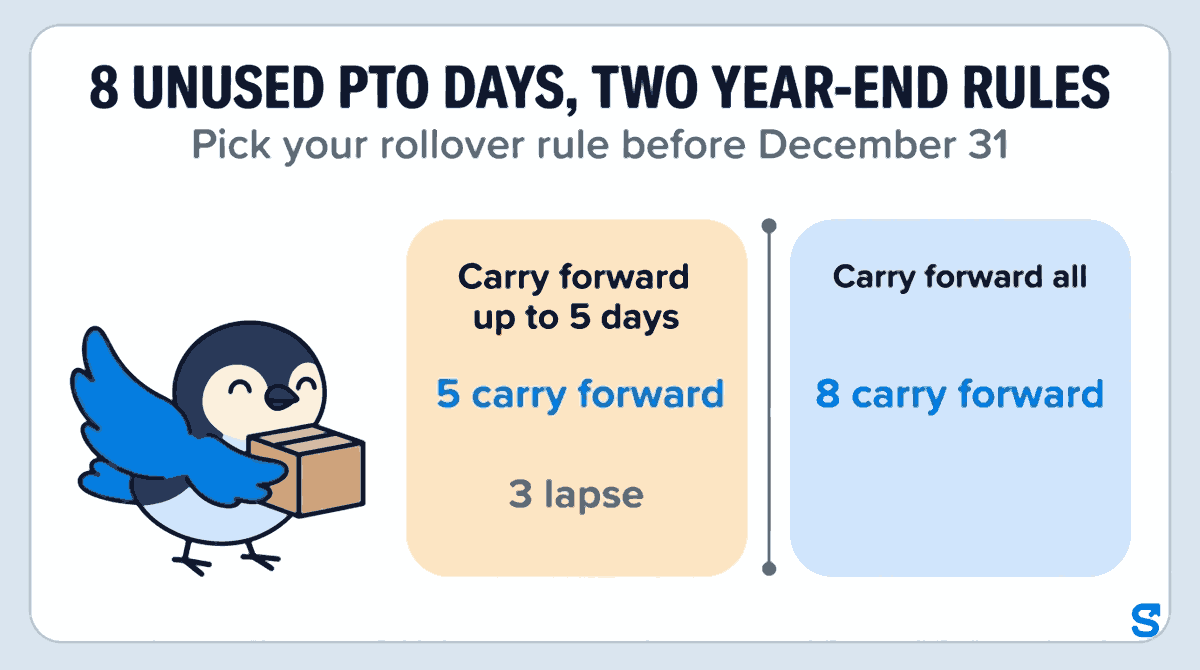
| Carry forward all | All 8 move into next year | Teams where people save days for one long trip |
| Carry forward up to 5 days | 5 move into next year, 3 lapse | Most small teams: some flexibility, no endless pile |
| Unused days lapse | All 8 are gone on January 1 | A use-it-or-lose-it policy, where state law allows it |
The rule matters less than when you choose it. A rule decided on December 30 and announced on January 2 is the "you never told me" conversation. A rule set in October, with a preview of who will lose days, gives Rosa and Kevin two months to book the days they would otherwise lose, and gives you two months to spread those days across the schedule instead of losing half your kitchen in the last week of December.
What the law says about PTO, federal and state
This is the background to the policy, not the point of this guide.
- Federal. The Department of Labor's vacation leave page says the FLSA "does not require payment for time not worked", such as vacations, and that these benefits are matters of agreement between an employer and an employee or the employee's representative. Checked on 12 October 2026.
- California, as one example of a state rule. The California Labor Commissioner's vacation FAQ says a policy that forfeits earned vacation by a set date is "an illegal policy under California law", that a cap on how much vacation can build up is permissible, and that the same applies to PTO: vested paid time off days cannot be forfeited. It also says earned, unused vacation is paid out when employment ends. Checked on 12 October 2026.
Other states have their own rules, including paid sick leave laws and rules on payout at the end of a job. Check your state labor department for the places your staff work.
This is general information, not legal advice: check with the agency or an employment lawyer for your case.
How Shiftelio tracks PTO for hourly staff
Shiftelio is employee scheduling, a time clock and time off in one app for small teams with hourly staff. Leave lives under Leaves, and the first thing it opens on is Balances.
Create a paid type such as PTO with its Days per year, and choose How days are given: all on the first day of the leave year, or earned every month (1/12 a month). If new hires wait, set Can be used after (months). Pick the year-end rule on the same type: carry forward all, carry forward up to a limit, or unused days lapse.
One row per person, one column per paid type, and every cell reads like "3 left of 10". A person with no days set shows Not set with a Give button. Filters by site, department and leave plan, plus a No leave set filter, find the people you missed.
Tap a name and the person sheet shows their history: days given, earned so far, carried forward, taken and adjusted. On a computer it opens beside the table, so you can step to the next person without losing your place.
Adjust lets you set days left to a number or add or remove days, with a required reason the person will see. They get a notification that their leave was adjusted. If you need the full method for a disputed number, see how to correct a PTO balance and tell the employee why.
Near the end of the leave year, Waiting for you tells you how many days will lapse and how many carry forward. The year-end preview lists each person and type, and an Only people losing days filter shows exactly who to remind. The new year opens on its own with those numbers, and you can undo the close for 7 days.
Your staff see their own days left in the Shiftelio app and send time off requests from it, which you approve from the same Leaves screen. If you also want to see how requests and approvals work on a shift team, read time off requests for shift teams.
Which app tracks PTO balances for a small team with hourly staff?
You can see how it fits a US business on the Shiftelio US page, and how schedules and shift rates work on the shift scheduling page.
Questions owners ask
What is a PTO tracker?
A PTO tracker is a record of each employee's paid time off: days given or earned, days taken, days left and what carries over. A good one shows the same number to you and to the employee.
Do I have to give hourly employees PTO?
Not under federal law. The FLSA does not require payment for time not worked, such as vacation. Some states and cities require paid sick leave or set payout rules, so check your state labor department.
Can unused PTO expire at the end of the year?
It depends on the state. California's Labor Commissioner says earned vacation and vested PTO cannot be forfeited, though a cap on how much builds up is allowed. Check your own state's labor department.
Should I track PTO in days or hours?
Use whatever your written policy uses, and keep it the same everywhere. Shiftelio counts leave in days, which suits a policy that gives a set number of days a year; an hours-worked accrual policy needs a different tool.
How do I stop employees asking how many PTO days they have left?
Show them. When the employee can see their own days left in an app, and it is the same number you see, the question goes away.
When should I set my PTO rollover rule?
Before the last two months of the leave year. That gives staff time to book days they would otherwise lose and gives you time to spread those days across the schedule.