Security Guard Attendance and Client Billing: When the Client Asks Who Edited the Days
In short
The client says your guard attendance was edited before you billed 120 guard-days. How a security agency shows every change, who made it and the time before.
On the fifth of the month your accounts person sends the invoice for an office park you guard: four guards, two on days and two on nights, 120 guard-days for September. Two days later the client's admin manager writes back. Their gate register has gaps on three nights. And one line in the email does more damage than the gaps: "Your attendance looks like it was corrected before you billed us. Who changed it?"
Your site supervisor did change it. Ramesh fixed a night guard's check-out when the phone died at 4 in the morning, added a day by hand for a relief guard who came without the app, and pushed one check-out forward when the morning guard arrived late. Every one of those was honest. None of them is provable from a register where the old time has been overwritten.
This article is about that second question: not "was the guard there", which the man-day dispute is about, but "who touched the record before it became an invoice". It is the question that turns a three-day deduction into a lost contract, and a security agency can answer it in one page if its attendance keeps an edit log.
Why a guard-day dispute turns into a question about edits
Most agencies already accept that a client will count heads. What they are less ready for is a client who asks about the record, because the honest answer is uncomfortable: guard attendance gets corrected all the time, and for good reasons.
- Night shifts cross midnight. A guard who checks in at 8 PM and out at 8 AM produces a day that straddles two dates, and a missed check-out is closed by somebody the next morning.
- Guard rooms have no signal. Basements, parking levels and gate cabins behind concrete are where phones lose the network. A check-out made there arrives later, sometimes after the day has already been closed.
- Reliefs come without the app. When a guard calls in sick at 7 PM, the supervisor sends whoever is free, and that person's day is often added by hand.
- The supervisor is on the roster too. On a small site the person correcting the attendance is also one of the people in it.
A client's admin team knows all of this. What they want to know is whether the corrections are the normal kind or the invoice-padding kind. A paper register cannot tell them, because a register written over shows only the final number. The man-day billing guide covers how to prove a guard stood at the post; this one covers how to prove nobody quietly moved the numbers afterwards.
What the client is really asking for
When the admin manager writes "who changed it", they are asking for four things, whether they say so or not:
- Every change, not a summary. Each day that was edited, added or removed, listed one by one.
- The time before and the time after. "Check out 8:00 AM became 9:30 AM" is a fact a client can test against their own gate register. "Corrected" is not.
- The name of whoever made the change, and their role. A supervisor, the owner, or the system.
- Something they can keep. A document they can attach to the invoice file, not a screen they were shown once on your phone.
Two more things make an agency's answer believable rather than merely complete. The supervisor must not be able to edit his own days, and days that were removed must still be visible somewhere. If a deleted day simply vanishes, the client has no way to know what else vanished with it.
How the Attendance Edit Log answers it in Shiftelio
Shiftelio is a staff attendance app where each guard checks in from their own phone with a selfie and GPS location at the site. Owners and managers with the right permission can correct a day when it is wrong, which is the attendance permission the app describes as "see who clocked in and out, and correct the record when it is wrong". Every correction, by anybody, is written to the Edit Log.
Where it lives
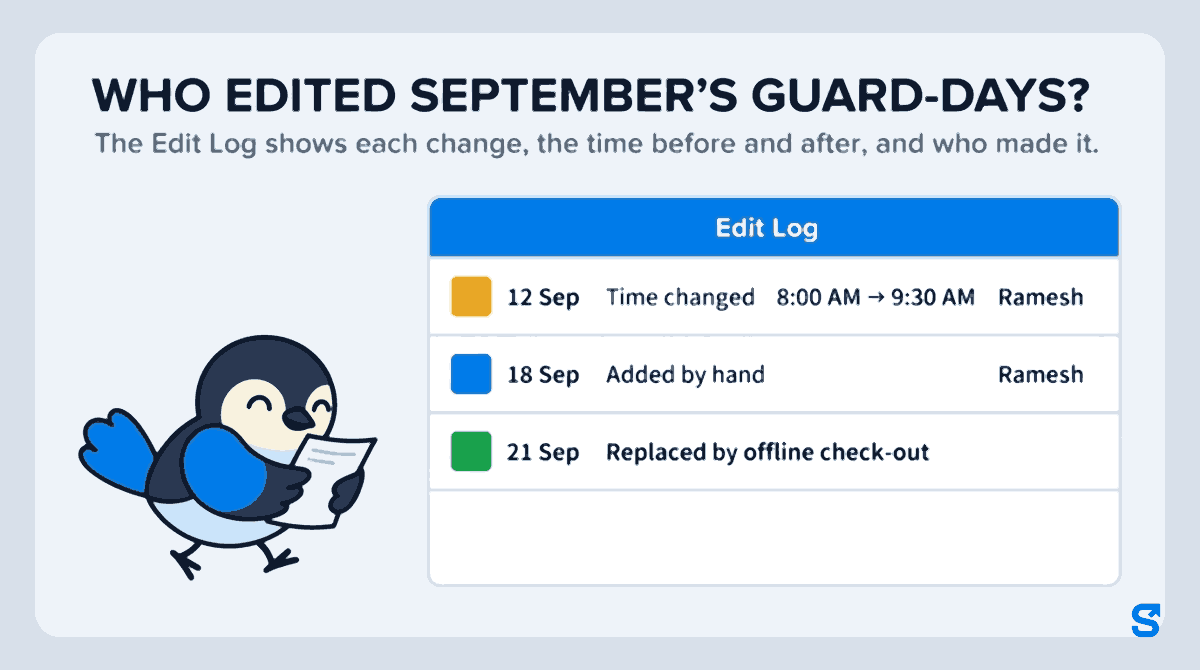
Open Attendance, then the Edit Log tab. It lists every change to every attendance day in your business, newest first, and each entry says what happened in plain words: Time changed, Added by hand, Day removed, Day restored, Marked present, Marked absent. A time change shows both ends: the old check-out and the new one, side by side, with the name and role of the person who made it.
The filters that matter for a client dispute
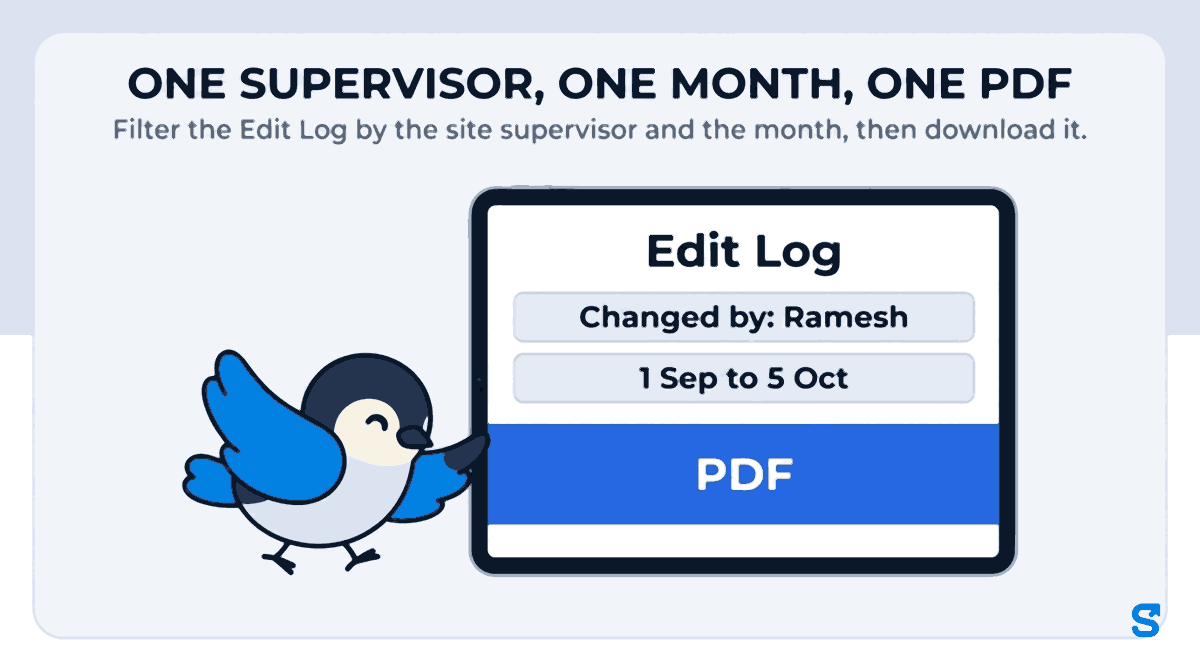
- Changed by shows every edit one person made. Pick Ramesh and you see all of his corrections across all of his guards. This is the filter that tells you, before the client does, whether a supervisor fixes a dead phone now and then or rewrites the site every week.
- Employee shows everything that ever happened to one guard's days.
- From and To dates. They count from when the change was made, so for September's invoice pick 1 September to the day you raised the invoice (1 Sep to 5 Oct for this one). A correction made on 3 October to a September night is the one the client is asking about.
- Removed days only shows days that were deleted. A removed day has no attendance record left to open, so this is the one place it can still be seen.
- Already-paid days only shows edits made after a guard's pay for that day was settled. On a site you bill, these are the corrections worth a second look.
The PDF you send back
The filtered list downloads as a PDF or a spreadsheet. The PDF carries your business name, the date range and the filters that produced it, so the person reading it can see exactly what they were given. Attach it to the reply. The spreadsheet holds the same lines, for your own accounts team.
Changes the system made, labelled as the system
Not every line in the log is a person, and on a night-shift site that distinction matters more than anywhere else. When a guard checks out from a guard room with no signal, the phone keeps the check-out and sends it when signal returns. If Shiftelio had already closed that day automatically in the meantime, the real check-out replaces it, and the log names that line Replaced by offline check-out rather than a time change by your supervisor. When the phone's own time cannot be trusted, the check-out is held for the owner to decide instead of being applied. A client reading the PDF can tell a guard's phone catching up from a person moving a time.
If one of those replacements turns out wrong, Restore puts the day back as it was before it. Restore is logged too.
The supervisor cannot fix his own day
A manager cannot change, restore or approve their own attendance in Shiftelio, and a manager only reaches the guards they manage. If Ramesh also stands a shift and his own check-out needs fixing, the owner fixes it, and the Edit Log shows that change under the owner's name. It is a small rule, and it is the one that makes the whole log believable to somebody outside your company.
Four lines, three kinds of answer
Here is how the client's three nights and one extra question come out of the log. The question is not whether there were corrections. It is what kind.
| Client's question | Paper register | What the Edit Log shows |
|---|---|---|
| Night of 12 Sep: check-out looks extended | The final time, written over | Time changed, check out 8:00 AM to 9:30 AM, by Ramesh (Manager) |
| 18 Sep: a guard we never saw | A name in the register | Added by hand, by Ramesh: the relief guard who came without the app |
| 21 Sep: check-out time changed overnight | No trace of the change | Replaced by offline check-out: the guard's own phone, from the basement cabin |
| Were any days deleted? | Nothing to look at | Removed days only: an empty list, or the exact days |
The 12 September line is the one to talk about. It is a real correction with a real reason (the morning guard was late and the night guard stayed), and it is now a conversation about 90 minutes on one night instead of an accusation about the whole month. The 18 September line is a fair question about whether the relief was deployed to their site, and the GPS check-ins of the other nights do not answer it, so a call to the supervisor does. The 21 September line answers itself.
Before the next invoice leaves the office
In Shiftelio a supervisor with the attendance permission sees and corrects only the people they manage. That keeps one supervisor's corrections from reaching another site, and keeps the Changed by filter meaning one site.
The edit screen has a Reason box, and it is optional. The log records who and what on its own; it can only record why if the person fills that box in, and "phone died in the basement cabin" settles a question that "8:00 AM to 9:30 AM" only raises.
On the day you raise the invoice, filter by Changed by for each supervisor over the billing month. Three corrections a month on a four-guard site is normal. Thirty is a conversation you want to have before your client has it with you.
An agency that attaches the month's edit log to the invoice is telling the client it has nothing to hide. Most clients never open it. The ones who would have disputed the invoice open it and stop there.
The licensing side of a security agency sits with your state's controlling authority under the Private Security Agencies (Regulation) Act, 2005 (the national portal is psara.gov.in), and the labour codes require an employer to keep attendance and wage records for the people it deploys (see the Ministry of Labour's labour codes page). An edit log does not replace either. It makes the attendance record you already have to keep defensible when somebody outside your company reads it.
If your sites run 24-hour posts, the guide to security guard duty rosters covers why two guards cannot cover one, and the retail guide to the edit log covers the same screen from a shop owner's side.
Which app shows a client who edited a security guard's attendance?
Questions security agencies ask
Can a site supervisor delete a guard's day without anybody knowing?
No. Removing a day writes a Day removed line to the Edit Log with the supervisor's name, and the Removed days only filter lists every removed day in the business. The log keeps a copy of the removed day, so if it was removed by mistake, Shiftelio support can put it back.
Can the client log in and see the Edit Log?
No. The Edit Log is inside your business account, open to the owner and to managers with permission to view attendance. You decide what the client sees by filtering and sending the PDF or the spreadsheet.
Does the log show changes made before we started using Shiftelio?
No. It records changes from the moment your business is on Shiftelio. A register from before that stays a paper register.
A guard's check-out from the basement arrived hours late. Will it show as an edit?
It shows as Replaced by offline check-out when it replaced a time Shiftelio had closed automatically, which is a different line from a person changing the time. If the phone's time could not be trusted, it is held for the owner to decide instead.
Can the supervisor correct his own attendance?
No. A manager cannot change their own day. The owner, or a co-owner, makes that fix, and the log shows it under their name.
How many guards does this cover?
The Growth plan covers up to 25 employees and the Business plan up to 100, both on every plan feature including the Edit Log. Past 100 staff it is an Enterprise plan, priced on request.
Keep reading
Free to use, no signup: HR letter formats.