When a Store Manager Edits a Late Check-In: The Attendance Edit Log for Retail Chains
In short
A store manager turns a 10:22 check-in into 10:00. How an attendance edit log shows who changed which day, the original time, and every deleted day.
- Store managers need to correct attendance. The risk is not the correction, it is a correction that erases what was there before.
- An attendance edit log keeps the original time, who changed it, when, and what they changed it to. A deleted day stays on record too.
- In Shiftelio every change to an attendance day is recorded automatically, and the whole business's history sits on one screen: Attendance → Edit Log.
The 10:22 that became 10:00
You own four shops. Each has a store manager who opens up, runs the floor and, because somebody has to, corrects staff attendance when a phone died or a worker forgot to check in.
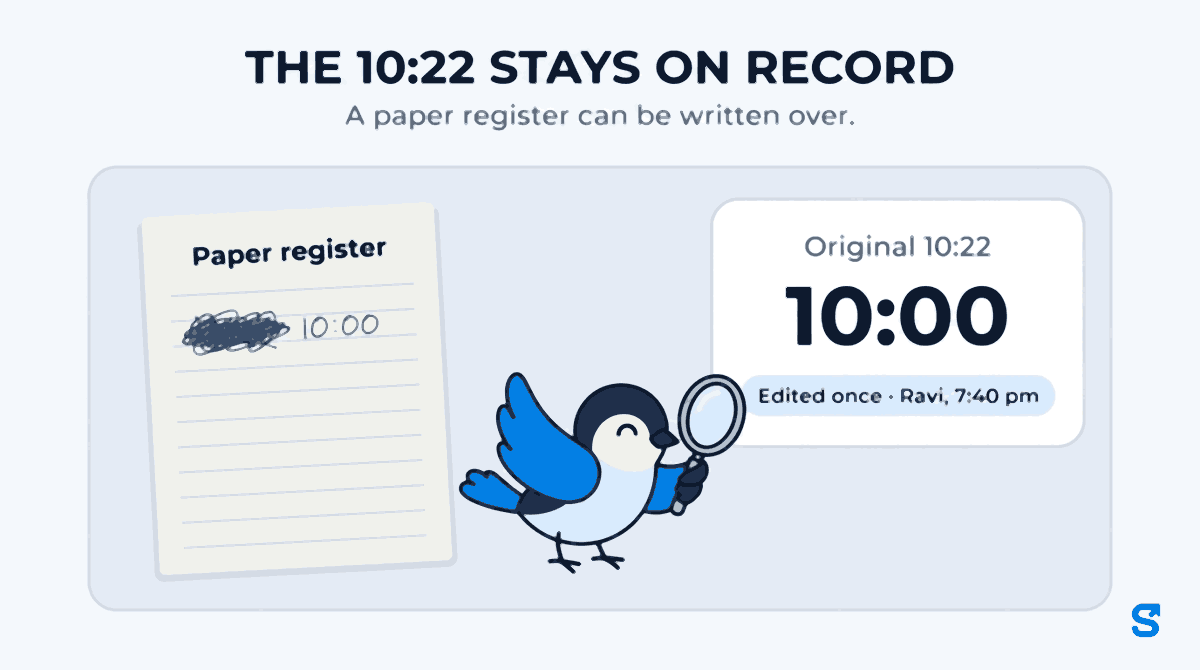
Priya checks in at 10:22 on Tuesday. The shift starts at 10:00. That evening Ravi, her store manager, changes it to 10:00. Maybe her bus broke down and Ravi is being fair. Maybe Priya is his favourite and this is the fourth time this month. Maybe it is Ravi's cousin.
On most attendance systems you will never know which, because once the time is changed the 10:22 is simply gone. The month-end report shows a spotless record, the late mark never reaches payroll, and the only person who knows what happened is the person who changed it.
That is attendance tampering in a retail chain. It is rarely dramatic and rarely a crime. It is a store manager with the power to correct attendance and nobody watching the corrections. The fix is not to take that power away: store managers genuinely need to fix a dead phone or a forgotten check-out. The fix is to make every correction visible, named and permanent.
Why multi-store attendance is where edits hide
A single shop owner sees the shop. An owner with four or ten stores sees a report, and the report is built from what the store managers leave in it. Three patterns come up again and again:
- The quiet correction. A late check-in is moved to the shift start. The late mark, and any deduction your late policy applies, disappears with it.
- The vanished day. A day that would raise a question, a check-in from somewhere odd, a double shift somebody did not work, is deleted outright. On paper a torn page at least leaves a stub. In most software a deleted day leaves nothing.
- The favour at month end. Corrections cluster in the last three days before payroll, made in bulk by one person, for the same few names.
None of these needs a dishonest manager to happen. It needs a system where a change leaves no trace, so a generous manager, a lazy one and a dishonest one all look identical from head office.
What an attendance edit log has to record
An edit log is only useful if it can settle an argument months later. That means five things, for every single change:
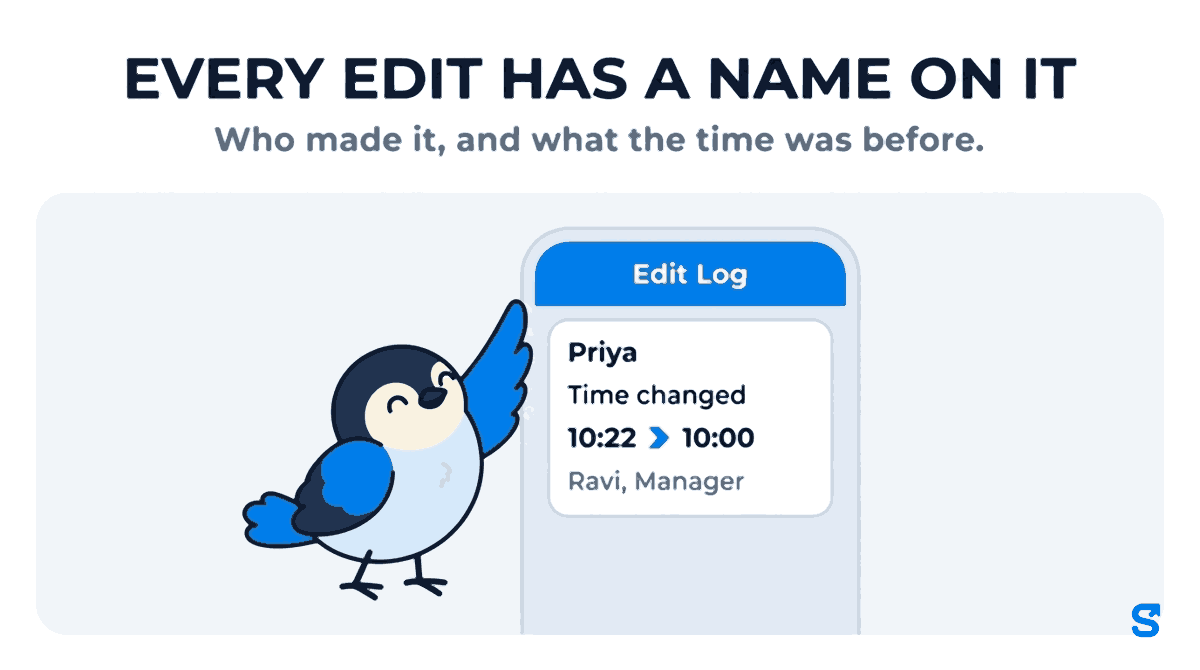
Not "admin". Ravi, Manager. An owner's change and a manager's change must be told apart.
The original check-in time is the whole point. A log that says "edited" without saying from what is only half a log.
A correction made the same evening is ordinary. The same correction made three weeks later, the day before payroll, is a different conversation.
If deleting a day also deletes the evidence that the day existed, the easiest way around the log is the delete button.
If the person who changes the attendance can also change the record of the change, you have a log in name only.
How Shiftelio's attendance edit log works
Shiftelio logs every edit to attendance, pay and staff records with who did it and when. For attendance, here is what that means on the screen.
On the day itself
Open any attendance day that was changed and it carries a line such as "Edited once · Ravi, 7:40 pm", the Original check-in time beside the one that stands now, and the name and role (Owner or Manager) of whoever changed it. If the worker really did check in with GPS and a selfie, that place is still shown: an edited time does not wipe out where the person stood. A day a manager typed in by hand is labelled Added by hand, so you can tell a correction from a day that never had a real check-in at all. If a change was wrong, Restore these times puts the day back to the times it had before.
Across the whole business: Attendance → Edit Log
The Edit Log tab on the Attendance page lists every change to every attendance day in the business, newest first. Each entry says what happened in plain words: Time changed, Day removed, Day restored, Marked present, Marked absent, Added by hand. You can narrow it by:
- Employee, to see everything that ever happened to Priya's days.
- Changed by, to see every edit one store manager made. This is the filter that answers "is Ravi fixing a dead phone now and then, or rewriting his store every week?"
- From and To dates, counted from when the change was made, because "what changed last week" is the question you actually ask.
- Removed days only, which is the reason the page exists: a deleted day has no attendance record left to open, so this is the one place you can still see that it was there.
- Already-paid days only, the edits made after a day's pay was settled, which are the ones that make a payslip disagree with the record behind it.
And the whole filtered list downloads as a PDF or a spreadsheet, which is what you hand to an accountant or keep beside the payroll file.
Changes Shiftelio made by itself
Not every entry in the log is a person. When a worker checks out with no signal, the phone keeps the check-out and sends it when the signal returns. If Shiftelio had already closed that day automatically in the meantime, it replaces its own check-out time with the real one when it arrives, or, when the phone's time cannot be trusted, holds it for the owner to decide between the phone's time and the one already saved. When it replaces the time itself, the Edit Log names that change Shiftelio (automatic), not the employee and not the store manager, so an automatic repair is never mistaken for somebody quietly editing a day. Older corrections of this kind, from before the label existed, are shown the same way.
A store manager cannot change their own day
The edit log answers "who changed Priya's day". There is a sharper question in a retail chain: who changes Ravi's?
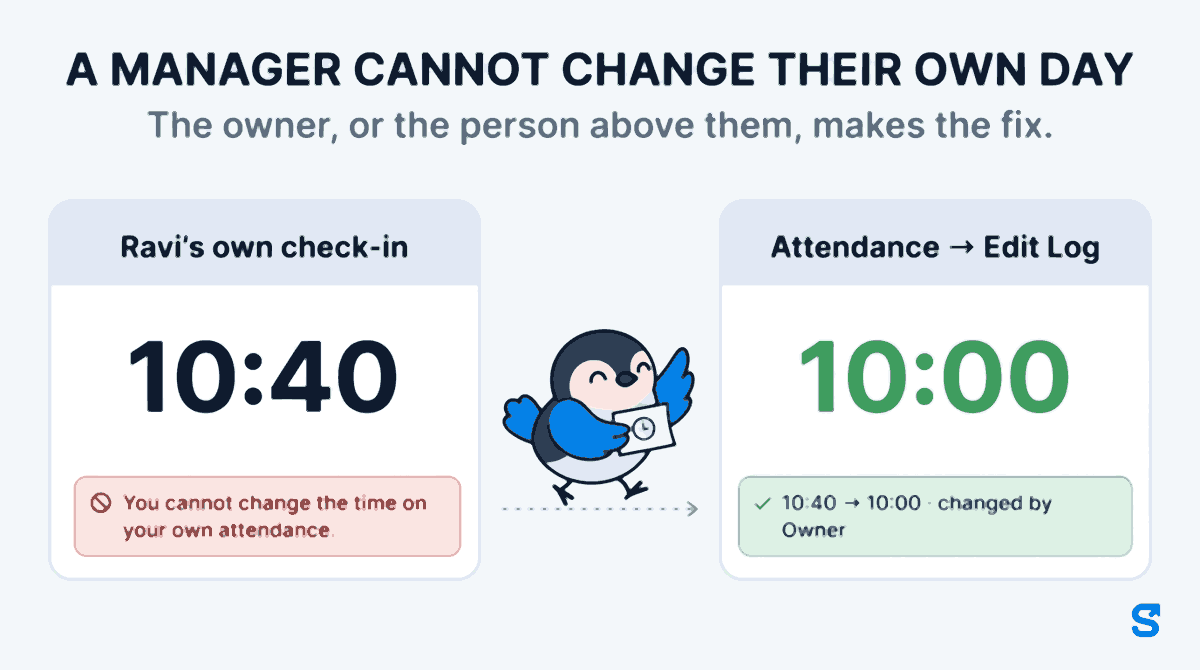
Store managers are staff too. They check in, they run late, they forget to check out. If Ravi's own check-in is 10:40 and Ravi can open his own day and type 10:00, the edit log will faithfully record that Ravi changed Ravi's day, and nobody above him may look.
So in Shiftelio a manager cannot change their own day. If Ravi tries, the app refuses with "You cannot change the time on your own attendance." The same rule closes every way around it. Ravi cannot:
- change the time on his own day, or mark himself present or absent;
- delete his own day, add one for himself by hand, or move it to another shift;
- waive his own late fine;
- approve his own flagged day;
- mark his own check-in from the screen he uses to mark attendance for his staff, or approve a day of his own that somebody else marked. His own days are left out of the list he reviews.
The owner, or the person above them, makes the fix. In the Edit Log that fix then shows as 10:40 → 10:00, changed by Owner, with the time it was made. If you are the only owner, nobody sits above you, so you can still correct your own day, and the log shows you as the person who did it. If the business has a co-owner, the other owner fixes it.
A manager also only reaches the staff their role covers. If a store manager's role is limited to one department, location or crew, the app refuses an edit to anybody outside it, even with permission to edit attendance. A store manager scoped to one store does not touch the next store's register.
Why a manager cannot tidy up the log
The log is written the moment an attendance day changes, not by the screen the manager is using, so there is no button anywhere that edits an edit. Who can read the log is decided by permission: you, and managers whose role lets them view attendance for those staff. Making changes in the first place is a separate permission, so you can let a senior manager read every store's log without letting them edit a single day. Setting up those roles is covered in giving a manager access without sharing your owner login.
A ten-minute weekly check for a retail owner
- Open Attendance → Edit Log, set From to last Monday.
- Filter Changed by for each store manager in turn. A handful of edits a week is normal. Twenty is a conversation.
- Look at the names on the edited days. The same two or three staff every week is the pattern to ask about.
- Tick Removed days only. Every removed day should have a reason you already know.
- Before you run payroll, tick Already-paid days only for last month. Anything there changed after the money went out.
When you do find something, the log turns an accusation into a question with facts in it: "Priya's Tuesday was 10:22 and you changed it to 10:00 at 7:40 that evening. What happened?" Most of the time there is a perfectly good answer. The point is that now there has to be one.
A late policy only holds if the times behind it hold. If you deduct for lateness or absence, the Code on Wages, 2019 (section 18) sets out which deductions from wages are allowed, and your records are what a labour inspector or the Chief Labour Commissioner's office will ask to see if a worker disputes one. A record that shows every correction, and who made it, protects the honest store manager as much as it catches the other kind.
For the rest of running several shops on one account, rosters, a geofence per store and cover shifts between outlets, see our guide to multi-outlet retail attendance and the full feature list.
Which attendance app shows who edited a staff member's attendance?
Can a store manager delete an attendance day without anybody knowing?
Not in Shiftelio. A removed day is recorded in the Edit Log as Day removed, with who removed it and when, and the Removed days only filter shows every one.
Can a store manager change their own attendance?
No. A manager cannot change the time on, delete, approve or mark their own attendance day. The owner, or the person above them, makes the fix, and the Edit Log shows who did. Only a business with a single owner lets that owner correct their own day.
Why does the edit log say Shiftelio (automatic)?
That entry is a correction the app made by itself: a check-out sent from a phone that had no signal arrived after the day had been closed automatically, and the real time replaced the automatic one. Nobody edited the day by hand.
Does the edit log show the original time?
Yes. A changed day keeps its Original check-in time beside the current one, with the name and role of the person who changed it.
Can a manager see the edit log without being able to edit attendance?
Yes. Reading attendance and editing it are separate permissions on a manager's role, so you can let an area manager review every store's edits while only the owner makes changes.
What about days that were edited before we started using the log?
They are marked as edited before edit logging existed. The app says the editor is unknown rather than guessing a name.
Can I give the edit history to my accountant?
Yes. Filter the Edit Log to the dates and people you need and download it as a PDF or a spreadsheet.
Keep reading
Free to use, no signup: HR letter formats.