Was the Guard at His Post? Count Only the Hours Inside His Assigned Site
In short
See how many hours each guard or cleaner spent inside their own assigned site: turn on Only assigned workplace in Shiftelio's Movement report.
- "On duty" and "at the client's post" are different numbers, and the client pays for the second.
- In Shiftelio, Report then Movement then Show then Only assigned workplace narrows km and time to each person's own site.
- Groups stay the same; only km and time change, and the report says Assigned workplace only so nobody misreads it.
To see how many hours a guard actually spent at his own post, open Shiftelio's Report, go to the Movement tab and switch on Only assigned workplace. Every km and every minute then counts only inside the site that person is assigned to, and the time at other sites or outside every site drops out of the figures.
A 12 hour night shift at a housing society gate is not 12 hours at the gate. The guard walks to the neighbouring building for tea, covers the next society's gate for an hour when a colleague is late, goes to the agency office to collect his uniform. On paper the register says 8 pm to 8 am. When the society secretary asks "how long was your man actually at our gate last night?", the register cannot answer, and neither can a plain attendance app that only knows he was on duty.
This article walks through why that question keeps coming up for security and housekeeping agencies, where the usual answers fall short, and how the switch works.
Why "on duty" is not the answer the client wants
Security agencies, housekeeping contractors and home-care agencies sell the same thing: a person, at a named place, for a number of hours. The client is paying for the place, not for the shift.
- The client pays for presence at their site. A guard on duty but standing at another client's gate is, from where the secretary sits, absent.
- Supervisors move people between sites. One guard covering a gap at a second society is good management, but those hours belong on the second society's bill.
- Staff often live near the post. A cleaner who steps out to her home two streets away is still "on shift" in a register.
- Disputes come months later. A client contesting an invoice wants hours at their site, per person, per day, not a total.
The Private Security Agencies (Regulation) Act, 2005 is what licenses an agency to put guards at a client's premises in the first place, and the contract with each client usually names the post, the hours and the number of guards. The question "was he at our post?" comes straight out of that contract.
Where the usual methods fall short
| Method | What you get | Where it breaks |
|---|---|---|
| Paper register at the gate | Signed in and out times | The guard writes his own times; nothing shows where he was in between |
| Patrol checkpoints or QR tags | Proof he passed a point at a time | Says nothing about the hours between rounds |
| GPS clock-in at the site | Proof he started and ended at the post | Silent about the middle of the shift |
| A live location trail | Everything the phone recorded | Mixes the post, other sites and errands into one total |
| Hours inside the assigned site only | Time and km at that person's own site | Needs the phone's location on during the shift |
A location trail already holds the answer, but as one blended number. Shiftelio's Movement tab used to show it as a split: time at the person's own site, time at another of your sites, and time outside every site. That split is still there. The new switch turns the split into the headline.
How the Only assigned workplace switch works
Every staff member in Shiftelio has a Work location on their profile: a single site, a few assigned sites, or all of them. That is their assigned workplace. The switch reads each person's own assignment, so one report covers a guard at Lakeview Apartments and a cleaner at Green Park Society side by side.
- On the dashboard, tap Report.
- Open the Movement (evening) tab and pick the day or the range.
- Tap Show. Under Km and time, turn on Only assigned workplace.
The report now carries the line Assigned workplace only under the date, so nobody reading it mistakes it for the whole shift. The switch is off by default, and turning it off puts every figure back exactly as before.
What changes on the screen
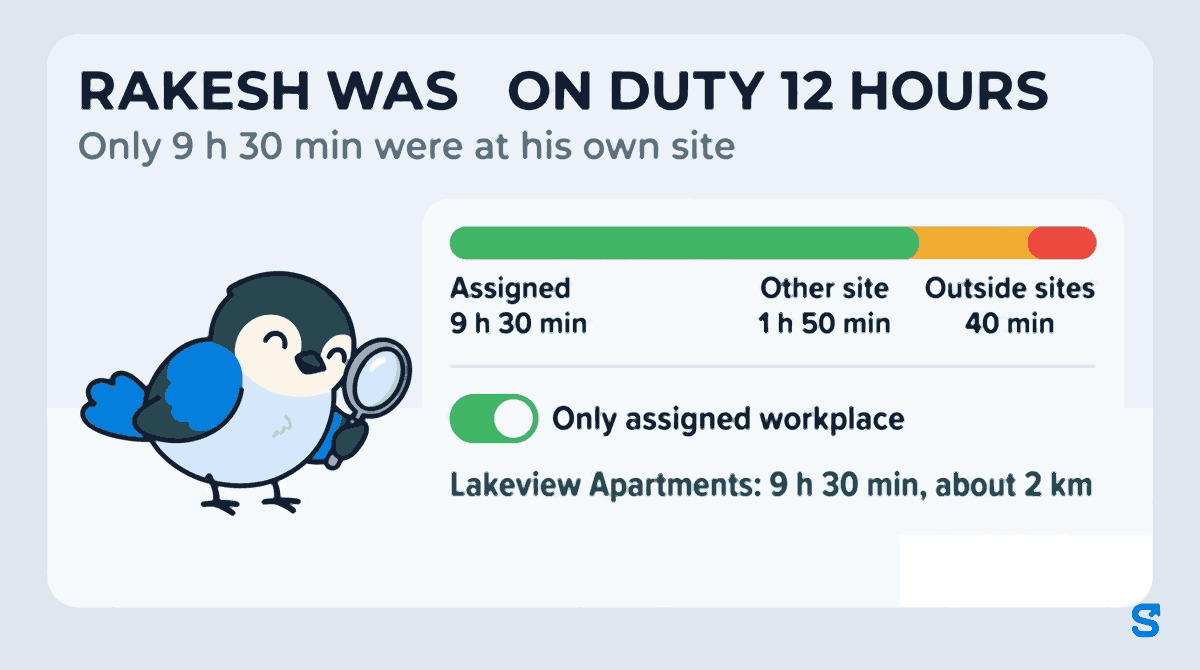
Say Rakesh is assigned to Lakeview Apartments and worked an 8 pm to 8 am shift. With the switch off, his Where the time went reads 9 h 30 min at his assigned site, 1 h 50 min at another site (Green Park Society, where he covered a late colleague) and 40 min outside every site. His total travelled reads about 6 km.
Turn the switch on and Rakesh's line reads 9 h 30 min and about 2 km: only what happened inside Lakeview Apartments. The 1 h 50 min at Green Park and the 40 min outside are hidden, not deleted.
Groups do not move. The report still sorts people by their whole shift: Moved around, Stayed in one place, Location missing. A guard who stood still at his gate all night stays in Stayed in one place whether the switch is on or off. Only the km and time figures change.
A few honest edges, all of them shown on the screen rather than guessed:
- A shift still running shows its time so far and the words km after check-out, because the km at the site is worked out once the person checks out.
- A shift the report cannot divide shows Not split instead of a made-up number, and in a range total it is counted as "N not split" rather than quietly added.
- Stop counts are hidden while the switch is on, because a stop count covers the whole shift and would no longer match the figures beside it.
Sending it to the client
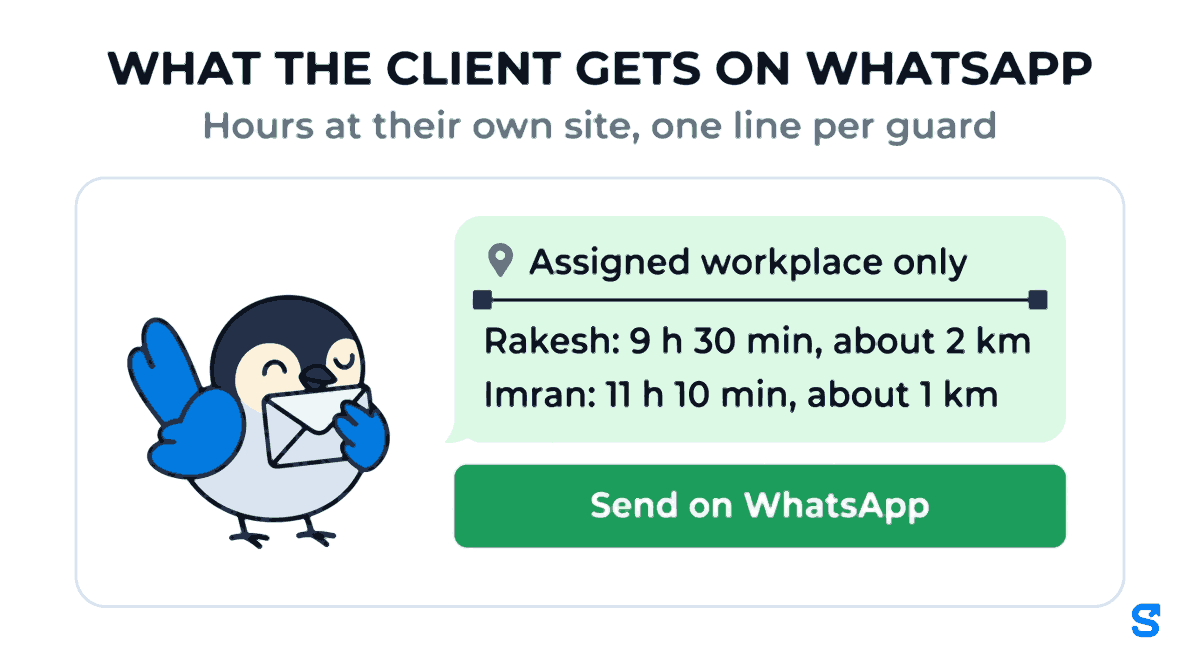
The Copy as text and Send on WhatsApp buttons follow the same choices as the screen. With the switch on, the message opens with Assigned workplace only under the date, and each person's figures are their time and km at their own site. That is the message a society secretary or a facility manager can actually check against the invoice.
For the two guards on the Lakeview Apartments contract, the lines read: Rakesh, 9 h 30 min and about 2 km; Imran, 11 h 10 min and about 1 km. Two names, two numbers the secretary can hold you to.
For a range such as Last 7 days, the Movement by person table adds each person's days together. A week's hours at the post for every guard on a contract becomes one paste.
If a client contests a month, pair this with the attendance edit log: the hours at the post come from the phone, and any change a supervisor made to the times is recorded with who made it. Our article on security guard attendance and client billing covers that side.
Who this is for, beyond security
The same question comes from anyone who sells a person at a place:
- Housekeeping contractors with cleaners assigned to one office or society each, who also send them to a second site on short days.
- Home-care agencies whose attendants are assigned to one patient's home.
- Municipal and facility contractors whose staff each have a ward or a block.
Our housekeeping supervisor article shows how to keep one crew on one client site; this switch is how you prove they stayed there.
Tell your staff what you record
Location during a shift is personal data, and India's Digital Personal Data Protection Act, 2023 expects you to tell people what you collect and why. Shiftelio records location only while a person is clocked in, never after check-out. Say so in the appointment letter or on the noticeboard: "your location is recorded during your shift so we can show the client the hours you spent at their site." Guards who know the report protects them from a wrong complaint are rarely the ones who object.
Where this fits, and what it is not
The one thing it does that a patrol app or a GPS trail does not: it answers the client's actual question, hours at their site per person, in one line per guard, without anyone adding up a trail by hand. See how the rest of the location features fit on the employee tracking app page.
Frequently asked questions
How do I see how long a guard was actually at his post?
Turn on Only assigned workplace in the Movement tab of the Report. Each person's time and km then count only inside the site set as their work location.
Does turning the switch on change anyone's attendance or pay?
No. It changes only what the Movement tab shows. Attendance, hours worked and pay are not touched, and turning it off shows the full shift again.
Why does a shift say Not split?
The report could not divide that shift between sites, so it says so instead of guessing. The shift is left out of the km at the site and shown as not split in range totals.
Can the client see this report directly?
No. It is a report for the owner and the managers allowed to see attendance. You share it by copying the text or sending it on WhatsApp.
Keep reading
Free to use, no signup: Shift roster template.