Site Expenses: Save a Supervisor's Pile of Bills in One Go
In short
Site expenses arrive as a pile of bills. Your supervisor photographs them together, ticks each one, saves them in one go, and you get one alert to review.
- Site expenses do not need a bill-by-bill routine. A supervisor can photograph or choose up to ten files at once and the app lists every bill it found in them.
- Each bill on that list is ticked, checked and saved as its own expense, so you still approve or refuse them one by one.
- A PDF invoice from a supplier, or an Excel or CSV sheet of expenses, goes in the same way as a photo.
The fastest way to handle site expenses is to stop entering them one bill at a time. In Shiftelio a site supervisor opens Add a bill, photographs the whole pile or picks the files, and the app shows every bill it found as a list. They tick the ones to keep, tap any card to check it, and press Save 3 expenses. You get one alert for the lot, and each bill still waits for your decision on its own.
Friday evening, eleven bills and a rubber band
Every contractor, interior firm and event company in India knows this scene. Ramesh, the site supervisor, has been on site all week. On Friday evening he comes back with a rubber band around a stack of paper: a hardware shop bill for fixings, a diesel slip for the generator, a tea stall receipt, an auto fare scribbled on the back of a visiting card, and a supplier's invoice that arrived on WhatsApp as a PDF.
Each of those is a site expense. Each one has to reach the books, and each one has to be squared off against the cash you gave him on Monday.
The usual way to do it is a site expenses sheet in Excel, kept by somebody in the office, typed up from the paper on Saturday morning. People search for a "site expenses format in excel" because that sheet is what most small firms run on. It works until the week the paper fades, the supervisor is on leave, or two people type the same bill.
An expense app is meant to fix that, but most of them were designed for an office worker with one lunch receipt. Ask a supervisor to open the app, photograph a bill, fill the form, save, and start again ten more times, and he will do it for the first week. By the third week the rubber band is back.
What changes when the whole pile goes in together
The point is simple: the supervisor should do one job, not eleven. Here is how it runs on his phone.
On the staff app the Money tab has an Add a bill button. It opens the same bill sheet staff already use for one receipt.
Take photo opens the camera; Add another photo keeps going for the next bill. Choose files picks photos already on the phone, a PDF invoice, or an Excel or CSV sheet. The sheet says it plainly: Up to 10 files at a time.
After a few seconds the sheet shows Found 3 bills in your files, one card per bill: the shop, the amount, the date and the category, and where it came from, such as from photo 2 or PDF page 3. For Ramesh's Friday pile that might be Balaji Hardware at ₹1,240, Sai Fuels at ₹2,150 for the generator diesel, and the tea stall at ₹360.
Every bill he wants is ticked. Tapping a card opens that bill's own form to correct a shop name or a category, and Done brings him back to the list. A payment method and a Note for all bills (optional) sit under the list and apply to all of them. Then one button: Save 3 expenses.
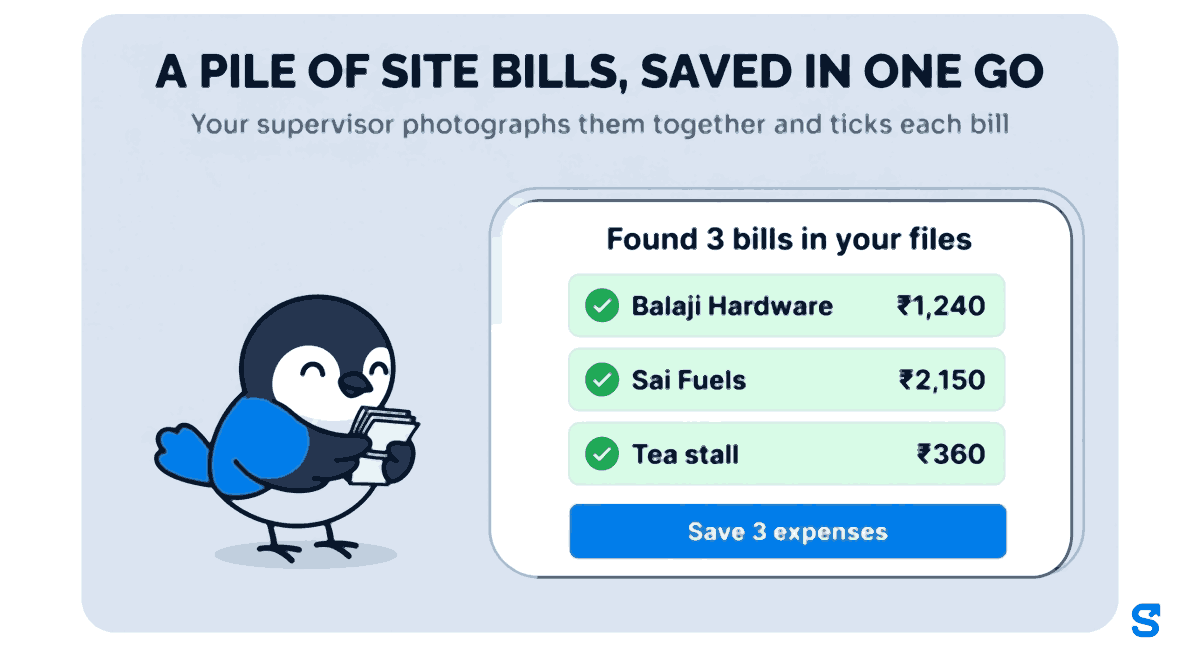
While it saves, the sheet counts out loud: Uploading receipt 2 of 3, then saving. Each bill keeps its own photo or its own PDF page as the receipt, so when you open one later you see the paper it came from, not the whole pile.
When the signal drops halfway
Sites are not known for good network. If something goes wrong in the middle, the sheet does not pretend. It says, for example, 2 saved. 1 could not be saved, locks the two that went through, shows the reason on the third and offers Try again. Trying again never saves the same bill twice, so a supervisor who taps the button three times in a basement does not leave you with three diesel slips.
A supplier's invoice, or a whole expense sheet
Two things that used to need the office now go in from the phone.
- A PDF invoice. Suppliers in India send invoices on WhatsApp as a PDF more often than they hand over paper. Save it to the phone and choose it like a photo. A PDF with several invoices on several pages comes back as several bills, each one marked with its page.
- An Excel or CSV sheet. If somebody already keeps a site expenses sheet, choose the file and the sheet shows Found 9 rows in expenses.xlsx, one card per row. An invoice sent as an Excel file gives its grand total and date. If a sheet is longer than one go can take, the app says so: Only the first 10 rows were read - upload the rest separately. A bill that came from a sheet has no photo, and its note starts with the file's name so you can see where it came from.
What you see on the other end
For the owner the change is quieter, and that is the point. Instead of a notification for every bill, you get one for the batch: Ramesh submitted 3 expenses, with the total that is now waiting for your review, ₹3,750 for his three bills.
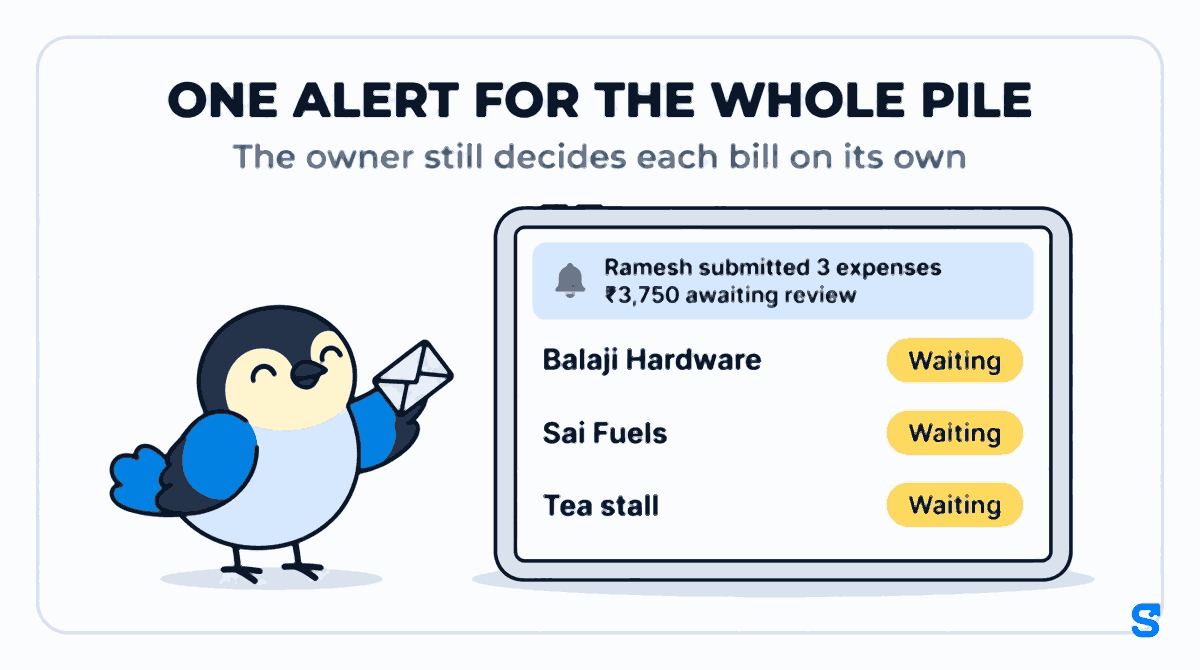
Saving together does not mean approving together. Each bill lands in Waiting on your Money pages as its own expense, and you decide each one: approve it at the amount you agree with, ask for a fix, or say no with a reason. On a computer you can tick several and use Approve selected. If the supervisor was holding work cash you gave him, an approved bill comes off that first, and only the rest is owed back to him. That part works exactly as described in expense claims from field staff, which also covers paying the remainder with salary and the month's Excel download for your CA.
One rule does not bend for a batch: no manager approves their own bill, however many they save at once.
Your own pile: a month of company bills
The same sheet works from the business side. On Money, then Expenses, the Add bill button asks Who paid? with two answers, Company or A staff member. Pick Company and the list reads For: the business; pick a person and it reads For: and their name. So an owner clearing a drawer of electricity, rent and supplier bills at month end can photograph them together the same way.
Company bills you add yourself save as done, with no approval step, because there is nobody to ask. A company bill a manager adds waits for an owner, which keeps the business's own spending under the owner's eye.
Why the bills should go in this week, not in March
There is one hard reason to get site expenses off paper quickly. A bill from a GST-registered supplier can carry input tax credit, and under section 16(4) of the CGST Act that credit for an invoice issued in a financial year has to be claimed by 30 November of the following year, or by the date the annual return is filed if that is earlier. Checked on 10 October 2026: for invoices dated in FY 2025-26, that date is 30 November 2026. The rules and your GSTR-2B are on the GST portal and the CBIC GST site.
A thermal receipt left in a site office for three months is often blank by the time anyone looks for the supplier's GSTIN. A photograph taken the evening it was issued is not. Which ledger head each kind of site expense goes under, in Tally or anywhere else, is your CA's decision, and the monthly export gives them the bills to make it.
The saving is not the typing. It is that the bill reaches your books in the week it was spent, while the paper can still be read and the supervisor still remembers what it was for.
Where this is the wrong tool
Saving a pile at once is for bills. It is not accounting software: it does not file GST returns, reconcile GSTR-2B or post entries to Tally. It does not issue company cards or hold a spending wallet for staff. And a pile is still read bill by bill: a crumpled or half-torn receipt may need its card opened and corrected before it is saved.
Which app saves a site supervisor's pile of bills in one go?
The rest of what the app does for site teams, from attendance on site to salary, is on the features page.
Questions owners ask
Can my staff upload several bills at once in Shiftelio?
Yes. In the staff app's Money tab, Add a bill takes up to ten photos or files at a time and lists every bill it found, which staff tick and save together.
Do I have to approve the whole batch together?
No. Every bill in the batch becomes its own expense. You approve, send back or refuse each one, or tick several on a computer and use Approve selected.
Can it read a PDF invoice or an Excel sheet?
Yes. A PDF invoice, including one with several pages, and an Excel or CSV sheet go in through Choose files. Each invoice or row becomes its own card on the list.
What happens if the upload fails halfway on site?
The bills that saved stay saved and are locked. The sheet names the one that failed and offers Try again, and trying again never saves the same bill twice.
Will I get a notification for every bill?
No. When staff save two or more bills together, you get one notification for the batch, with the number of bills and the total waiting for review.
Can I add the company's own bills the same way?
Yes. On Money, then Expenses, Add bill asks Who paid?. Choose Company and the bills save for the business; bills you add yourself need no approval.
Keep reading
Free to use, no signup: HR letter formats.