Employee Turned Off Location During the Shift? The Attendance Record Now Shows It
In short
A gap in a staff member's location trail has two explanations. The attendance record now says which: every phone setting changed between check-in and check-out.
- A gap in a location trail has several causes, and only some of them are a person switching location off.
- The attendance record now lists every phone setting changed between check-in and check-out, with the time and a Stopped working or Fixed tag.
- The same changes appear in the check-out alert and in the dashboard Report and its WhatsApp text.
Suresh does sales calls for a distributor in Pune. He checked in at 9:00 am, his location trail is clean all morning, and then it stops. Nothing between 2:14 pm and 3:05 pm. When you ask him, he says the phone was acting up.
Maybe it was. Phones do drop their location for honest reasons: a battery saver that kicks in at 20%, a basement with no signal, an Android update that quietly restricted the app. But a gap can also mean somebody opened the quick settings and tapped Location off for an hour. Until now the trail could not tell you which, so the conversation became your word against his.
This article is about that hour: what a gap in a location trail can and cannot prove, and how Shiftelio's attendance record now shows every phone setting your staff changed between check-in and check-out.
A gap in the trail is not proof of anything
An employee location tracking app records points while the phone is willing to give them. When the points stop, there are only a few possible reasons, and only one of them is a person choosing to hide.
- Location turned off. The person, or a family member borrowing the phone, switched off location services.
- Permission taken back. The app's own location permission was changed from Allowed to Not allowed, often after an Android pop-up asked "keep allowing?". Google explains these permission levels in its Android location permissions guide.
- Battery restriction. The phone's battery manager restricted the app, which on many brands stops it in the background. Don't kill my app keeps a list of how each maker does this.
- No signal or a flat battery. Nothing was changed at all; the phone simply could not send.
The first three are setting changes. The fourth is not. If you could see which settings changed, and when, most of these arguments would end before they started. That is exactly what was missing.
What the attendance record now shows
Open Suresh's shift in Attendance. The record now has a section, Phone settings during this shift, with a red chip that counts the changes: 2 phone setting changes. Below it, one row per change:
Suresh's shift, as the record shows it
- seen at 2:14 pm · Location services · On → Off · Stopped working
- seen at 3:05 pm · Location services · Off → On · Fixed
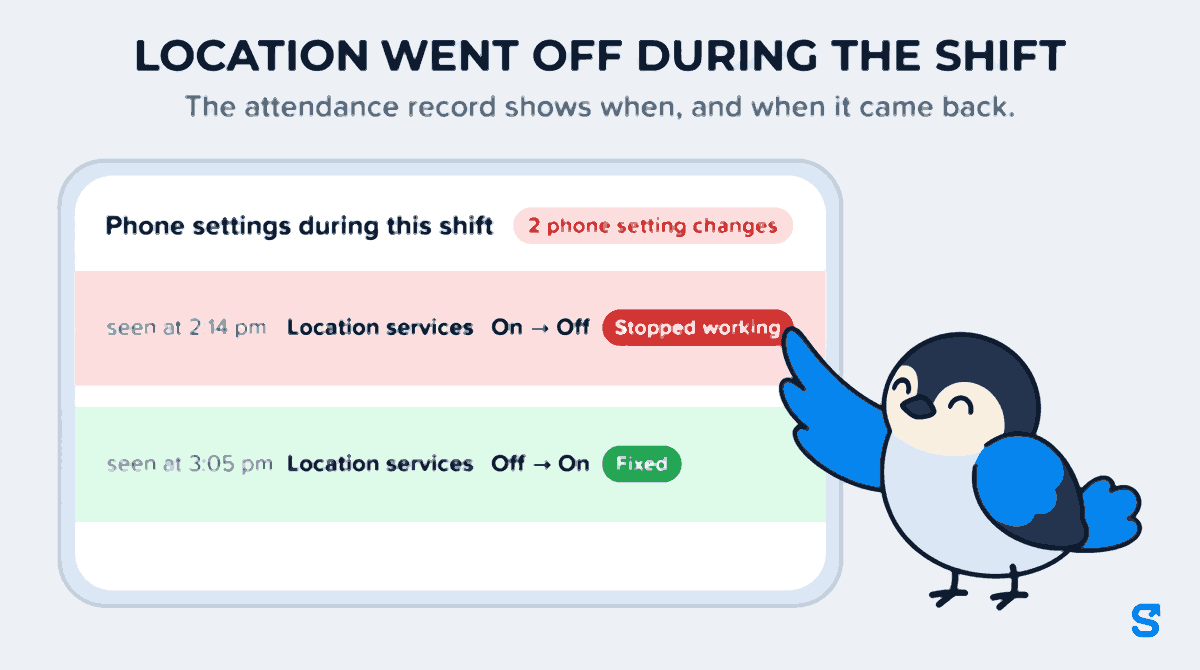
Now the conversation is different. The gap was not the phone acting up. Location services was switched off at 2:14 pm and back on at 3:05 pm. You still do not know where Suresh was in that hour, and the record does not pretend to. But you know the gap was a setting, not the signal, and you can ask a fair, specific question.
The settings the record watches are the ones that decide whether tracking works:
| Setting | What the row says |
|---|---|
| Location services (the phone's main switch) | On → Off, or Off → On |
| Location (the app's own permission) | Allowed → Not allowed |
| Background location | Allowed → Not allowed |
| Battery, on Android | Free to run → Restricted |
| Background refresh, on iPhone | Free to run → Restricted |
| Notifications | Allowed → Not allowed |
A change that broke something carries a red Stopped working tag. A change that put it right carries a green Fixed tag. If somebody taps the same setting on and off several times in a few minutes, those taps fold into one row, such as "Location services changed 3 times, now On", so a fidgety thumb does not fill the screen.
The same changes reach you without opening the record
You do not have to go looking for every shift.
When the person checks out, the check-out notification to the owner and managers carries one extra line: "📵 2 phone setting changes during the shift." A shift with no changes gets no extra line.
The Report on your dashboard, on its Attendance tab, gets a Phone settings box and a Phone settings changed on duty section listing each person's changes for the period. The same lines go into the text you copy or share on WhatsApp, so the daily summary you send your partner or your area manager already includes them.
For the detail, the attendance record of that shift lists every change with its time, as above.
All three only appear when there were changes. On a quiet day your screens look exactly as they did before.
Only what happens on duty
The record shows changes made between check-in and check-out, and nothing else. If Suresh switches location off at 8:30 am on his way in, or at 7:40 pm at home, you will never see it. What a person does with their own phone on their own time is not the employer's business, and India's Digital Personal Data Protection Act, 2023 points the same way: collect what you need for the purpose, and no more.
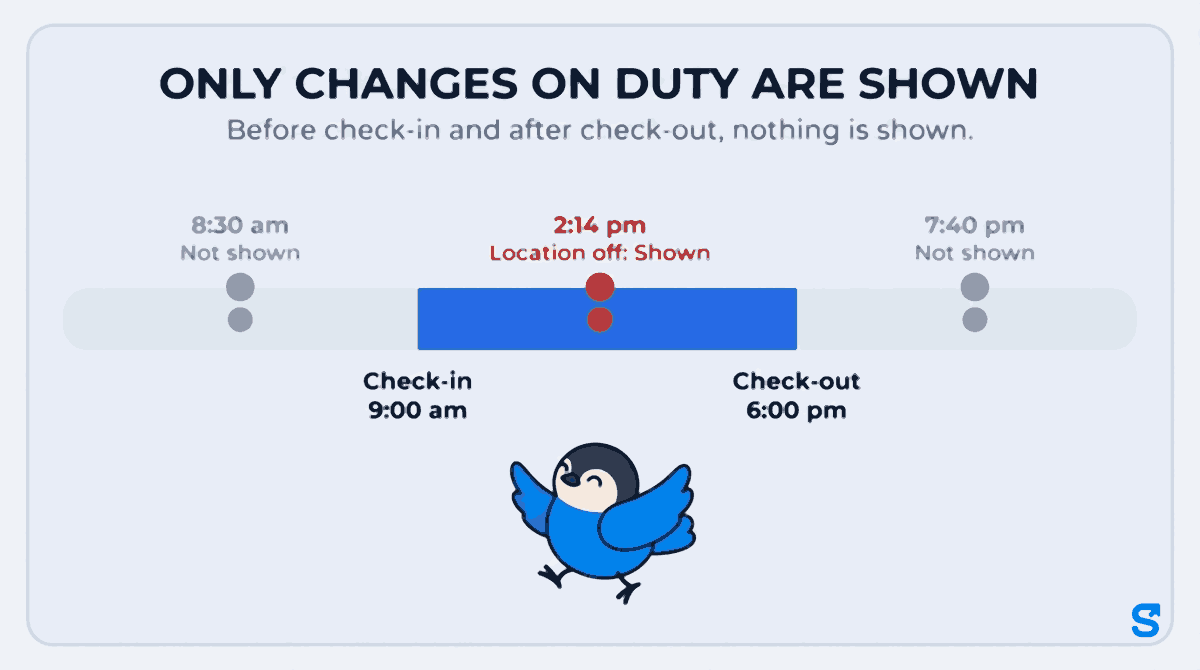
This matters for the conversation too. When you tell your staff that the app shows setting changes during duty hours and nothing outside them, most people accept it, because it is fair. A tool that watched the evenings as well would be uninstalled, and you would be back to no trail at all.
What the record cannot tell you
It is worth being plain about the limits, so you do not lean on it harder than it can bear.
The time is when the app noticed, not the exact second. The phone reports its settings when the app runs, for example when it is opened or while it is tracking. So "seen at 2:14 pm" means the change had happened by then, possibly a few minutes earlier. That is why the row says "seen at".
It does not say where the person was. A setting change explains a gap. It does not fill it.
No change does not mean bad intent was absent, and a change does not prove it. A phone that loses signal in a basement shows a gap with no setting change. A phone whose owner turned off location to save battery on a long day shows a change with an innocent reason. Ask before you conclude.
It starts from the phone's first report. A phone's very first reading is a starting point, not a change, so it is never listed. And the record only covers changes the app has seen since this history began in September 2026.
What to do when you see a red row
Most red rows are fixed with one conversation and one setting.
- Ask, using the times. "Your location was switched off from 2:14 to 3:05. What happened?" A specific question gets a specific answer.
- If it was the battery, fix the setting, not the person. On Android, set the app's battery to Free to run. The steps for each phone brand are in background attendance tracking on Android.
- If it was the permission, set it back. Location should be allowed all the time for tracking during the shift. Google's help page shows where to manage location settings on Android.
- If it keeps happening, say what you see. Tell the team the record shows on-duty setting changes. Most repeat cases stop there.
- Keep the gap and the setting together. A visit report with a missing hour and a red row at the same time is a far stronger basis for a warning than either on its own. Field teams can see their named stops in the daily visit report for field staff.
If the gap problem is really one person checking in for another, that is a different fix: see how to stop buddy punching without buying hardware.
Which employee tracking app shows a location switched off on duty
Can I see if my employee turned off location during the shift?
Yes. Open the shift in Attendance. The section Phone settings during this shift lists each change, for example Location services On → Off, with the time the app saw it.
Will I see changes my staff make after work?
No. Only changes between check-in and check-out are shown. Anything before check-in or after check-out is never shown.
Does a gap in the location trail always mean the person switched location off?
No. A gap can come from no signal or a flat battery, which are not setting changes. If the record shows no setting change during the gap, the cause was most likely the signal or the battery.
Which settings does the record watch?
Location services, the app's location and background location permission, the battery setting on Android or background refresh on iPhone, and notifications.
Do I need a special plan for this?
No. It is shown for every business, on every plan.
Keep reading
Free to use, no signup: Attendance register generator.