Background Attendance Tracking on Android in India: The Punch Survives, the Clock-Out Does Not
In short
A killed background process does not leave your register empty. It leaves a nine hour shift recorded as fifteen, and section 14 prices the difference.
A facilities company in Pune runs eighteen technicians across client sites. The attendance app has been in for a year and nobody complains about it. Then the operations manager opened the month and found four people showing shifts of fourteen, fifteen and in one case nineteen hours, and a GPS trail for one of them with a hole in the middle of the afternoon shaped exactly like a long lunch somewhere he was not supposed to be.
Nobody worked nineteen hours and nobody went anywhere. All four carried the same kind of handset, all four had granted every permission the app asked for, and all four phones had spent the afternoon in a trouser pocket doing precisely what their manufacturer designed them to do, which is to stop apps from running when nobody is looking at them.
This is the most expensive silent failure in mobile attendance in India, and it is expensive in the direction almost nobody expects. Everybody worries about the app failing and a worker being marked absent. In practice a killed process usually fails the other way: the shift never ends, the register writes down a number larger than the truth, and the overtime column bills you for it.
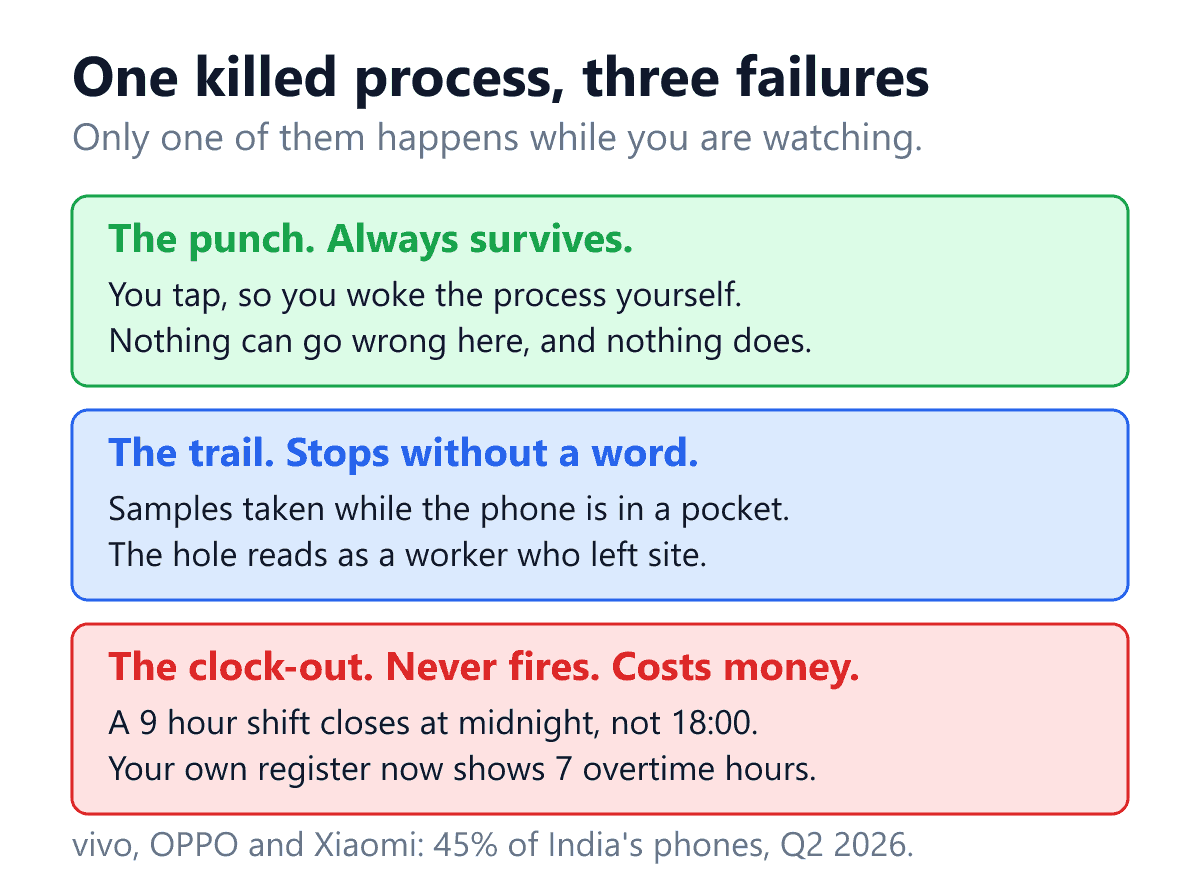
Background tracking is three features, not one
When a vendor says the app tracks in the background, they are describing three mechanisms that fail independently and that an owner has no reason to separate until the month closes.
One: the punch. The worker unlocks the phone, opens the app, taps, sees a tick. This is a foreground action. The operating system woke the process because a human touched the screen, so there is nothing for a battery manager to interrupt. This part essentially never fails, which is exactly why it is the part everybody tests.
Two: the trail. Periodic location samples taken through the shift, at whatever interval the settings say, while the phone sits in a pocket or on a dashboard. This is background work. It is the first thing a battery manager stops, and when it stops, the record does not say so. It simply has fewer points in it, and a supervisor reading a sparse trail reads it as a worker who went somewhere.
Three: the unattended event. The geofence exit that ends a site visit. The automatic clock-out at the end of a shift. The reminder that fires at 18:00. These are the ones that have to happen when nobody is holding the phone at all, which makes them the most fragile of the three and, by a distance, the most expensive.
The reason this survives procurement. A product demonstration is thirty minutes with the phone in your hand. During those thirty minutes the process is in the foreground continuously, so all three mechanisms appear to work. The defect only exists in the state you cannot demonstrate, which is a phone in a pocket for four hours.
What Android itself requires, before any manufacturer gets involved
It is worth separating Google’s rules from the manufacturer’s, because they are different rules with different remedies and most of the advice floating about conflates them.
Google’s rules are published and consistent across every Android phone. An app that keeps location running while it is not on screen has to say so openly, which is why a background-tracking app shows a persistent notification that the worker cannot swipe away. That notification is not the app being nosy. It is the price the platform charges for the permission to keep running.
The second platform rule is the one that catches most deployments. Location permission has three states, not two: denied, allowed while using the app, and allowed all the time. Only the third supports a trail. And since Android 11, an app cannot ask for the third one in a pop-up. Google’s background location documentationis explicit that the system dialog no longer includes an “Allow all the time” option and that the user has to enable it on a settings page instead.
Read that against how a phone gets handed out on an Indian shop floor. Somebody installs the app, taps through the prompts in ninety seconds, sees the tick, and moves on. Tapping through gets you “while using the app”. Nothing on screen is red. The punch works. And the trail will produce nothing for the next eleven months, because the one setting that mattered was on a screen nobody ever visited.
Worth knowing if you ever audit this yourself.The programming interface a web or hybrid app uses to check location permission reports “granted” for a phone set to “while using the app”. So a status screen built on that check alone will tell you the phone is fine when it is not, and it will tell you so honestly, because from where it is standing the permission genuinely is granted.
Two switches on the same phone, and only one is Google’s
Now the manufacturer layer, which is where India differs from the markets most of this software was designed in.
Counterpoint Research put vivo at 18 per cent of Indian smartphone shipments in the second quarter of 2026, OPPO at 14 and Xiaomi at 13, with Samsung second and realme fifth. Three brands, forty five per cent of the market, and realme on top of that. Every one of those Android skins ships a background-app manager of its own, on top of Android’s, with its own name, its own screen and its own defaults. Samsung has one too, and so, in a milder form, does almost everybody else.
This is not a scandal and the manufacturers are not wrong to do it. A buyer in this price band chooses a phone partly on how long it lasts off the charger, and the honest way to deliver that is to be ruthless with anything running in the background. The problem is narrower: turning off Android’s battery optimisation for an app does not turn off the manufacturer’s. They are two switches, on two different screens, with similar words on them, and an IT person who flips the first one has every reason to think the job is done.
| The switch | Where it lives | What it actually decides |
|---|---|---|
| Location permission set to Always | Android settings, per app. Since Android 11 it cannot be granted from a pop-up. | Whether a trail is legally possible at all. Without it there is no background location, however well behaved everything else is. |
| Battery optimisation set to unrestricted | Android settings, per app. This is Google’s switch and it is the same on every phone. | Whether Android itself defers the app’s work while the screen is off. |
| Autostart, or auto launch, or allow background activity | The manufacturer’s own settings app. Different name and different place on vivo, OPPO, Xiaomi and realme. | Whether the manufacturer’s battery manager lets the app restart after a reboot and keep running once the phone is idle. This is the one that is missed. |
There is a fourth, quieter mechanism worth knowing about: Android keeps its own opinion of how often you use an app, and an app the worker never opens because attendance is two taps a day gets progressively less freedom over time. That is why a deployment can work perfectly for three weeks and degrade in the second month with nobody having changed a setting.
Keeps running: the switch no phone will report
The awkward fact about the manufacturer’s switch is that no phone reports it. Android will tell any app how its location permission and Google’s battery exemption are set. Autostart on a Xiaomi, background power consumption on a vivo, auto launch on an OPPO, realme or OnePlus, and Sleeping apps on a Samsung are not exposed to apps at all. An app that says it has checked them has guessed.
So Shiftelio stopped guessing and asks the one person who can see the screen. On those six brands the worker’s phone health bar, and the phone card in the app’s Settings, carry an item called Keeps running. Until the worker has dealt with it, it reads Not set up. Tapping it gives four things:
- Open settings. It opens that brand’s own screen for Shiftelio where the phone allows it, and Shiftelio’s App info page where it does not.
- Steps that start on the screen that actually opened. On most vivo, OPPO, realme and OnePlus phones the button lands on the App info page rather than an autostart list, so the steps begin there: Shiftelio’s App info page opens, tap Battery usage. On a Xiaomi they begin at the Autostart list, and on a Samsung at the Battery screen and the Sleeping apps list. An instruction to tap something that is not on the screen is worse than none, because the worker concludes the app does not know what it is talking about.
- The same steps played on a mock phone, with a Watch again button, for the worker who would rather see where to tap than read it.
- Yes, done. It appears once the worker has opened the settings screen. Because the phone cannot confirm the switch, the app does not pretend to: the item reads Set up because the worker said so, and that answer is saved against that handset.
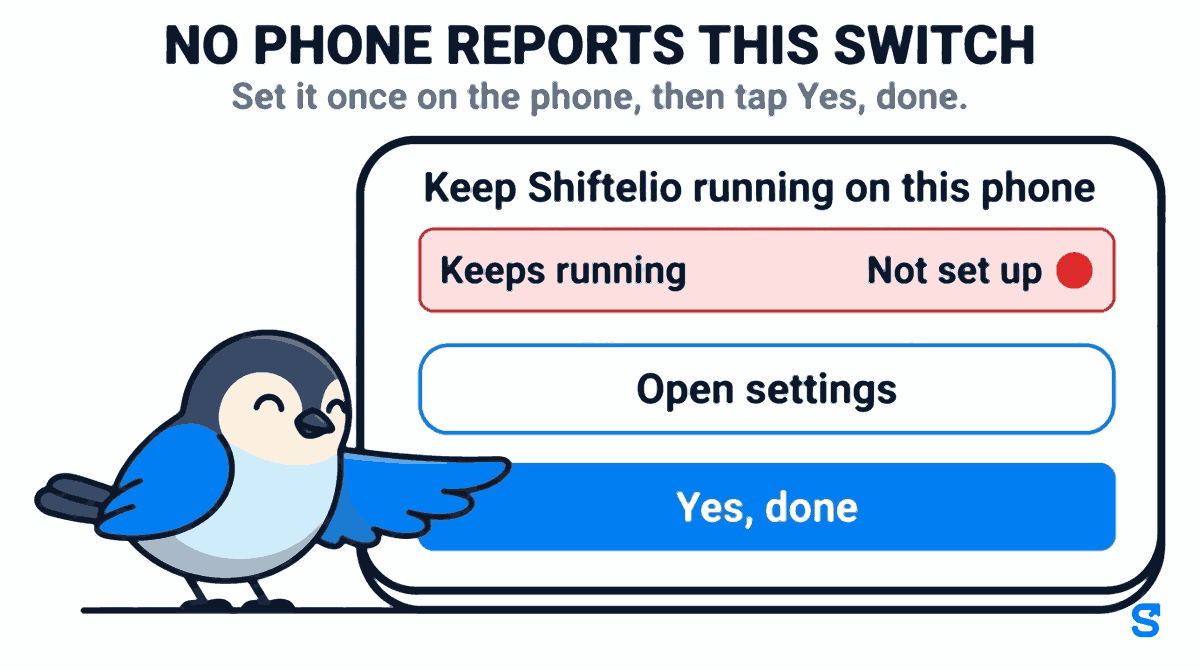
Two consequences worth knowing. Reinstall the app and the item comes back as Not set up, which is correct, because most of these brands reset the switch when an app is uninstalled. And a Set up tapped by a worker is a promise, not a measurement, so it never raises a phone’s grade. What an owner can rely on is the grade each handset earns from the location points that actually arrived, which is what the employee tracking page is built around.
What the owner sees when a phone keeps stopping
The grade tells an owner that a phone is barely reporting. For a long time it could not tell them why, and the worst case was a phone whose permissions all read correctly: every chip green, and the grade beside it red. That is almost always the manufacturer’s switch, and it was the one thing the owner’s screens did not show.
They show it now, in a deliberately narrow case. When the phone a person is graded on is an Android handset from one of the six brands, and its grade is red or amber, the owner’s Phones page and the phone details in the live map drawer carry the same Keeps running item the worker sees, reading Not set up or Set up. On a phone that is grading green it is not shown at all, because a phone that reports well does not need its settings questioned. Three things follow from it:
- The live map stops calling that phone fine. A Keeps running item that is not set up counts, so the phone loses its green tick, and when every other setting is on the summary says so plainly: Settings are on, but the phone may be closing Shiftelio. On the Phones page the line under the person names the brand, for example that vivo phones often close Shiftelio in the background, and suggests asking them to open Shiftelio and tap Fix next to Keeps running.
- Set up is dated, not trusted. Once the worker has confirmed it, the owner line says when Keeps running was set up and that the grade improves as new shifts finish. The grade still comes from the points, so a confirmation that did not work stays visible as a phone that is still amber.
- The owner can send a set-up reminder. A Send set-up reminder button sits on the phone that reads Not set up. It sends a notification to that phone, in the worker’s own app language, titled Keep Shiftelio running, and tapping it opens the app where the Fix is.
The reminder has limits, and they are on purpose. It goes at most once per phone in 24 hours. It only goes while the person is on shift, so nobody is pinged about work settings on a day off; press it outside a shift and the app tells you to send it during their next one. A manager can only remind people in their own team. And for anybody other than the owner it is a separate tick on the manager’s role, Send set-up reminder, which starts switched off, so an owner who wants a supervisor to chase this has to turn it on.
One honest caveat, which the app itself states after you press the button: if Shiftelio is being closed on that phone, the notification may not arrive either. That is the same fault the reminder is trying to fix. When the phone cannot receive notifications at all the app says so and tells you to tell them in person, which is still the fastest fix of all.
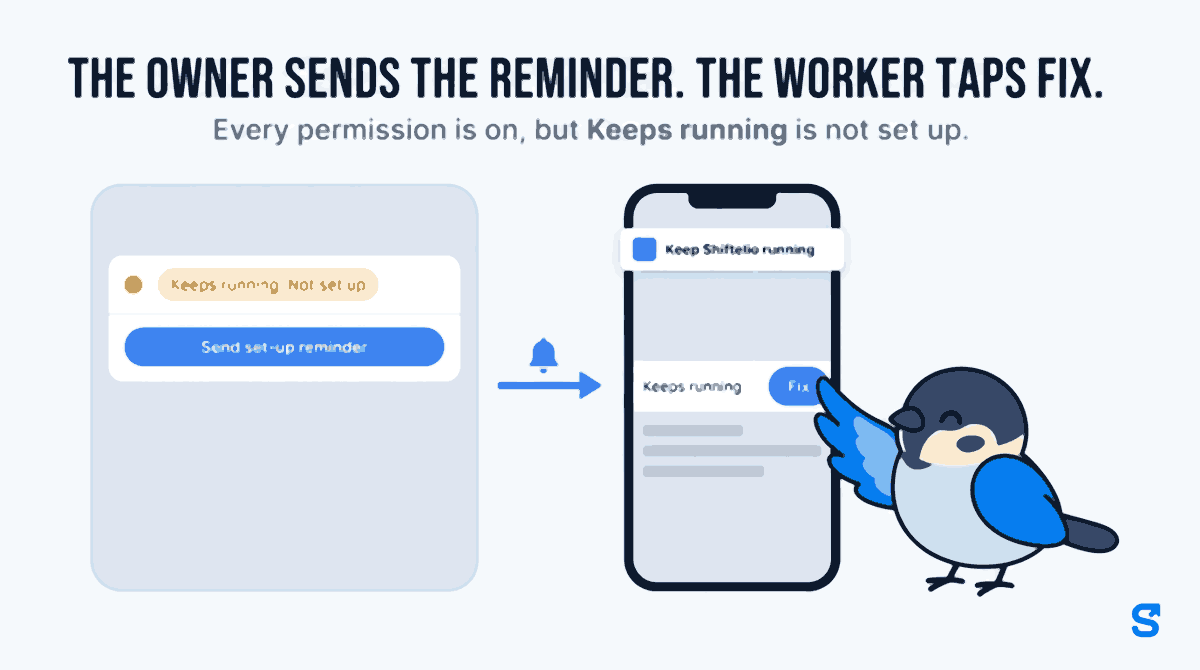
In practice the loop is short. The owner sends the reminder. The worker taps Fix, follows the steps for their brand, and taps Yes, done. The owner line changes from Not set up to the date it was set up, and over the next few shifts the grade either climbs, which settles it, or stays amber, which tells you it is time for the pocket hour test below.
And on an iPhone
An iPhone has no manufacturer layer, but it has one switch that matters here, Background App Refresh, and its effect is usually described wrongly. With it off, iOS does not shut the app down. It stops the app restarting itself after iOS has closed it, which across a long shift comes to much the same thing. The health bar now says exactly that: Background App Refresh is off, so Shiftelio can’t restart itself if your iPhone closes it.
Open Settings lands on Shiftelio’s own page, and the steps say to turn Background App Refresh on there. They also cover the case that stalls most people, a grey switch that will not move. That means the phone-wide setting is off, under Settings › General › Background App Refresh, which has to be set to Wi-Fi & Mobile Data first, or that Low Power Mode is on, which a yellow battery icon gives away. When the worker comes back to the app it checks again, and says Still off if it still is. Apple’s menu names stay in English in every language the app speaks, because English is what is printed on the phone.
A missing clock-out is not a blank. It is a bill.
Here is the part that separates this from a support ticket. When the unattended event fails, your attendance record does not end up with a hole in it. It ends up with a number, and the number is wrong in the worker’s favour, and it was written by you.
A technician starts at 09:00 and finishes at 18:00. Nine hours. The automatic clock-out that should fire at the end of the shift never runs, because the process that was supposed to run it was terminated at some point after lunch. The session stays open until whatever fallback the system has: midnight, a configured maximum, or the next morning’s punch. Take midnight, which is the common one.
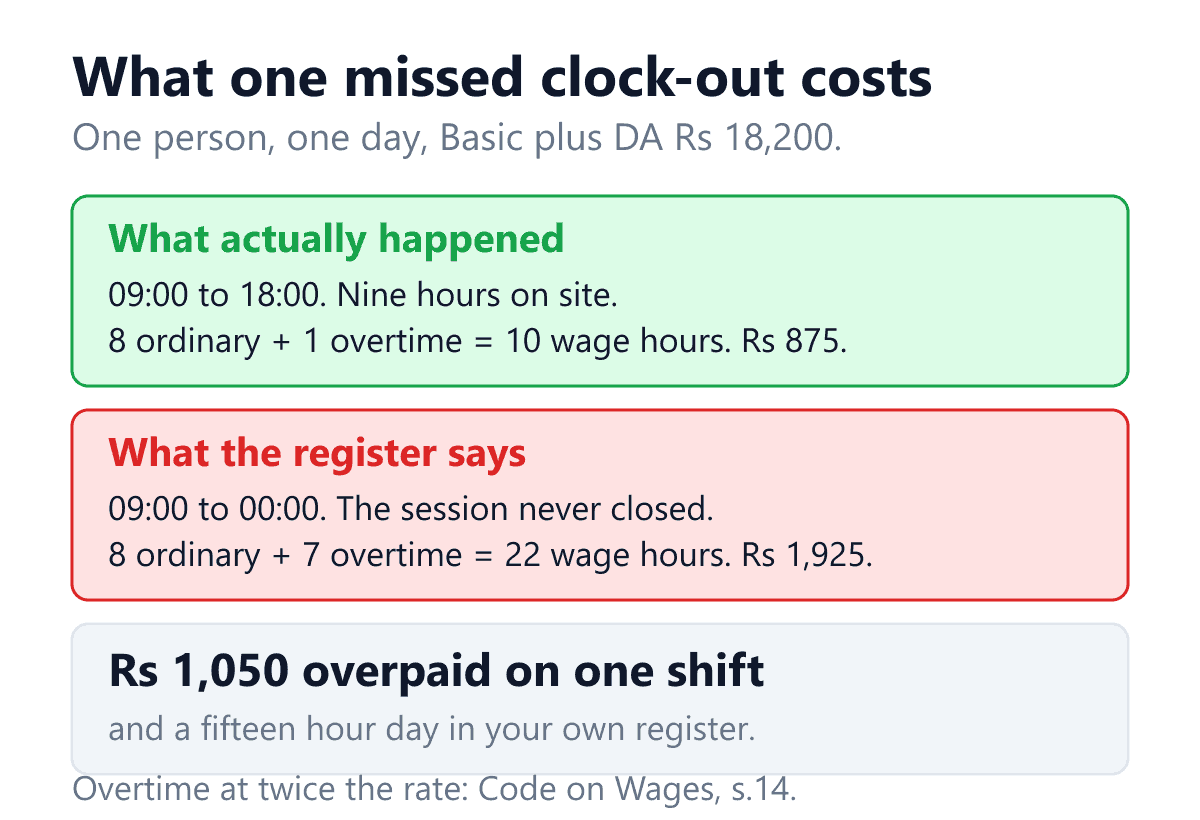
The arithmetic uses the standard convention: the ordinary hourly rate is Basic plus Dearness Allowance divided by twenty six days of eight hours, and everything past the eighth hour in a day is paid at twice that rate under section 14 of the Code on Wages, 2019. On Basic plus DA of Rs 18,200 a month the ordinary hour is Rs 87.50 and the overtime hour is Rs 175. We derive all of this properly in the article on overtime pay calculation, and there is a free overtime calculator if you would rather just put your own numbers in.
- The day as worked. Eight ordinary hours at Rs 87.50 and one overtime hour at Rs 175. Rs 875, ten wage hours.
- The day as recorded. Eight ordinary hours and seven overtime hours. Rs 1,925, twenty two wage hours.
- The difference. Rs 1,050, on one person, on one day.
Four technicians, twice a month each, is roughly Rs 8,400 a month walking out on a battery setting. That is the visible cost and it is the smaller one.
The larger one is what the record now says. Rule 51 of the rules under the Code on Wages gives the attendance register a shape and a number, Form IX, the Attendance Register-cum-Muster Roll, with columns for hours worked and overtime hours; we took the whole set apart in the article on statutory registers and wage slips. Under rule 72 of the OSH Central Rules the equivalent register has to be preserved for five calendar years and produced to an Inspector-cum-Facilitator on demand. Section 25 of the Occupational Safety, Health and Working Conditions Code caps the working day. So a register showing a fifteen hour shift is not an untidy row. It is a five-year document, in your custody, recording a day that should not have happened, and the explanation for it is a sentence about a Chinese Android skin that nobody in the room will find persuasive.
The sentence worth keeping. A gap in your record is a problem you can explain. A wrong number in your record is a problem you have to disprove, and you are the party who wrote it down. Those are not the same kind of trouble.
The mirror image of this is worth a line, because it is the other article. If the system has no fallback at all and simply leaves the session open, the day never closes, payroll has nothing to pay, and somebody ends up marking the worker present from memory or absent from the blank. What that costs, and why marking absent is the expensive choice, is the subject of the piece on offline attendance. Same symptom on the screen. Opposite fault, opposite bill.
The pocket hour: a test you can run at handover
None of this is diagnosable from a settings screen, because the settings screen is exactly what lies to you. It is diagnosable in an hour, on the actual handset, before it goes out to the actual worker. Do this once per phone model you deploy, not once per phone.
- Set it up the way a worker would. Install, tap through the prompts at normal speed, punch in. Do not fix anything yet. You are measuring the default outcome, because the default outcome is what happens to the other seventeen phones.
- Lock the screen and put it in a pocket or a drawer for one hour. Not on a desk with the screen up. Not plugged in, because several manufacturers relax their battery manager while charging and you will get a clean result that means nothing. Walk somewhere with it if you can.
- Look at the trail. Count the points. Compare against the sampling interval you were promised. Thirty seconds of samples at the start and then nothing is the signature of a killed process, and it is very different from evenly spaced points.
- Test the event, not just the trail. Set a shift that ends during the test, or walk out of the geofence, and leave the phone alone. Then check whether the clock-out happened at the right time, happened late, or did not happen. This is the step people skip and it is the one attached to the money.
- Now fix the settings and repeat. Location to Always, battery optimisation off, and the manufacturer’s own autostart or background permission on. If run two is clean and run one was not, you have just learned that your deployment procedure is the product, and that a phone handed out without those three steps is not tracking.
- Reboot the phone and wait ten minutes. Autostart is specifically about what runs after a restart. A phone that recovers from a reboot on its own is genuinely configured. One that needs the app opened by hand will lose every shift that follows a flat battery.
Two more things worth writing down while you are there. First, note which screen you had to visit on that brand, in those words, because the person doing this next month will be a supervisor and not you. Second, if your sites also have poor signal, run the aeroplane mode test on the same handset in the same session. The two faults compound and they are easiest to tell apart when you have just seen both.
The only fix that is not a settings screen
Everything above is mitigation, and mitigation has a ceiling. You can configure three switches on every phone you own and you will still lose some of them: a worker replaces a handset, a system update resets a manufacturer setting, somebody runs a battery saver shortcut before a long day out. Across eighteen phones and four brands, a device-side timer is never going to be reliable, and no amount of documentation makes it so.
So the design answer is to stop asking the phone to do the part that costs money.
The end of a shift is not information the handset holds. The roster already knows the shift was 09:00 to 18:00. Closing the day at the right time should not depend on the phone being awake, or even switched on. If the clock-out does not rely on the phone, a dead battery costs you a trail and does not cost you a payroll error. If it does rely on the phone, the manufacturer’s battery policy has quietly become your overtime policy.
The same logic decides what to do about the trail, which genuinely does need the phone. You cannot make a killed process report. What you can do is stop pretending a gap is data. A sparse hour should be shown as a phone that stopped reporting, attributed to the handset, and never presented to a supervisor as a worker who left site. That single distinction ends most of the arguments this defect causes.
Two questions that separate products quickly.Ask whether the automatic clock-out still happens when the phone is dead or killed, and accept only a specific answer. Then ask what the supervisor’s screen shows for an hour with no location points. If the answer to the second is that it looks the same as an hour spent off site, you now know what your next disciplinary conversation is going to be built on.
What to ask before you buy
Five questions, in the order that matters. None of them are answerable from a feature list, which is the point of asking them.
| Ask this | What a good answer sounds like |
|---|---|
| Does the automatic clock-out still happen if the phone is killed? | Yes, it follows the roster and does not depend on the phone being awake. Not “the app closes it”. |
| How do I know a phone has stopped reporting? | There is a list of handsets, graded on what actually arrived over recent shifts, that I can look at without ringing anybody, and on a badly graded phone it says whether the brand’s keep-running switch was ever set up. |
| Does the app tell the difference between Always and While using the app? | Yes, and it says so in those words. A product that reports both as “granted” cannot see the single commonest cause of this failure. |
| Can the app open my brand’s autostart screen for me? | For the common Indian brands, yes, as a button, and then steps that start on whichever screen the button really opened. Finding that screen on an unfamiliar skin is a genuinely hard thing to ask a supervisor to do. And since no phone reports the switch, ask how the app knows it was set: an honest answer is that the worker confirmed it. |
| What does an hour with no points look like to my supervisor? | Marked as not reported, attributed to the phone. Never rendered as a straight line between two points an hour apart, which is a picture of a journey that did not happen. |
So what should a small employer actually buy?
Questions owners ask
Is this the same thing as the app not working without internet?
No, and they are worth telling apart because the fixes are unrelated. No network means the punch happened and is waiting to be sent. A killed process means the punch, or the sample, or the clock-out never happened at all. On the operations manager’s screen both look like a thin day. A punch made with no signal keeps the time it was really made; a sample that was never taken does not exist.
Would a more expensive phone solve it?
Partly, and not in the way people assume. The aggressive background managers are a feature of particular Android skins rather than of cheap hardware, so a mid-range phone from a gentler brand can behave better than a flagship from a fierce one. If you buy handsets centrally, pick the model on how it behaves in the pocket hour test and not on the spec sheet.
My staff use their own phones. Can I even ask them to change these settings?
You can ask, you should explain why, and you should expect it to decay: people factory reset, they change handsets, they turn on a battery saver before a long day. Plan for the settings to be wrong on some fraction of the fleet permanently. A worker who reinstalls the app will see Keeps running go back to Not set up, which is the app telling them the switch probably reset with it, and if their phone then starts grading amber you will see the same Not set up and can send them a set-up reminder instead of a WhatsApp. That is the real argument for keeping anything that touches pay off the device. The separate question of what you may collect from a personal phone, and what consent that needs, is its own article.
Can I just tell the worker to keep the app open?
It does work, and it is not a policy you can enforce or verify. The phone is also their phone, the app goes to the background the moment they answer a call, and you will have converted a technical problem into a discipline problem that lands on the person with the least control over it.
Should I go back to a biometric machine at the gate?
For a single fixed premises with one door, that trade is often right and the failure described here disappears entirely. It is the wrong answer for anybody whose people work at addresses the employer does not own, which is the whole of field service, security, home care and most construction. Those are covered in GPS attendance without a biometric device.
We already have four weeks of these inflated entries. What do we do with them?
Correct them, and record that they were corrected and on what basis, rather than silently overwriting the rows. A register entry fixed against a supervisor’s sign-off sheet with that noted is defensible. The same entry quietly replaced is not, and the difference is one column. Do not simply pay the overtime to avoid the argument either: you would be paying real money for hours nobody worked, and leaving a five-year record saying you routinely run fifteen hour days.
Sources
Read directly. Android’s platform rules are on developer.android.com: background location permission for the rule that since Android 11 “Allow all the time” cannot be granted from an in-app dialog. Handset shares are Counterpoint Research, India smartphone shipments, second quarter of 2026, published 16 July 2026: vivo 18 per cent excluding iQOO, OPPO 14, Xiaomi including POCO 13, Samsung second and realme fifth. Overtime at twice the ordinary rate of wages is section 14 of the Code on Wages, 2019; the registers and their retention sit in the rules made under the Codes, carried on the Ministry of Labour and Employment’s labour codes pages and in bare text on India Code.
Not claimed.No attendance product other than our own is named, and nothing here says that any particular rival handles any particular one of the three mechanisms badly. They are described as properties to test, because the pocket hour test takes an hour and taking somebody’s word for it takes a year. No manufacturer is accused of sabotage: an aggressive background manager is a reasonable engineering choice on a phone sold partly on battery life, and it is only a problem when a payroll number has been made to depend on it. The forty five per cent figure is the sum of the three brands with published shares in that quarter and does not include realme, whose share was not disclosed. No rupee figure is typed for our own pricing; the table above renders from the same source as the pricing page. Nothing here is legal advice.
Keep reading
See how Shiftelio does this in practice with running a team across sites you do not own.
Still deciding what to buy? Compare what GPS attendance actually costs once location is not an add-on.
Work your own numbers with the free overtime calculator. No signup, no email.