Employee Salary Slip Online: Let Staff See What They Get, What Was Paid and What Is Still Due
In short
Staff open My Pay on their phone and see You get, Paid (how and when) and Still to get for any month, so pay day stops being an argument about what was given.
- Staff open My Pay, pick a month, and see You get, Paid (with how and when) and Still to get at the top.
- An Earned row opens into days paid, paid days off and overtime; Cut later shows what will come off a later month.
- Staff can send their own approved slip as a picture with Share slip.
An employee salary slip online works when the staff member can open it on their own phone and read three numbers without asking anyone: what they get for the month, what has already been paid, and what is still due. In Shiftelio that is the My Pay screen, and it puts those three numbers at the top of every month in the staff member's own language.
Most pay day arguments in a small business are not about the salary itself. They are about the part that was paid in two goes, the advance that was cut, or the Rs 4,200 the owner says was "given last week". A slip that only shows the month's total does not settle any of that. A slip that shows the money already handed over, and the date, does.
Why pay day turns into an argument
Picture a 12 person restaurant in Pune. Ramesh, a cook, earns for September a net Rs 14,200 after his advance is cut. The owner pays him Rs 10,000 by UPI on 5 October because cash is short, and promises the rest after the weekend. On the 12th Ramesh asks for "his salary". The owner says most of it was paid. Neither of them has the same number in their head, and the printed slip in the drawer says Rs 14,200, which is true and settles nothing.
Three things cause almost every one of these disputes:
- Part payments. Salary paid in two or three goes, by cash one day and UPI another, with nothing the staff member can look at afterwards.
- Cuts the worker forgot. An advance, a loan instalment or a cut for a day off without pay, agreed weeks ago and remembered differently.
- Days counted differently. The worker counts the days they came; the owner counts paid days, paid leave and overtime separately.
A paper slip, or a PDF sent once on WhatsApp, answers none of these after the day it is given. What staff need is a slip that stays current: the same month, showing what has moved since.
What staff see in My Pay
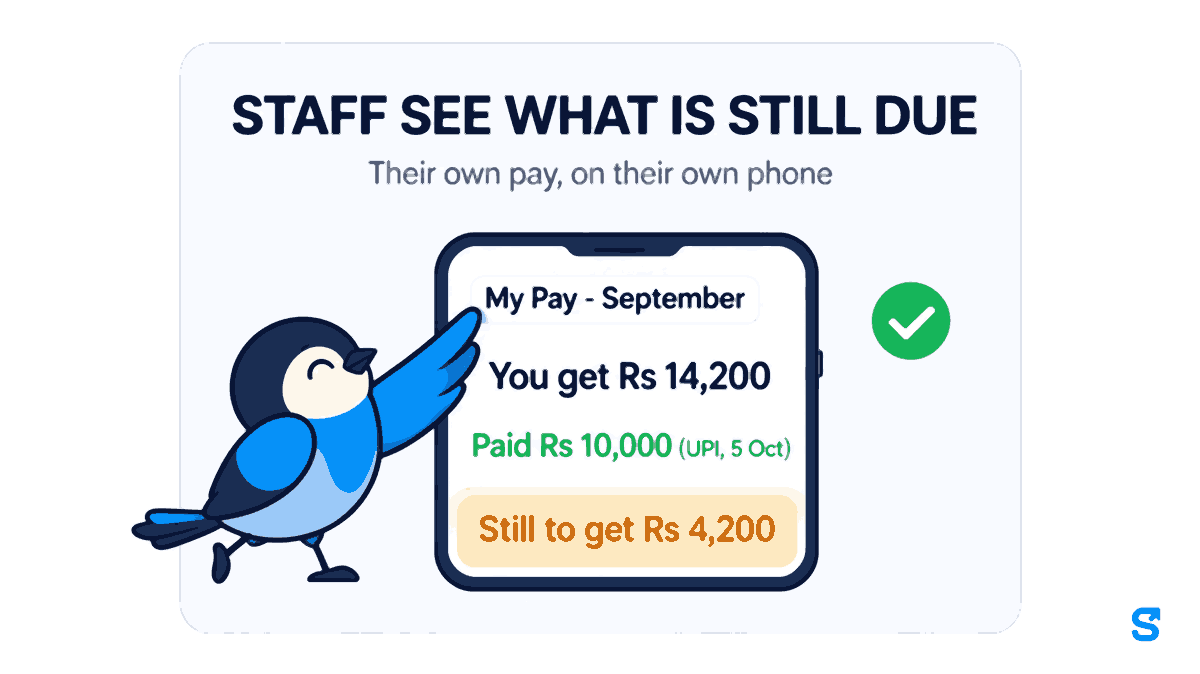
Staff open My Pay in the Shiftelio app and tap a month. The top of that month is three lines, large enough to read at arm's length:
- You get: the net pay for the month, after cuts.
- Paid: the amount already paid, with the method and the date of the last payment, for example Paid Rs 10,000 (UPI, 5 Oct).
- Still to get: what is left. It only shows when something is actually still due, and it disappears once the month is fully paid.
So Ramesh, opening September, sees You get Rs 14,200, Paid Rs 10,000 (UPI, 5 Oct), Still to get Rs 4,200. That is the whole conversation, already had, on his own phone.
Under those three lines sit the parts people argue about next:
- Earned taps open into Days paid, Paid days off and Overtime, with the overtime hours beside the amount. A worker who thinks they were short a day can see exactly how many days were paid.
- Cut later shows any cut that could not come off this month because the pay ran out. It is not forgotten: it is shown so the worker is not surprised when it comes off a later month.
- Kept back as agreed appears under Still to get when part of what is due is being held back with the worker's agreement, so the worker can see it is held and not lost.
Below that are the daily breakdown and the shift breakdown, then Download Payslip for a PDF. On an approved or paid slip there is also Share slip, which sends the worker's own slip as a picture. That matters more than it sounds. A worker applying for a room on rent, a loan at a cooperative bank or a school admission for a child is usually asked for a salary slip, and now they can send one without coming to the owner.
How the owner gets staff there
Work out salary for the month from attendance, as you already do. Each person gets a draft payslip.
Check it and approve it. From this point the worker can see the month and, if a number looks wrong, raise a dispute before you pay.
Paying lives in one place: Money > Salary sheet. Record each payment with its method (bank transfer, UPI, cash or cheque). A part payment is just a payment for less than the full amount, and the worker's Still to get updates with it.
Staff open My Pay and pick the month. Nothing else to install, nothing to send.
If you are still working out salary in Excel, you do not have to switch everything at once. Our guide on building the salary sheet from attendance covers the first month.
Show to worker: a big text slip for staff who read poorly
Not every worker reads a phone screen comfortably, and some have no smartphone at all. For them the owner opens the payslip and taps Show to worker. The slip fills the whole screen in big text: the worker's name, the month, You get, Paid, Still to get and the cuts, written in the worker's own app language. The owner turns the phone round, or reads it out, and taps Close when done.
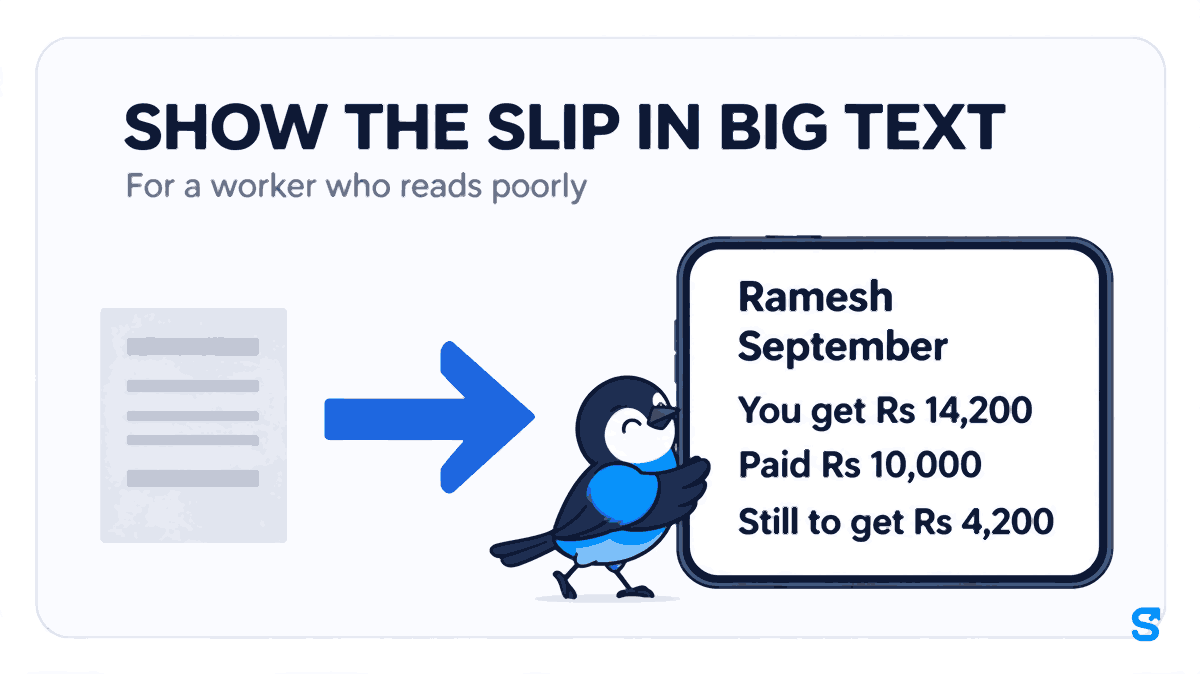
It changes nothing on the payslip. It is the same slip, at a size and in a language the worker can actually read. If your staff read Hindi better than English, our article on salary slips in Hindi covers the printed slip side of the same problem.
When something looks wrong: Raise a Dispute
On an approved payslip, staff see Something looks wrong? Raise a Dispute. They choose the type of issue, describe it ("I worked on 14 September but it shows as absent") and submit. The owner sees it before paying, and the worker sees it marked as awaiting review, then resolved or dismissed.
This is the cheapest correction you will ever make. A wrong day found before payment is one edit. The same wrong day found after payment is a second payment, an argument and usually a worker who now checks every month suspiciously.
A good rule for a small team: approve payslips a day or two before you pay. That gives staff a window to raise a dispute while fixing it is still free.
What the law asks of a wage slip
Since the Labour Codes came into force, the wage slip has a deadline. Under the Code on Wages (Central) Rules, 2026, every employer must issue a wage slip in Form V to every employee on or before the payment of wages, and the rules expressly allow it to be issued electronically. Section 17(1)(iv) of the Code on Wages, 2019 sets the deadline for monthly wages as before the end of the seventh day of the following month. The Ministry's own summary is on the Labour Codes page of labour.gov.in. Checked on 3 November 2026.
Two practical points follow. A slip handed over weeks after pay day misses the rule, and an electronic slip the worker can open on the day you pay is the easiest way to show it reached them in time. For the full list of registers and forms, see our guide to statutory registers and wage slips under the Labour Codes, and for the deadline itself, the salary payment deadline article.
Which app shows staff their pay on the phone
The thing the usual payslip tools do not do is keep the slip current after pay day. A PDF says what the month comes to. My Pay also says what has been paid, how, when, and what is still owed, and it changes the moment you record the next payment. See the payroll software for small businesses page for the rest of the pay run.
Questions owners ask
Can employees see their salary slip online in Shiftelio?
Yes. Staff open My Pay in the app, pick a month and see the slip, with You get, Paid and Still to get at the top, and can download it as a PDF.
Does the worker see a payslip before I approve it?
A draft is not final. Share slip and Raise a Dispute only appear once you approve the payslip, so approve it a day or two before you pay.
What does Still to get mean on the slip?
It is the amount of that month's pay not yet paid. It shows only when something is due and disappears once the month is fully paid.
I paid part in cash and part by UPI. Will the slip show both?
Yes, if you record both payments on the Salary sheet. Paid shows the total paid so far, with the method and date of the last payment.
Can a worker share their own salary slip?
Yes. On an approved or paid slip, Share slip sends the worker's own slip as a picture, for example to a landlord or a bank.
My worker cannot read English. What can I do?
Tap Show to worker on the payslip. It shows the slip full screen in big text in the worker's own app language, and changes nothing on the slip.
Keep reading
Free to use, no signup: Payroll calculators.